AugForums.com

An Acumatica User Group

  • Free
    • Start Here
    • In-Person Gatherings
    • Power BI Workshop
    • Podcast
    • Rolodex
    • Blog
    • Forums
  • Paid
    • AugSQL
    • GI Course
    • GI Library
    • Consulting
  • Register

— The Forums are now read-only —

— All new activity now takes place here: —

AugForums.com Discord Server
Forums
AUG Forums
Acumatica Generic I...
Empty Drilldown fil...
 
Notifications
Clear all

Questions Empty Drilldown filter page

 
Acumatica Generic Inquiries & Pivot Tables
Last Post by Taylan 8 years ago
7 Posts
2 Users
1 Reactions
2,898 Views
RSS
Taylan
Posts: 66
 Taylan
Topic starter
February 16, 2018 1:43 pm
(@taylan)
Estimable Member
Joined: 8 years ago

Hi Tim,


I have a few GI which converted to Pivot tables, and when I click on the links on the pivot table, the resulting drilldown pages come out empty. Is there a catch-all reason behind it? 


Thank you.


6 Replies
Tim Rodman
Posts: 3204
 Tim Rodman
Admin
February 17, 2018 3:38 pm
(@timrodman)
Famed Member
Joined: 11 years ago

When you drilldown on a Pivot Table, all it does is apply a filter to the underlying Generic Inquiry.


So when you click a number like this:


It drills you down to the underlying Generic Inquiry and opens a Drilldown Filter Applied tab like this:


But you can click the Filter icon highlighted in the screenshot above to see what filters were applied. Clicking that icon will show you something like this:


Looking at those applied filters hopefully will help you to troubleshoot what the problem is.


Reply
Taylan
Posts: 66
 Taylan
Topic starter
February 17, 2018 11:46 pm
(@taylan)
Estimable Member
Joined: 8 years ago

Tim,


I have checked the filter and noticed that the formatting of the application period is different. It is 01-2018 in GI result, but 201801 in pivot result, therefore, they do not match, hence the filter shows nothing. I even tried to change the formatting of the period on the pivot table to mm-yyyy, but it still kept its own format of yyyymm.
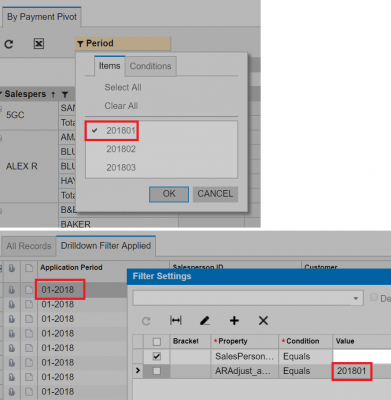


Reply
Tim Rodman
Posts: 3204
 Tim Rodman
Admin
February 18, 2018 6:39 am
(@timrodman)
Famed Member
Joined: 11 years ago

Ah, very interesting. What build number of Acumatica are you on? Seems like you found a bug which isn't that surprising because Pivot Tables are a newer thing.


Reply
Taylan
 Taylan
(@taylan)
Joined: 8 years ago

Estimable Member
Posts: 66
February 18, 2018 7:45 pm
Reply toTim RodmanTim Rodman

Currently on 6.10.0133, trying to move to 2017 R2.


Reply
Tim Rodman
Posts: 3204
 Tim Rodman
Admin
February 19, 2018 12:42 am
(@timrodman)
Famed Member
Joined: 11 years ago

I just tried on 6.10.0472 and it worked for me.


I used a simple Pivot Table:


I drilled down on a number:


And it seems to work:


Reply
Taylan
Posts: 66
 Taylan
Topic starter
February 19, 2018 9:33 am
(@taylan)
Estimable Member
Joined: 8 years ago

So, maybe it was a bug in the earlier versions and fixed later. Hopefully, I won't have this issue in 2017 R2.


Thank you for your help Tim.


Reply
Tim Rodman reacted
Forum Jump:
  Previous Topic
Next Topic  
Forum Information
Recent Posts
Unread Posts
Tags
  • 12 Forums
  • 2,533 Topics
  • 11 K Posts
  • 33 Online
  • 2,438 Members
Our newest member: Ralph Torres
Latest Post: Nested SubReport Issue
Forum Icons: Forum contains no unread posts Forum contains unread posts
Topic Icons: Not Replied Replied Active Hot Sticky Unapproved Solved Private Closed

By using this website, you agree to our Terms of Use (click here)

Acumatica Forums

Terms of Use & Disclaimers :: Privacy Policy

Copyright © · AUG Forums, LLC. All rights reserved. This website is not owned, affiliated with, or endorsed by Acumatica, Inc.

‹›×

    ‹›×