
By using this website, you agree to our Terms of Use (click here)

Hi Tim,
I have a few GI which converted to Pivot tables, and when I click on the links on the pivot table, the resulting drilldown pages come out empty. Is there a catch-all reason behind it?
Thank you.

When you drilldown on a Pivot Table, all it does is apply a filter to the underlying Generic Inquiry.
So when you click a number like this:

It drills you down to the underlying Generic Inquiry and opens a Drilldown Filter Applied tab like this:

But you can click the Filter icon highlighted in the screenshot above to see what filters were applied. Clicking that icon will show you something like this:

Looking at those applied filters hopefully will help you to troubleshoot what the problem is.
Tim,
I have checked the filter and noticed that the formatting of the application period is different. It is 01-2018 in GI result, but 201801 in pivot result, therefore, they do not match, hence the filter shows nothing. I even tried to change the formatting of the period on the pivot table to mm-yyyy, but it still kept its own format of yyyymm.
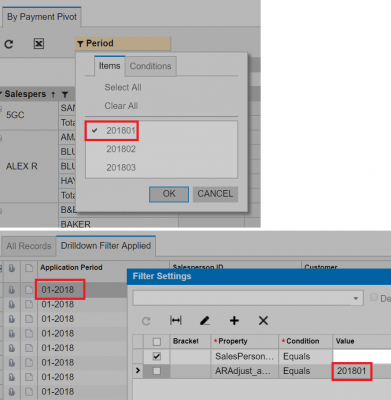
Ah, very interesting. What build number of Acumatica are you on? Seems like you found a bug which isn't that surprising because Pivot Tables are a newer thing.
I just tried on 6.10.0472 and it worked for me.
I used a simple Pivot Table:

I drilled down on a number:

And it seems to work:

So, maybe it was a bug in the earlier versions and fixed later. Hopefully, I won't have this issue in 2017 R2.
Thank you for your help Tim.