
By using this website, you agree to our Terms of Use (click here)

A suggestion I would make moving forward on lessons is continue to show the tips and tricks.
Hey @andrew-smith, a big thank you for the feedback.
Regarding what you are looking for with tips and tricks, can you elaborate or give an example? The course is just getting started and I still need to get through creating video lessons according to the course outline. After that I am planning to continue contributing video lessons that are more tangential in nature.


Tim:
I just finished Default Visible Columns And Active......
1. Another great module. Showing us several different ways to change the generic inquiry and how the ways vary was deep, but helpful.

Tim,
My feedback is I think the course was well done, and will be well received.
I found some of the material too simple for where I'm at in my Acumatica experience, but would be very valuable for newer users. Given I knew much of the material already - no fault of yours, of course - I was pleased to discover a button to speed up the pace of the presentations. This was very helpful. When I was confused, I backed up and slowed down.
I did learn how to use pivot tables and calculated columns. These will be useful - thank you!
Future: I would like to learn how identify and add elements to the column configuration button, when they're not already available. i have added some, but get a pesty yellow warning that I am degrading system performance. Obviously, I don't understand how to properly link the tables... .
Glad I made the purchase and will be watching for more courses from you in the future.
Thanks Tim, well done!
Thanks for the feedback @andrew-smith and @marty-w-jensen-cpa about Tangents and Tips and Tricks.
Regarding Tangents, I think that would be a great section to have at the end of the Course. Right now I'm focused on recording a broad stroke of core Lessons. Then I'd like to come back and go deep in certain areas, going on "Tangents". The goal is that the Course is never complete but is always being added to.
Regarding Tips and Tricks, my thought is to use the existing Acumatica Generic Inquiries (and Pivot Tables) forum for this. The advantage is that everything is public so people not in the Course can contribute and (more importantly to me) Google can index it. I don't know of a better way to search than Google, but everything has to be public for Google to see it. What do you think about this? Do you see a need for a separate Forum specifically for the Course?
There are also other Forums. Great tip about copying and pasting between Tenants. I just posted your tip in the Everything Else forum:
https://www.augforums.com/forums/everything-else/copying-transactions-between-tenants/
Future: I would like to learn how identify and add elements to the column configuration button, when they're not already available.
@marty-w-jensen-cpa, take a look at the Course Outline at the top of this Discussion Topic. It's a tricky topic, but I'm going to do my best to address this in the 05. Building a New Generic Inquiry from Scratch and 06. Adding Relations sections.

Hi Tim,
Thanks for providing this link and for letting us see each other's comments. I like seeing what other people wrote. Here's what I have so far:
I think go faster. "The stuff you need is below the blue buttons" - yeah, i know. I can slow them down or re-watch your mouse if I need. Giving detail on the fact on what the Bills & adjustments screen does feels slow.
Everything you do is more interesting when you explain WHY things happen that way, or why the software has a certain architecture or flow. I am playing almost everything on 1.5 or 2x speed which to me says, everything is too slow.
Recording suggestion: Software like camtasia highlights your mouse clicks, which might be nice- would make it easier to follow you around the screen.
Running a Generic Inquiry
I like the initial explanations that Inquiries are everywhere
Some info too elementary for a GI class I think:
Refreshing data - browser vs screen
Paging ,especially since you even declare that you don't even use it. Not relevant enough IMO
Feels like filler
Sorting & Quick Search
Too elementary: Explaining difference between ASC and DESC
Fun: column configurator that shows us which columns are searched on.
Filtering & Quick Filters
Excellent: Right-click a field, showing 'filter by this column'
Helpful: toggling between the screen and the Generic Inquiries helps reiterate the points from the first video.
Possibly needed: what about sharing best practices on when to actually edit an Inquiry? we don't want to edit the original Inquiries that are used to display data - instead, we're meant to make a copy of it, edit the copy, and define the copied screen as "the" data display screen. These videos are a good opportunity to help people develop good habits right away.
Saved Filters
Because I studied the Humanities I have to add this: instead of saying "dot dot dot icon" = call it by it's name- ellipsis
Suggestion: Instead of naming it "My Filter" give it a meaningful name like "Open Records prior to last quarter" or whatever. A meaningful name makes it feel more real.
Good: example of using an and/or filter for multiple items. Really like the ideas of how to apply the concepts.
Hi Tim,
A bunch more comments for you as I've been through the courses now.
Resizing, Rearranging, Hiding/Showing Columns
Great, great recording.Maybe edit some of these to remove the seconds while screens are loading.
Modifying an existing Generic Inquiry
Default Visible Columns & Active Checkbox
Generally I think you should cut out the seconds when the screen is loading. Just edit them out so things feel snappy.
Questions I can anticipate users asking: if I change the default columns, does it change for all users? When would I/should I choose "reset to default"? What are the upgrade implications of making changes to a Generic Inquiry that is used for many screens?
Good call: urging people to inactivate a column instead of delete! Good practice in general
Additional Navigation Options
I'd use a video editor to edit out the minor mistake you made when you accidnetally opened "New Vendor" when you meant to open "New Bill." Otherwise it feels like a first take- could compromise the feeling of value. Also I KNOW you have to do a ton of work for each video but we can't sense that. Like Olympic ice skaters! They make it look easy.
Creating Pivot Table
Again I suggest giving your filter a meaningful name. Couple reasons that I'd argue for. 1. It tips off the learner as to what kind of pivot you're going to make and keeps them more engaged WHILE you make it. 2. IMO it's a bad habit for users to make a filter called "My Pivot" so I think it's counterproductive for an expert to show that. Why not just call the pivot "Document Status Count" from the beginning?
Generic Inquiries
Adding Calculated Columns
The Switch statement does look good, but how do you actually use the last "catchall" statement? You say "it's not shown here" but this left me wondering, what would a good Switch statement look like? Do you actually use an ellipsis as the catchall? Just not clear to me and I think you have an opportunity to clear it up.
>>> update, perhaps just mention that you will do this example in Example 3.
Adding Calculated Columns - Examples 1 & 2
Killing me with the Calc 1& 2 etc columns.
Excellent trick to show the values as strings to see the DB value! Love it!
Software design
I think it would be nicer if the software automatically marked videos as complete once I watched them all the way through instead of having me do that as an extra step. I just think the default should be that the software does it, not me.

Tim,
The Using Generic Inquiries section was more basic than I anticipated, but it is a good refresher and new users will learn a lot in this course. I did pick up a few tips along the way and as the other users indicated, showing tips and tricks is very helpful to make us all more productive.
I would recommend adding Review Questions and Answers to each section and to provide Exercises to reinforce learning.
More examples would be beneficial as well using extensively used modules such as Inventory and Sales Orders.
I think go faster.
Great "go faster" feedback. Seems like that's the preference from multiple people. I don't want to go too fast because I want to be able to reach people with no experience, but I will definitely try to pickup the pace.
Recording suggestion: Software like camtasia highlights your mouse clicks, which might be nice- would make it easier to follow you around the screen.
Good style point. I have played with those Camtasia mouse settings and there are a few options. But I'm not very visual personally so I didn't use them. I'm thinking to finish this course with no special mouse effects so everything is consistent, then take a poll for the next course to see if people would prefer some of those effects.
Some info too elementary
If this were a course aimed at consultants, I would agree. Just trying to be as comprehensive as possible. It's a slow start in the beginning, but it will pickup.
Possibly needed: what about sharing best practices on when to actually edit an Inquiry? we don't want to edit the original Inquiries that are used to display data - instead, we're meant to make a copy of it, edit the copy, and define the copied screen as "the" data display screen. These videos are a good opportunity to help people develop good habits right away.
Great idea. I'll add that to a future Lesson. "Best practices" seems to be a big part of what people are looking for in the course. Seems like the more "best practices" the better.
Because I studied the Humanities I have to add this: instead of saying "dot dot dot icon" = call it by it's name- ellipsis
This is hilarious, quite possibly the best feedback so far. I LOVE it!
Suggestion: Instead of naming it "My Filter" give it a meaningful name like "Open Records prior to last quarter" or whatever. A meaningful name makes it feel more real.
Good idea. Another good "best practice".
Maybe edit some of these to remove the seconds while screens are loading.
That would definitely be better for everyone watching. But it opens the door to a lot of editing possibilities. For now I'm in a "no editing" mode because it allows me to push stuff out faster, but we could revisit in the future.
Questions I can anticipate users asking: if I change the default columns, does it change for all users? When would I/should I choose "reset to default"? What are the upgrade implications of making changes to a Generic Inquiry that is used for many screens?
Great feedback. More "good practices".
Also I KNOW you have to do a ton of work for each video but we can't sense that. Like Olympic ice skaters! They make it look easy.
I aspire to be an Olympic ice skater. I agree, that will enhance the value of the course. For now I'm just a hockey player.
2. IMO it's a bad habit for users to make a filter called "My Pivot" so I think it's counterproductive for an expert to show that. Why not just call the pivot "Document Status Count" from the beginning?
You caught me, I got lazy. Great suggestion.
The Switch statement does look good, but how do you actually use the last "catchall" statement? You say "it's not shown here" but this left me wondering, what would a good Switch statement look like?
There will be multiple lessons on expressions, including Switch. There's a lot to cover in that area. Long term, I'd like to re-record all of the lessons on a later version of Acumatica (maybe 2020 R2). That will be the opportunity to improve the "connectedness" between the Lessons.
Killing me with the Calc 1& 2 etc columns.
(one time, one time), (two times, two times). Get the reference?
I think it would be nicer if the software automatically marked videos as complete once I watched them all the way through instead of having me do that as an extra step. I just think the default should be that the software does it, not me.
I totally agree. I do have that option, but then I would lose the ability to play videos at 1.5x or 2x speed. There are a bunch of WordPress plugins out there though so maybe after I spin my propeller hat a little faster I'll find a better option.
showing tips and tricks is very helpful to make us all more productive
Thanks @jeff-harris. The feedback is loud and clear from multiple people. Less "basics", more "tips and tricks" and "best practices".
I would recommend adding Review Questions and Answers to each section and to provide Exercises to reinforce learning.
I would also like to do this in the future. Eventually I'd even like to offering continuing education credit for CPAs and review questions are a prerequisite for being able to do that.
More examples would be beneficial as well using extensively used modules such as Inventory and Sales Orders.
Definitely. My thought is that, once the core course content is complete, I'll continue contributing Lessons that are example focused since the number of examples that we can come up with is almost endless.

Tim,
First off, I want to thank you for creating this course and making it available to us. It is proving to be a great resource.
The purchasing process was easy and straight forward. I don't know how it appeared on the credit card as I do not have access to the statements.
I think the course content is great. Like many, I feel that it starts out very basic, but that is not a bad thing. Your presentation is also on the slow side, again, not a bad thing, I just bump it up to 1.25x speed and it is perfect.
Things started to get interesting for me when we got into the pivot tables as that is my first experience with them. I am finding them very useful in application. Like Doug M. mentioned, I would love to have access to more of the "codes" to format the results. I am pulling in a time value and it formats it in minutes so I am trying to format that in hours, minutes.
I am now working through the Calculated Columns...another great session which is answering a lot of my questions and bringing forth a lot of great information.
John T
I posted an update on April 18, 2020 to the AUG Courses page and, unfortunately, nothing has changed:
https://www.augforums.com/courses
As much as I'm chomping at the bit to build more course content, my family comes first, especially helping to care for our 6.5 and 8.5 year old.
In the meantime, something hit me today as I attended the closing session of the virtual 2020 Cloud xRP Summit where Mik C., the "brain" who created Acumatica, outlined their development focus for the next 1-2 years.
Mik talked about the emphasis they are putting on improving the reporting tools. This is not just a few tweaks, but in some areas a major overhaul.
What hit me was this: It's very difficult to keep up with Acumatica. I knew this already, especially for ISVs, but it hit me freshly today.
The current format of video training content is VERY time-consuming for me to produce. I'm starting to wonder if written format might be better because it would be faster to add new content and keep up with Acumatica's pace of innovation.
I'm also distilling some of your feedback:
1. The pace is too slow.
2. The real value is in examples and tips & tricks. Better examples, more tips & tricks.
3. Not just the "how", but the "why".
4. Adding review questions to reinforce learning.
5. Spend more time editing the videos to make them "snappy".
When I look at that, I realize that I could address those issues more easily with written content rather than video content.
And then there's my personal strengths/weaknesses. I've discovered that consistently creating video content is exhausting for me. Some people (I envy you) get energized by creating video, but I'm the opposite. I get energized by writing, like I'm doing now. And online courses are an endurance race, not a sprint, in that they require a lot of energy.
So, I'm rethinking things after my "brain jolt" today. I'm not in a position to create video content right now anyways. But, what if I delivered this Course in written format instead of video format?
You could think of it as a "living and breathing" book, with a steady dose of new chapters. The goal would be to make it very readable and somewhat entertaining. But it would be different from blog posts in that the lessons would follow a flow and build on each other rather than being disconnected.
In general, video content is more valuable than written content. But I need to consider my ability to address your feedback and produce at a pace that can keep up with Acumatica's development pace year after year.
What do you think about the idea of a written Course rather than a video Course?

Tim,
I finished the lessons up to the first Pep Talk.
Your format is really good, concise and very easy to follow and understand. Even after spending hundreds of hours in Acumatica's training and certifications courses and having used Acumatica for three years I still found several important items I had either forgotten about or missed in Acumatica's material.
The lesson on the Pomodoro Technique is very valuable to anyone. Including this in your materials is a stroke of genius as far as I am concerned.
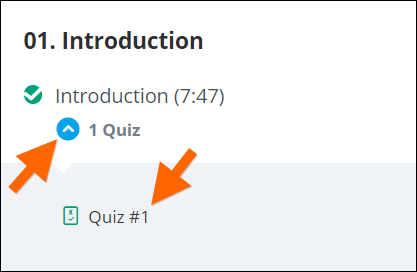
The only thing I would change, coming from a nitpicking developer type, if it can be done on your platform would be to move the Quiz Link to just underneath the Video Link so the user doesn't have to scroll through the transcript to take the quiz.
More to follow
I just finished the Pivot Tables section which much more useful than the training documentation provided by Acumatica and easier to get through as well.
I like the Pep Talk sessions. Explaining why you chose to handle the topics the way you did is brilliant.