AugForums.com

An Acumatica User Group

  • Free
    • Start Here
    • In-Person Gatherings
    • Power BI Workshop
    • Podcast
    • Rolodex
    • Blog
    • Forums
  • Paid
    • AugSQL
    • GI Course
    • GI Library
    • Consulting
  • Register

— The Forums are now read-only —

— All new activity now takes place here: —

AugForums.com Discord Server
Forums
AUG Forums
Acumatica Analytica...
Expand the fields i...
 
Notifications
Clear all

Questions Expand the fields in P&L report

 
Acumatica Analytical Report Manager (Financial Report Writer)
Last Post by sunwayfan 8 years ago
3 Posts
2 Users
1 Reactions
2,556 Views
RSS
Posts: 58
 sunwayfan
Topic starter
January 29, 2018 3:19 pm
(@sunwayfan)
Member
Joined: 9 years ago

How can I get a detailed P&L report?

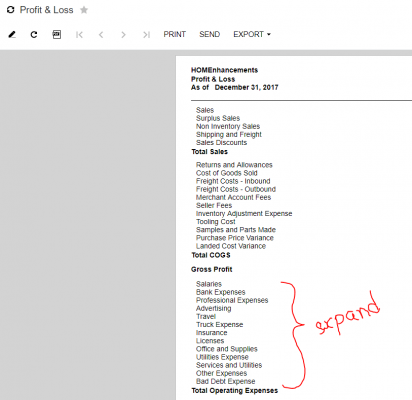
I want to expand the fields marked in the picture so as to include the sub fields from them

2 Replies
Tim Rodman
Posts: 3204
 Tim Rodman
Admin
January 31, 2018 11:05 pm
(@timrodman)
Famed Member
Joined: 11 years ago

Have you tried going into the Row Sets (CS206010) screen, clicking the magnifying glass in the Data Source column, and setting the Expand field to Account?


Reply
 sunwayfan
(@sunwayfan)
Joined: 9 years ago

Member
Posts: 58
February 1, 2018 9:43 am
Reply toTim RodmanTim Rodman

Yes I figured that out. It works if we select Account from the Expand drop down list.

Thank you!


Reply
Tim Rodman reacted
Forum Jump:
  Previous Topic
Next Topic  
Forum Information
Recent Posts
Unread Posts
Tags
  • 12 Forums
  • 2,533 Topics
  • 11 K Posts
  • 25 Online
  • 2,437 Members
Our newest member: Matt Butler
Latest Post: Nested SubReport Issue
Forum Icons: Forum contains no unread posts Forum contains unread posts
Topic Icons: Not Replied Replied Active Hot Sticky Unapproved Solved Private Closed

By using this website, you agree to our Terms of Use (click here)

Acumatica Forums

Terms of Use & Disclaimers :: Privacy Policy

Copyright © · AUG Forums, LLC. All rights reserved. This website is not owned, affiliated with, or endorsed by Acumatica, Inc.

‹›×

    ‹›×