AugForums.com

An Acumatica User Group

  • Free
    • Start Here
    • Rolodex
    • Podcast
    • Blog
    • Forums
  • Paid
    • AugSQL
    • GI Course
    • GI Library
    • Consulting
  • Register
Acumatica Forums

By using this website, you agree to our Terms of Use (click here)

Forums
AUG Forums
Acumatica Analytica...
Expand the fields i...
 
Notifications
Clear all

Questions Expand the fields in P&L report

 
Acumatica Analytical Report Manager (Financial Report Writer)
Last Post by sunwayfan 8 years ago
3 Posts
2 Users
1 Reactions
2,350 Views
RSS
Posts: 58
 sunwayfan
Topic starter
January 29, 2018 2:19 pm
(@sunwayfan)
Member
Joined: 8 years ago

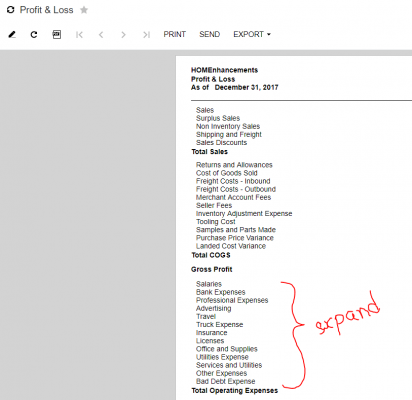
How can I get a detailed P&L report?

I want to expand the fields marked in the picture so as to include the sub fields from them

2 Replies
Tim Rodman
Posts: 3199
 Tim Rodman
Admin
January 31, 2018 10:05 pm
(@timrodman)
Famed Member
Joined: 10 years ago

Have you tried going into the Row Sets (CS206010) screen, clicking the magnifying glass in the Data Source column, and setting the Expand field to Account?


Reply
 sunwayfan
(@sunwayfan)
Joined: 8 years ago

Member
Posts: 58
February 1, 2018 8:43 am
Reply toTim RodmanTim Rodman

Yes I figured that out. It works if we select Account from the Expand drop down list.

Thank you!


Reply
Tim Rodman reacted
Forum Jump:
  Previous Topic
Next Topic  
Forum Information
Recent Posts
Unread Posts
Tags
  • 12 Forums
  • 2,527 Topics
  • 10.9 K Posts
  • 17 Online
  • 2,412 Members
Our newest member: Peter Paasch
Latest Post: Can't export GI's to excel that contain the FATrans DAC after upgrade to 2025 R1 in less than 25 min
Forum Icons: Forum contains no unread posts Forum contains unread posts
Topic Icons: Not Replied Replied Active Hot Sticky Unapproved Solved Private Closed

Online Members

  • Tim Rodman amassey
Acumatica Forums

Terms of Use & Disclaimers :: Privacy Policy

Copyright © 2026 · AUG Forums, LLC. All rights reserved. This website is not owned, affiliated with, or endorsed by Acumatica, Inc.

‹›×

    ‹›×