
By using this website, you agree to our Terms of Use (click here)

I am trying to setup a simple Financial Statement that has just 2 columns Period to date and Quarter to Date. I know how to set a report to look at a specific quarter, but I would like to have it set to show the quarter of the period that is selected.
Any help would be appreciated.

Kraig,
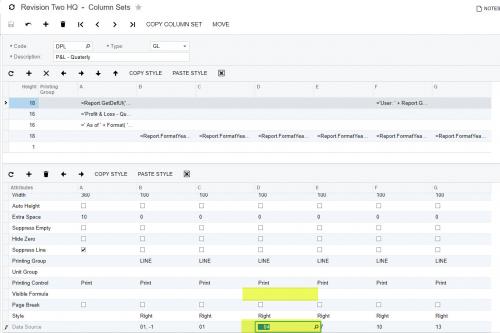
I assume you want the quarter in which the reporting period falls to be quarter that displays. If that is the case, I would create six columns in a column definition. The first is for the description and the second is for the period to date values. The last four are for quarterly columns. Each would reference a specific quarter (ie period 1 through 3, 4 through 6, etc.).
I would then put a calculation in the Visible Formula cell for each quarter column so only one of the columns displays based upon the period reported on.
Here is the text from the help system regarding the Visible Formula. (version 2018 R1)
Visible Formula
You use the Visible Formula attribute to define the conditions of hiding a column when you run the report. If you do not want to have needless columns (for example, those with no data) in the report, you can hide a column or multiple columns by specifying appropriate hiding conditions in the Visible Formula box.
Hiding a column does not remove a column or its data at all. The column will be displayed when the report is generated outside the specified conditions.
For example, suppose you have an annual report that has twelve columns, where each column accumulates data by month. If you run the report in March, it will contain the data for the three months (from January to March), so only three columns will contain data. In that case, there is no need to display other columns that have no data. Thus, you can specify conditions to hide the columns depending on the period of time when you run the report.
For the Visible Formula attribute, you can specify such values as =True (for displaying the column), =False (for hiding the column), or a formula with specific conditions for hiding the column depending on the @StartPeriod parameter.
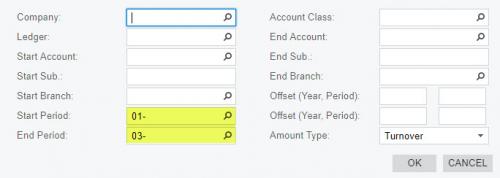
I have attached a couple of screen shots from a sample report from a demo company that comes close but you will have to add the Visible Formula to restrict to a single quarter.
I will try this in the morning. Thank you

What would the visible formula for the 12 month example you used above look like?

Something like this should work.
Here are the formulas in case you want to paste them.
For Q1: =Month(Report.GetPeriodEndDate(@StartPeriod))>=1 and Month(Report.GetPeriodEndDate(@StartPeriod))<=3
For Q2: =Month(Report.GetPeriodEndDate(@StartPeriod))>=4 and Month(Report.GetPeriodEndDate(@StartPeriod))<=6
For Q3: =Month(Report.GetPeriodEndDate(@StartPeriod))>=7 and Month(Report.GetPeriodEndDate(@StartPeriod))<=9
For Q4: =Month(Report.GetPeriodEndDate(@StartPeriod))>=10 and Month(Report.GetPeriodEndDate(@StartPeriod))<=12


Online Members

