AugForums.com

An Acumatica User Group

  • Free
    • Start Here
    • Rolodex
    • Podcast
    • Blog
    • Forums
  • Paid
    • AugSQL
    • GI Course
    • GI Library
    • Consulting
  • Register

In Acumatica, how do I prevent users from changing the status of a customer?

August 14, 2014 by Tim Rodman

Continuing the “Real-World” theme from last week (click here), I wanted to cover another real-world Acumatica situation. This question came to me through the Contact page here on the blog (click here). That’s right, this came from a person who is actually using Acumatica at their company! Here’s the question and a solution. I say a solution because I’m sure there is more than one way to tackle this.

Note: I’ll keep this shorter than usual because I’m writing this in an empty living room, tired from a long evening of packing. 90% of our stuff is in the moving van that is currently sitting in our driveway. We’ll load up the remaining 10% in the morning and head to our new house in Columbus (click here).

How do I prevent users from changing the status of a customer?

Basically what we want to do is make the following field read-only for certain users.
How do I prevent users from changing the status of a customer?

In order to do this, we need to apply the methodology used in the Field Security post from this past March (click here). First we’ll create a new User Role. Then we can create a new user and give them access to our new User Role. This way we can login as that user to prove that things are working as intended.

  1. Create a new User Role using the User Roles (SM201005) form.
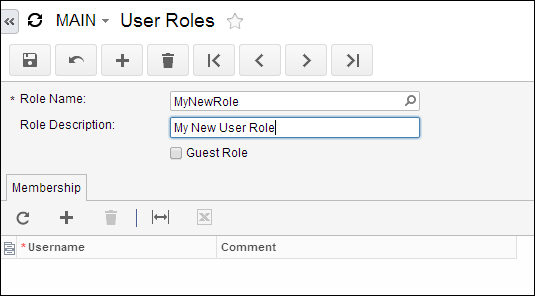
    Create a new Acumatica User Role
  2. Create a new User using the Users (SM201010) form and assign the User to the User Role that we just created.
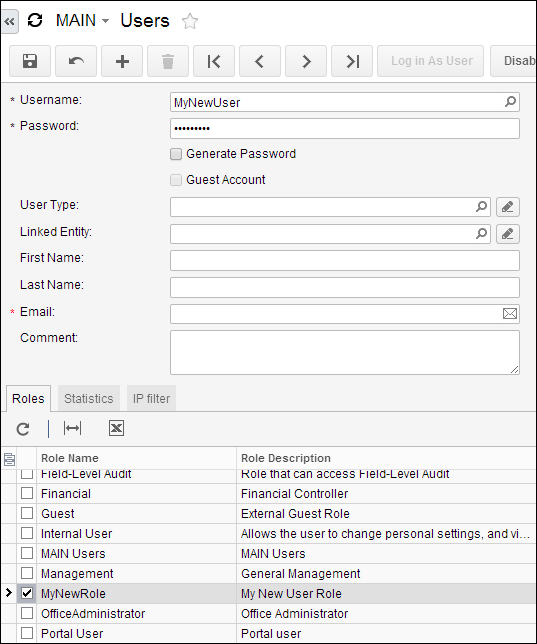
    Create a new Acumatica User
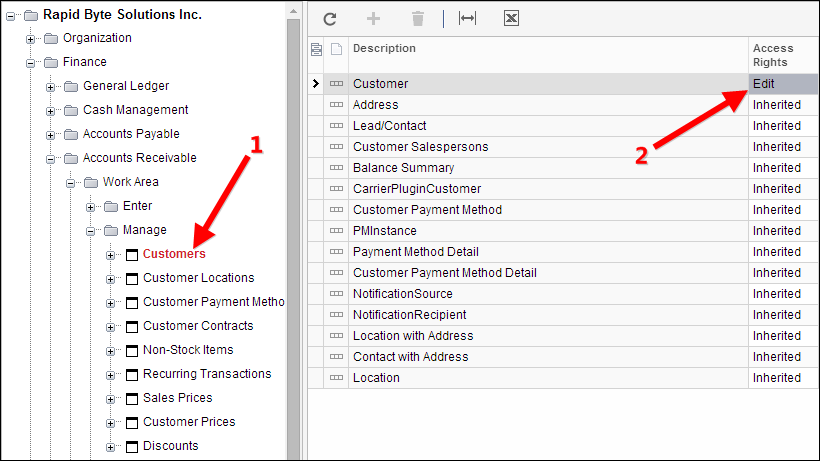
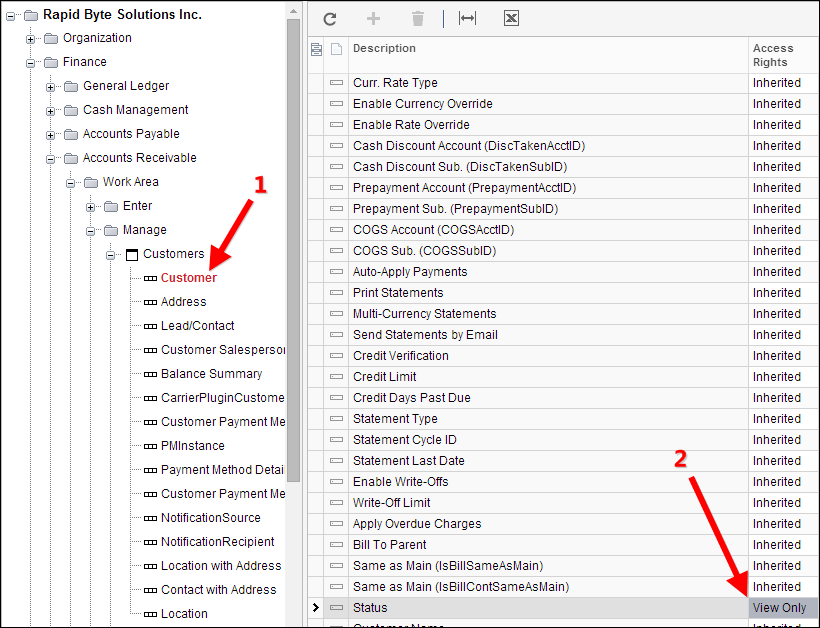
  3. Then we need to use the Access Rights By Role (SM201025) form to assign permissions to this new role/user. We have to drill all the way into the list of fields since we want to set permissions at the field level. Don’t forget that we first assign permissions to the screen, then permissions to the DAC (Data Access Class), then permissions to the individual field. It’s easy to get confused at the second step, the DAC. Here are three separate screenshots showing the permissions needed at each level.
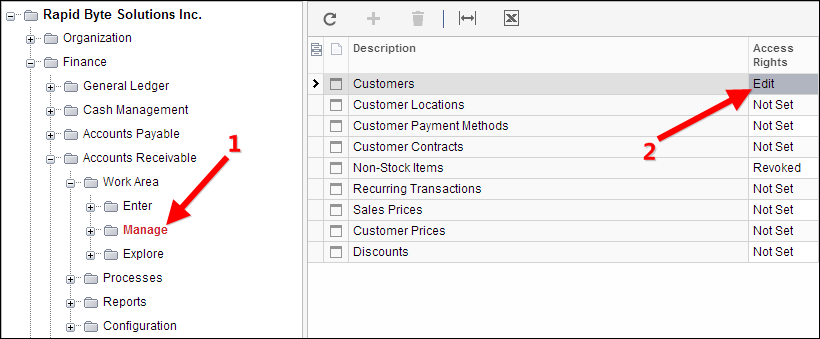
    Acumatica Form PermissionsAcumatica DAC PermissionsAcumatica Form Element Permissions
  4. Now that we’ve set the permissions (they key one being View Only on the Status field), we can login as our user and try things out. Just go back to the Users (SM201010) form, pull up MyNewUser, and click the Log in As User button.
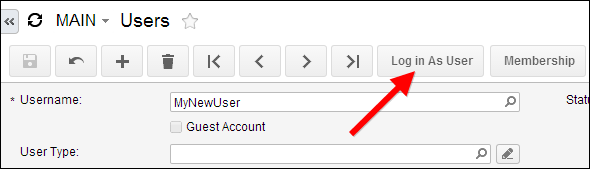
    Acumatica Log in As User Button
  5. Now we can see that our new user only has access to the Customers (AR303000) form and the Status field is read-only which is what we wanted.
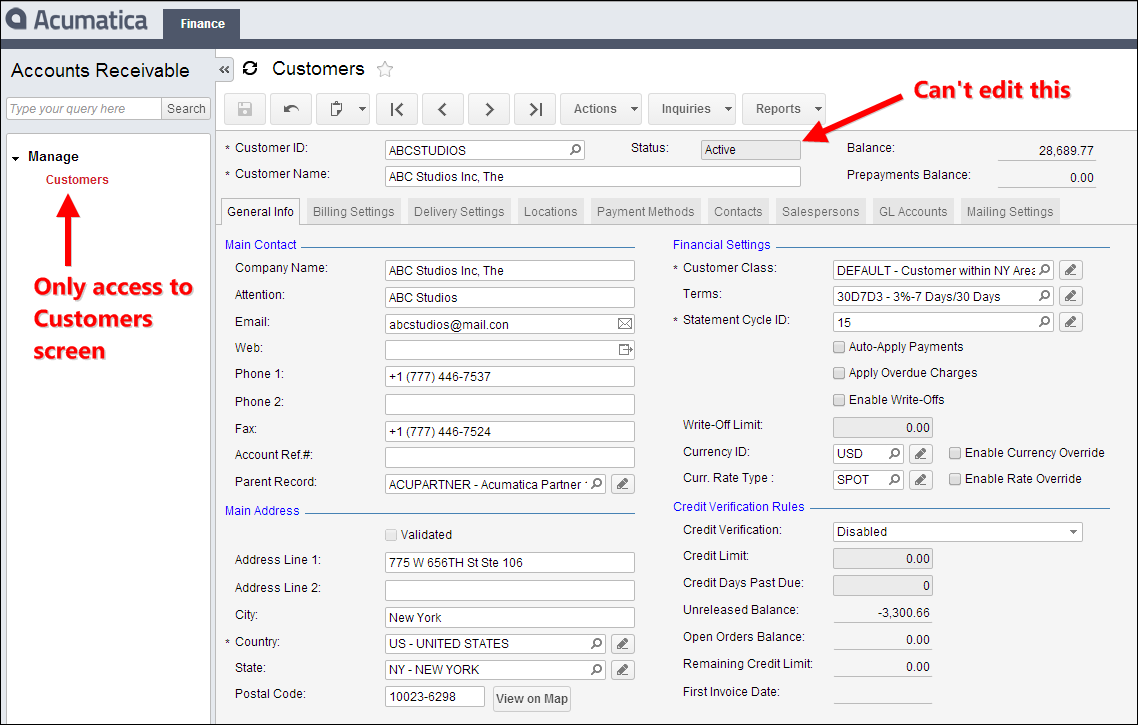
    2014-08-13_23-17-60

Filed Under: Acumatica Learning Tagged With: Acumatica, Acumatica Blog, Acumatica Columbus, Acumatica Field Security, Acumatica Security, Acumatica Training, Acumatica User Roles

By using this website, you agree to our Terms of Use (click here)
Building Generic Inquiries & Pivot Tables

Online Members

 No online members at the moment

Recent Blog Posts

  • EP 160: How long does it take an Automation Schedule to run in Acumatica (Podcast) November 7, 2025
  • EP 159: Mark Safran – Smartsheet Dashboards with Acumatica data (Podcast) October 29, 2025
  • EP 158: Garrett Rochell – Acumatica Upgades, especially with the Modern UI (Podcast) October 4, 2025
  • acuCONNECT 2025 – Visualizing Inventory Balance $ and Service Level % TOGETHER September 19, 2025
  • EP 157: acuCONNECT 2025 Preparation – Part 4 (Podcast) September 16, 2025

Recent Forum Posts

  • Tim Rodman

    RE: Generic inquiry with information from Audit history(CT301000)

    @graemelm Just pulled it in as a Custom DAC fed by the ...

    By Tim Rodman , 2 days ago

  • Tim Rodman

    RE: Importing Acumatica User Roles / User Security Permissions from Excel

    @astra-mathis thank you for the detailed instructions. ...

    By Tim Rodman , 2 days ago

  • Astra Mathis

    RE: Importing Acumatica User Roles / User Security Permissions from Excel

    @timrodman - using the files from this article and foll...

    By Astra Mathis , 2 days ago

  • GraemeLM

    RE: Generic inquiry with information from Audit history(CT301000)

    @timrodman Hi Tim, hope you're well! I'm interested t...

    By GraemeLM , 3 days ago

  • sangland

    RE: Customer Portal Setup - Access issues to create sales order

    Hi, was there an answer for this problem?

    By sangland , 2 weeks ago

  • Bronwyn Duprey

    RE: Attribute Input Mask

    Does anyone know where I can find instructions on the f...

    By Bronwyn Duprey , 3 weeks ago

  • Astra Mathis

    RE: Importing Acumatica User Roles / User Security Permissions from Excel

    @nangel SM651500 Access Rights by Role or SM651700 Acce...

    By Astra Mathis , 1 month ago

  • matthewjames

    RE: Generic Inquiry Screenid changes to ScreenId=00000000

    if anyone gets this error again (resetting screen ID to...

    By matthewjames , 2 months ago

  • Travis

    RE: Pick List report suddenly not splitting on Shipment

    I never found a solution initially - here I am 3 years ...

    By Travis , 3 months ago

Terms of Use & Disclaimers :: Privacy Policy

Copyright © 2025 · AUG Forums, LLC. All rights reserved. This website is not owned, affiliated with, or endorsed by Acumatica, Inc.