AugForums.com

An Acumatica User Group

  • Free
    • Start Here
    • In-Person Gatherings
    • Power BI Workshop
    • Podcast
    • Rolodex
    • Blog
    • Forums
  • Paid
    • AugSQL
    • GI Course
    • GI Library
    • Consulting
  • Register
Acumatica Forums

By using this website, you agree to our Terms of Use (click here)

Forums
AUG Forums
Everything Else
Update Existing Lin...
 
Notifications
Clear all

Questions Update Existing Line Record

 
Everything Else
Last Post by Tim Rodman 7 years ago
6 Posts
3 Users
0 Reactions
8,460 Views
RSS
Posts: 14
 Brett Nothan
Topic starter
April 5, 2019 4:07 pm
(@brett-nothan)
Member
Joined: 7 years ago

Hi All...  

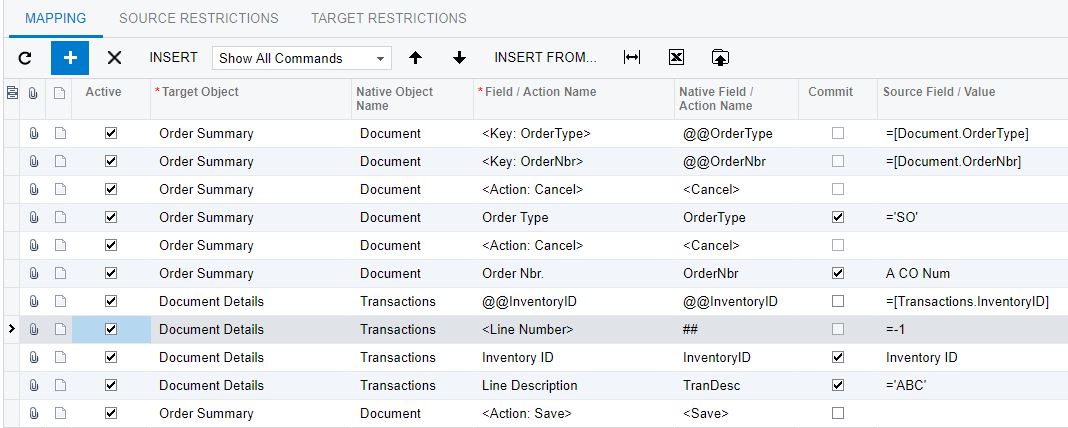
I'm trying to update an existing Sales Order Line but it keeps creating a new line instead.   I'm utilizing a custom key to find and update the existing line via the Inventory ID.   These test Sales Order are very basic with only 1 line.   

Can anybody see what I'm doing wrong?   I've tried to follow the new 2019 Import Scenario Training Docs to the T with no luck.

Thanks,

Brett

5 Replies
Brandon
Posts: 26
 Brandon
April 5, 2019 5:38 pm
(@brandon)
Member
Joined: 7 years ago

The line that you have highlighted in your screenshot for the Line Number with the value "=-1" needs to be unchecked on the Active box so that it is inactive. Other than that it looks like you have everything set up correctly.

Reply
 Brett Nothan
(@brett-nothan)
Joined: 7 years ago

Member
Posts: 14
April 6, 2019 6:19 pm
Reply toBrandonBrandon

Thanks Brandon.   I was trying to follow the example on pg 108 which I believe is supposed to update the PO Line quantities...

https://openuni.acumatica.com/wp-content/uploads/2017/08/I100_Integration_Scenarios_2019R1.pdf

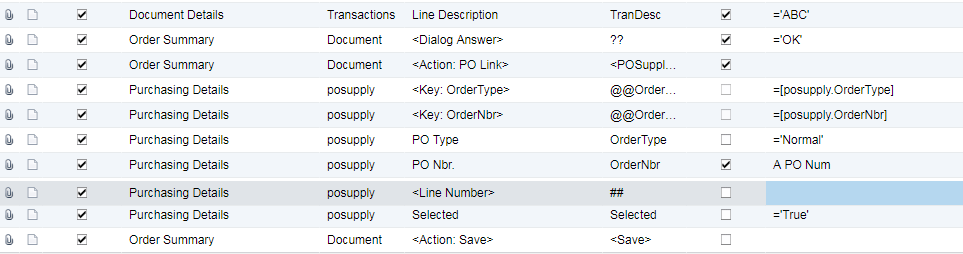
Now that I have the right SO/SO Line selected my ultimate goal is to execute the "PO Link" button and associate the SO to an existing PO.  For this I'm trying to follow the example on pg 114.  I have added these additional lines to the import scenario.   I'm getting "Error: 'LineNbr.' cannot be empty"

I also can't seem to find the equivalent to their command after they have "selected" the line.   Maybe it is not need in this case.

Thanks,

Brett


Reply
Tim Rodman
Posts: 3204
 Tim Rodman
Admin
April 25, 2019 11:41 pm
(@timrodman)
Famed Member
Joined: 10 years ago

For matching on the line number, isn't page 93 more what you're looking for?


As for the PO LINK button, I've never tried that. Not sure how you would match on the desired line. Not saying it's not possible, I'm just not sure how.

Reply
 Brett Nothan
(@brett-nothan)
Joined: 7 years ago

Member
Posts: 14
April 26, 2019 10:56 am
Reply toTim RodmanTim Rodman

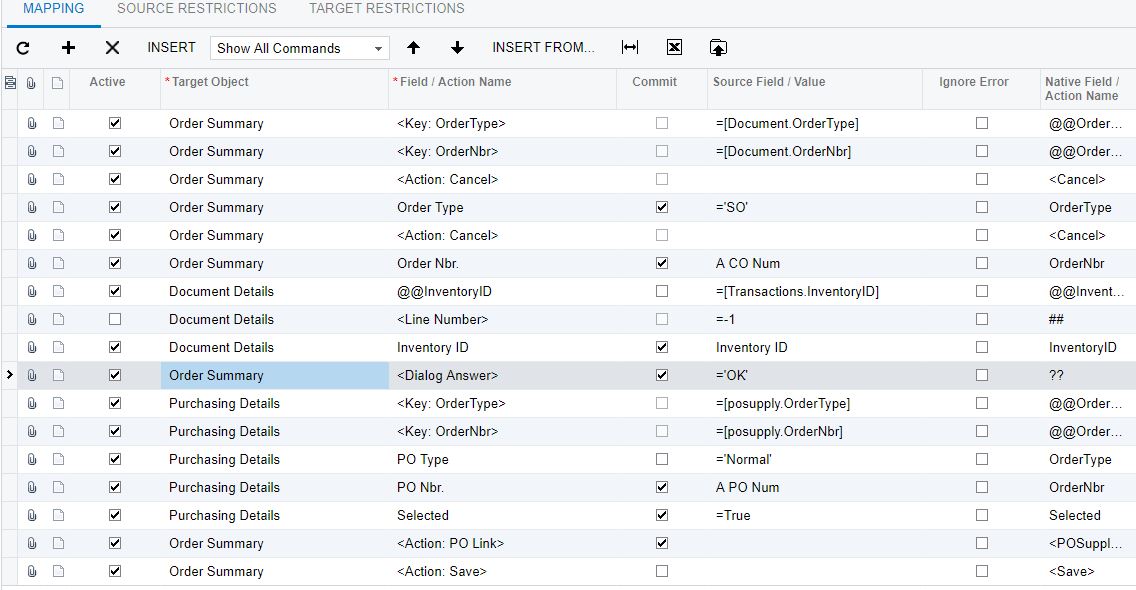
Thanks Tim.   I was able to get it to work.   In my case I already had the Sales Orders and Purchase Orders imported but needed to "Link" them together as a "Purchase to Order".   I knew the Acumatica SO # and the Acumatica PO #.   This finds the SO by the Acumatica SO Number (A CO Num) and then finds the correct Sales Order line by Inventory ID (which was sufficient in my case).   It then executes the "PO Link" button and associates via the Acumatica PO Number (A PO Num).   The part that threw me off was the next to last line of the import scenario.   Unlike dialog boxes where you acknowledge BEFORE the event here you execute the Action (PO Link) at the END of the event.

Hope this helps others.

Brett


Reply
Tim Rodman
Posts: 3204
 Tim Rodman
Admin
May 5, 2019 8:41 pm
(@timrodman)
Famed Member
Joined: 10 years ago

Wow, this is AWESOME! Thank you so much for sharing this.


Reply
Forum Jump:
  Previous Topic
Next Topic  
Forum Information
Recent Posts
Unread Posts
Tags
  • 12 Forums
  • 2,530 Topics
  • 11 K Posts
  • 10 Online
  • 2,418 Members
Our newest member: Chad Treadwell
Latest Post: Negative/Credit Inventory Value?
Forum Icons: Forum contains no unread posts Forum contains unread posts
Topic Icons: Not Replied Replied Active Hot Sticky Unapproved Solved Private Closed

Online Members

  • Johnny Tang
Acumatica Forums

Terms of Use & Disclaimers :: Privacy Policy

Copyright © 2026 · AUG Forums, LLC. All rights reserved. This website is not owned, affiliated with, or endorsed by Acumatica, Inc.

‹›×

    ‹›×