
By using this website, you agree to our Terms of Use (click here)

Hi all,
As per the topic, I am trying to build an import scenario to import kit assembly data. We have some pretty complex allocations requirements and doing them by hand would take forever. I've built an import scenario but keep getting errors when attempting to import data.
Just wondering whether anyone else has managed to get this working?
Thanks for any response,
Royce.

Can you include a screenshot of your import scenario definition?
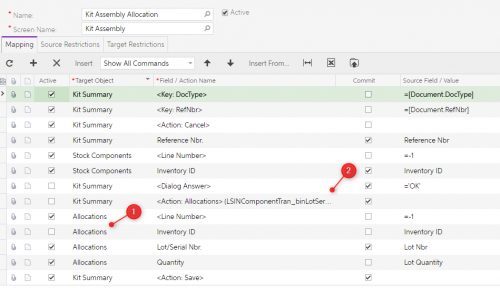
Notes about this image:
- I am fairly certain the Allocations object here refers to the Allocations on the Tab, which is the output allocations. The input allocations don't appear to be accessible from the page. I think that is where the issue lies.
- I have tried with our without pressing the Allocations button but i think the button does need to be pressed. The issue is that once its pressed, there is no way to access the data on the popup panel from this import scenario.
I believe this page isn't compatible with Import, or at least not the allocations side of it.
My Data Provider is a simple spreadsheet with Reference Nbr, Inventory ID, Lot Nbr, Lot Quantity. The intention being you first create the assembly and select the inventory item but leave the quantities zero. Then the import would import the allocations as per the spreadsheet and apply these to the Stock Items tab inventory items.
Can you include a screenshot of your import scenario definition?
Hi Tim,
Screenshot included - any suggestions?
Cheers,
Royce.
Hi Royce,
Just curious, what's the reason for the Stock Components -> Inventory ID line? Does that line already exist and you're trying to update it or are you trying to add it?
Or, in other words, it sounds like you create the record first before running the Import Scenario. When you create it initially, are you populating anything on the Stock Components tab of the Kit Assembly (IN307000) screen or just leaving it empty?
Hi Royce,
I spent some time on this, but wasn't able to figure it out. Your best bet is probably to open an Acumatica support case. I actually think this should be possible because everything seems to be available in the Import Scenario. It's just matter of getting the steps down in the correct order.
This is where I left off:

But I'm getting this error:
Error: The system failed to commit the ComponentSplits row.

Hi Tim,
Thanks for your efforts. Although i am a little confused by your example because AFAIK, the Allocations popup is for lot/serial number allocations of inputs, whereas you have tried to use locations. Was there any reason you didn't use Lot/Serial numbers? I don't see in your scenario assignment of the Lot/Serial Nbr field of the Allocations popup.
You should be able to use Locations in there too. I just picked the Locations field because the first item I grabbed was not Lot or Serial tracked.

Yes I got it working but it's quite different from what you are trying to achieve. As always, try doing your IS manually in the same order you defined it in the IS. You should see the issue.

I've ran this manually a number of times, it's how I build all my IS's. This works perfectly fine in my system (manually). I'm not sure what is amiss here, except setting the location on the component lines, which is what my original question was regarding as I'm not sure how to access component lines.
When you do it manually, do you need to insert a record into the Stock Components tab or is it already there? The IS that I wrote was for adding allocations to an existing assembly for a specific Inventory ID only.
For what it's worth, here it is:

I think there could be an issue with your IS as you've ignored Inventory ID on Stock Components and it's a required field.
No, our component lines are generated from a kit spec and fill in automatically. I merely need to set the location on the lines so the assembly knows where to pull from. This is why I'm having a hard time accessing the lines, they exist the moment I add the header Inventory ID to the assembly, but they are not always numbered consistently. Sometimes they're line 3 & 5, sometimes 5 & 7. All of the lines must come from the same location, so if I could just overwrite the entire set of lines regardless of position that would work too. Anyone know how to run sequentially through the lines?
Assuming they don't go higher than 9, would it be a bad idea to target lines 3,5,7, & 9 hoping to hit the right lines? Would it create a new line if one didn't exist at that index? I'm super unfamiliar with creating lines in a record or modifying them, so this is a great learning exercise for me. Thanks @royce-lithgo for your help and advice. I'm gonna try hitting lines 3,5,7,9 and see if it'll let me save. Fingers-crossed that this one works!
I just tried adding the "From Loc" to line 1, 3, 5, 7, & 9. Same error as before.
You need to do it the same way I did - in other words, locate the record you want to update first via Inventory ID, then do the update.
Checkout the I100 training, Example 2.5.3: Updating Detail Lines by Custom Key (AR Invoices). That was how I built my IS. If you look carefully, before I apply the allocations, I first find the Inventory ID (Component) from my data provider.
These are new assemblies that do not exist. I am not updating an existing record. The moment I put the inventory ID in my header, I get component lines. Below is an image where all I've done is open a new assembly record and select the header inventory ID. I would assume the IS follows suit when I input the inventory ID. From here I need to edit the warehouse, to and from locations, and the dates.

We also use auto-numbering, so it not necessary to select the Assembly Reference number, it should happen as soon as I save the document. The document will not save unless I have locations in the component fields. I "think" this is where my issue lies. In this case, it gave me Component Locations, but they're not correct and I would need to edit them.
Online Members
