AugForums.com

An Acumatica User Group

  • Free
    • Start Here
    • In-Person Gatherings
    • Power BI Workshop
    • Podcast
    • Rolodex
    • Blog
    • Forums
  • Paid
    • AugSQL
    • GI Course
    • GI Library
    • Consulting
  • Register
Acumatica Forums

By using this website, you agree to our Terms of Use (click here)

Forums
AUG Forums
Everything Else
Import Scenario bas...
 
Notifications
Clear all

Questions Import Scenario base on fixed-field length .txt file

 
Everything Else
Last Post by Tim Rodman 5 years ago
12 Posts
4 Users
2 Reactions
4,193 Views
RSS
martingaxiola
Posts: 3
 martingaxiola
Topic starter
July 18, 2019 4:37 pm
(@martingaxiolabpw)
Member
Joined: 6 years ago

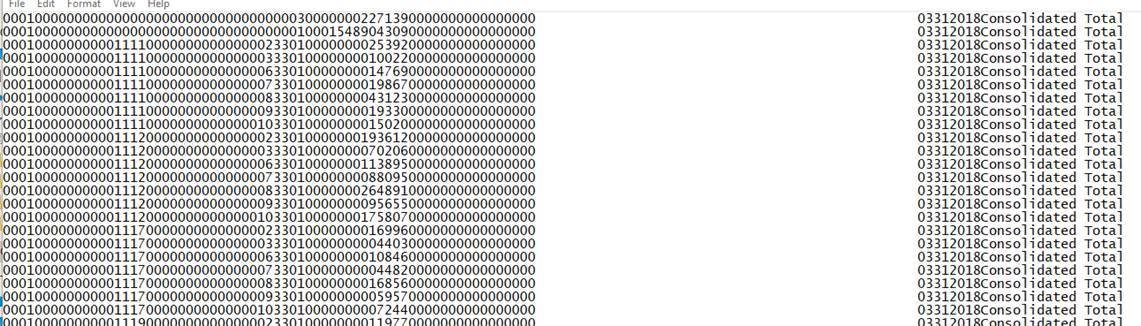
Good day, I am trying to create an import scenario and/or data provider that can be for a fixed-field length .txt file. I have to import a file every day, but I was asked if this can be done by using the file in its original form. Attached I put an image of the file. Is there a way to either create a new Data provider or use one that is already in Acumatica? Thank you and have an amazing day.


11 Replies
Royce Lithgo
Posts: 557
 Royce Lithgo
July 18, 2019 7:34 pm
(@roycelithgo)
Honorable Member
Joined: 6 years ago

Indeed there is no default data provider type for fixed text. The only nasty way i can think of is use the CSV data provider type, import each record as one long String field called "Data". Then in your import scenario, use functions instead of fields. Use the Substring function to extract the data for each field, and wrap that with a Cxxx function, to convert the string to the correct field type. 

So suppose the first field is the 0001 above, you might use:

=CInt(Substring[Data],0,4))

This is only a theory. 


Reply
martingaxiola
 martingaxiola
(@martingaxiolabpw)
Joined: 6 years ago

Member
Posts: 3
July 18, 2019 9:24 pm
Reply toRoyce LithgoRoyce Lithgo

@royce-lithgo

Thank you so much. I will try this for sure. 


Reply
Royce Lithgo
Posts: 557
 Royce Lithgo
July 18, 2019 9:52 pm
(@roycelithgo)
Honorable Member
Joined: 6 years ago

I just noticed a typo, it should be:

=CInt(Substring([Data],0,4))


Reply
Tim Rodman reacted
Jswartz
 Jswartz
(@jswartz)
Joined: 6 years ago

Eminent Member
Posts: 18
July 30, 2020 6:47 pm
Reply toRoyce LithgoRoyce Lithgo

@roycelithgo How would you go about setting up the schema on the Data Providers screen? Do you use your code to refer to where each field is located per line or that is only used on the import scenario screen?


Reply
Royce Lithgo
 Royce Lithgo
(@roycelithgo)
Joined: 6 years ago

Honorable Member
Posts: 557
July 30, 2020 9:55 pm
Reply toJswartzJswartz
Royce Lithgo

@jswartz As i said in my comment, import as one long string and extract the data in the import scenario. The schema would have a single field of type string with length as the maximum expected record length.


Reply
Jswartz
 Jswartz
(@jswartz)
Joined: 6 years ago

Eminent Member
Posts: 18
July 31, 2020 11:54 am
Reply toRoyce LithgoRoyce Lithgo
Jswartz
Royce Lithgo

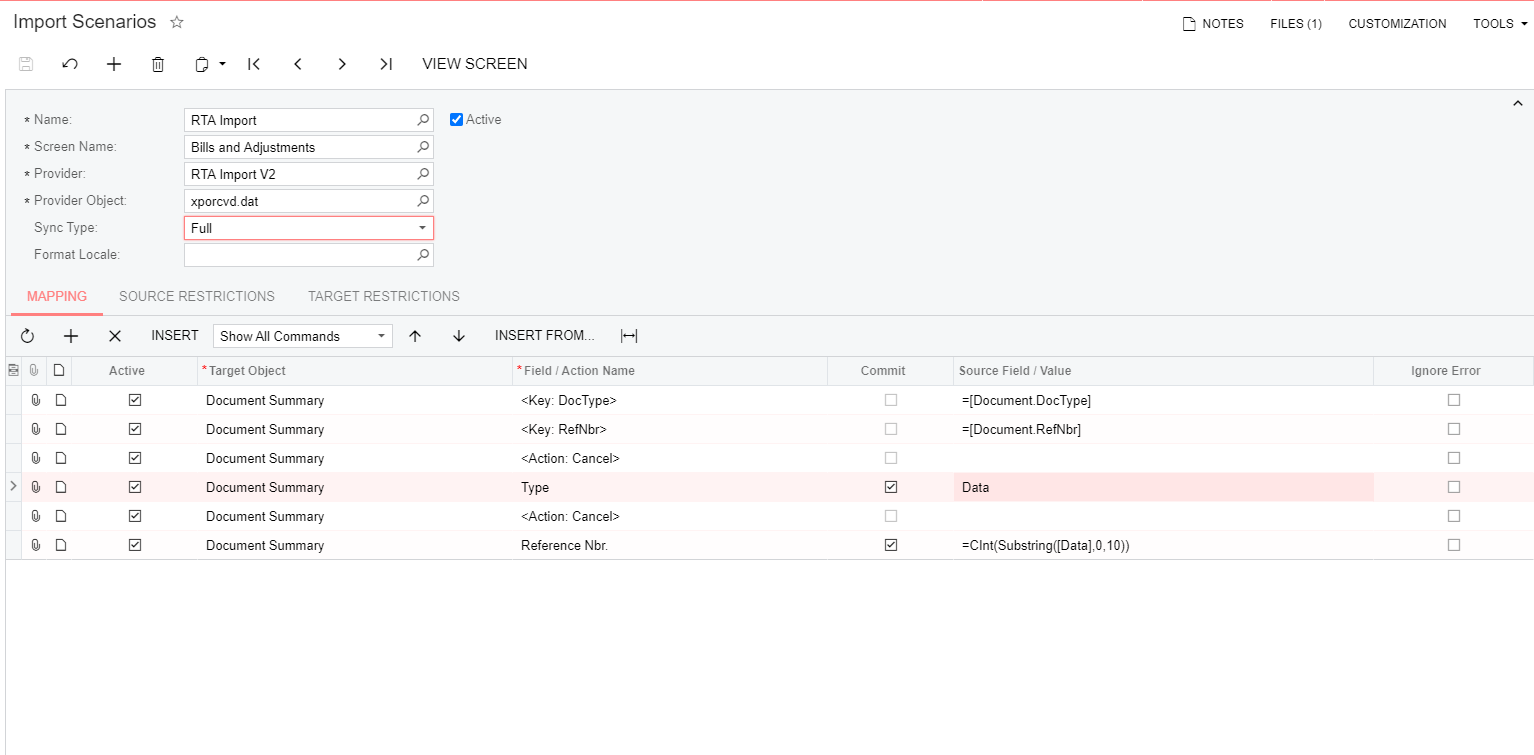
@roycelithgo I think I understand what you are saying now. I am trying to automate an AP Bills import with a fixed-width file type. I have attempted to try and first see if I can import the PO number but I am getting an error during the prepare phase. I will post photos of my setup for reference. Thank you again for your help with this import.

Annotation 2020 07 31 115158
Annotation 2020 07 31 115142
Annotation 2020 07 31 115211
Annotation 2020 07 31 115224

Reply
Royce Lithgo
 Royce Lithgo
(@roycelithgo)
Joined: 6 years ago

Honorable Member
Posts: 557
August 4, 2020 12:04 am
Reply toJswartzJswartz
Royce Lithgo
Jswartz
Royce Lithgo

@jswartz You need to include a header record in your input file. Use the word "Data" for the record.

example:

Data
ABC123DEF
ABC456GHJ

In my test case I could prepare this file with the following outcome:


Reply
Jswartz
 Jswartz
(@jswartz)
Joined: 6 years ago

Eminent Member
Posts: 18
August 4, 2020 11:14 am
Reply toRoyce LithgoRoyce Lithgo
Jswartz
Royce Lithgo
Jswartz
Royce Lithgo

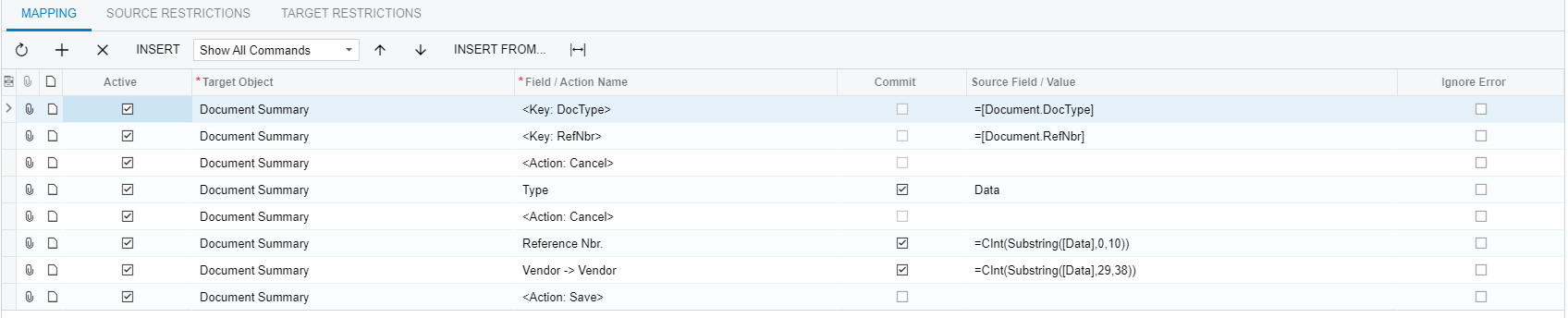
@roycelithgo Thank you! I now have the data populating. However, I am trying to separate the columns based on their width using the formula you provided above. However, it keeps adding the whole line into one column when it should be separating it with the function based on the field I designate. Photos for example.

Annotation 2020 08 04 111029
Annotation 2020 08 04 111140

Reply
Royce Lithgo
 Royce Lithgo
(@roycelithgo)
Joined: 6 years ago

Honorable Member
Posts: 557
August 4, 2020 9:27 pm
Reply toJswartzJswartz
Royce Lithgo
Jswartz
Royce Lithgo
Royce Lithgo

@jswartz The formula will only be applied during the actual import - so when you prepare it, you will see the entire value as one column but when you import it should split it based on the formulas. Did you actually try and import the data?


Reply
Jswartz
 Jswartz
(@jswartz)
Joined: 6 years ago

Eminent Member
Posts: 18
August 21, 2020 2:00 pm
Reply toRoyce LithgoRoyce Lithgo
Jswartz
Royce Lithgo
Jswartz
Royce Lithgo

@roycelithgo I was able to resolve the issue and get it to work! Thank you for your help. 


Reply
Royce Lithgo reacted
Tim Rodman
Posts: 3204
 Tim Rodman
Admin
September 30, 2020 5:08 pm
(@timrodman)
Famed Member
Joined: 10 years ago

You might also checkout this product for an easier way to work with fixed-length files:

https://www.acusync.io


Reply
Forum Jump:
  Previous Topic
Next Topic  
Forum Information
Recent Posts
Unread Posts
Tags
  • 12 Forums
  • 2,530 Topics
  • 11 K Posts
  • 10 Online
  • 2,418 Members
Our newest member: Chad Treadwell
Latest Post: Negative/Credit Inventory Value?
Forum Icons: Forum contains no unread posts Forum contains unread posts
Topic Icons: Not Replied Replied Active Hot Sticky Unapproved Solved Private Closed

Online Members

  • Johnny Tang
Acumatica Forums

Terms of Use & Disclaimers :: Privacy Policy

Copyright © 2026 · AUG Forums, LLC. All rights reserved. This website is not owned, affiliated with, or endorsed by Acumatica, Inc.

‹›×

    ‹›×