AugForums.com

An Acumatica User Group

  • Free
    • Start Here
    • In-Person Gatherings
    • Power BI Workshop
    • Podcast
    • Rolodex
    • Blog
    • Forums
  • Paid
    • AugSQL
    • GI Course
    • GI Library
    • Consulting
  • Register
Acumatica Forums

By using this website, you agree to our Terms of Use (click here)

Forums
AUG Forums
Everything Else
Import Sales Price ...
 
Notifications
Clear all

Questions Import Sales Price Worksheet

 
Everything Else
Last Post by Tim Rodman 8 years ago
6 Posts
2 Users
0 Reactions
4,030 Views
RSS
MichaelHansen
Posts: 149
 MichaelHansen
Topic starter
June 5, 2018 12:10 pm
(@michaelhansen)
Estimable Member
Joined: 6 years ago

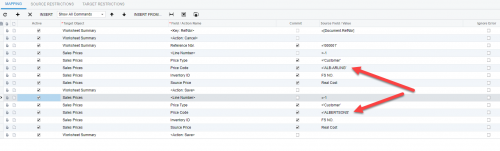
Does anyone have a working import that has the same items with the same prices going into the lines for a sales price worksheet? Mine keeps saying duplicate sales price and errors out, but I have selected a new customer on the second pass for the item, which works when I do it by hand... 

5 Replies
Tim Rodman
Posts: 3199
 Tim Rodman
Admin
June 6, 2018 10:46 pm
(@timrodman)
Famed Member
Joined: 10 years ago

What does the Data Source for this Import Scenario look like?


Reply
MichaelHansen
Posts: 149
 MichaelHansen
Topic starter
June 7, 2018 9:16 am
(@michaelhansen)
Estimable Member
Joined: 6 years ago
FS NO. PK PPD Real Cost
 FS3349  12            2.95       35.40
 F16544  4            6.25       25.00
 F16545  4            7.00       28.00
 F16547  12            1.80       21.60


The middle two columns are not used in the import. I know that when I sell a segment of items, I need to hit multiple customers with the price sheets. I was hoping to create an import scenario for each "set" of customers. Worst case, I just create an import for each customer in our system, but that's a lot of bloat..


Reply
Tim Rodman
Posts: 3199
 Tim Rodman
Admin
June 9, 2018 8:28 pm
(@timrodman)
Famed Member
Joined: 10 years ago

Have you thought about just including Customer in the Data Source? I've never tried to create two rows with an import scenario before. One thing you might do is deactivate the second set of rows for the second customer and see if that gets you past the error.


Reply
MichaelHansen
Posts: 149
 MichaelHansen
Topic starter
June 12, 2018 1:53 pm
(@michaelhansen)
Estimable Member
Joined: 6 years ago

That works! Sorry for the delay, got side-tracked from my upload. For anyone else following along:
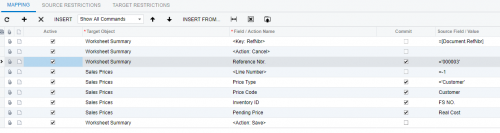


This will import lines into a Sales Price Worksheet with reference ID 000003. My Data is formatted as:
FS NO. (Inventory ID)  <> COST (Pending Price) <> CUSTOMER (Customer ID)


Thanks again Tim!


Reply
Tim Rodman
Posts: 3199
 Tim Rodman
Admin
June 15, 2018 10:34 pm
(@timrodman)
Famed Member
Joined: 10 years ago

Awesome! And thanks for sharing your final solution Michael.


Reply
Forum Jump:
  Previous Topic
Next Topic  
Forum Information
Recent Posts
Unread Posts
Tags
  • 12 Forums
  • 2,528 Topics
  • 10.9 K Posts
  • 26 Online
  • 2,412 Members
Our newest member: Peter Paasch
Latest Post: Credit Reference Report Needed
Forum Icons: Forum contains no unread posts Forum contains unread posts
Topic Icons: Not Replied Replied Active Hot Sticky Unapproved Solved Private Closed

Online Members

 No online members at the moment

Acumatica Forums

Terms of Use & Disclaimers :: Privacy Policy

Copyright © 2026 · AUG Forums, LLC. All rights reserved. This website is not owned, affiliated with, or endorsed by Acumatica, Inc.

‹›×

    ‹›×