AugForums.com

An Acumatica User Group

  • Free
    • Start Here
    • In-Person Gatherings
    • Power BI Workshop
    • Podcast
    • Rolodex
    • Blog
    • Forums
  • Paid
    • AugSQL
    • GI Course
    • GI Library
    • Consulting
  • Register
Acumatica Forums

By using this website, you agree to our Terms of Use (click here)

Forums
AUG Forums
Everything Else
Import multi-select...
 
Notifications
Clear all

Questions Import multi-select combo box

 
Everything Else
Last Post by Astra Mathis 3 years ago
8 Posts
4 Users
3 Reactions
8,116 Views
RSS
DWS253
Posts: 33
 DWS253
Topic starter
June 4, 2018 5:28 pm
(@dws253)
Member
Joined: 9 years ago

Can anyone provide an example of an import scenario to import multiple values for an attribute that is configured as a multi-select combo box?  I can get my import to check one of the values, but only one.


Astra Mathis reacted
7 Replies
Tim Rodman
Posts: 3204
 Tim Rodman
Admin
June 4, 2018 5:42 pm
(@timrodman)
Famed Member
Joined: 11 years ago

Good question DWS253. Hopefully there is a way to do this. Probably a good question for Acumatica support.


Reply
Jangam Nagaraj
Posts: 3
 Jangam Nagaraj
June 5, 2018 6:05 am
(@jangam-nagaraj)
Member
Joined: 8 years ago

Hello DWS253,

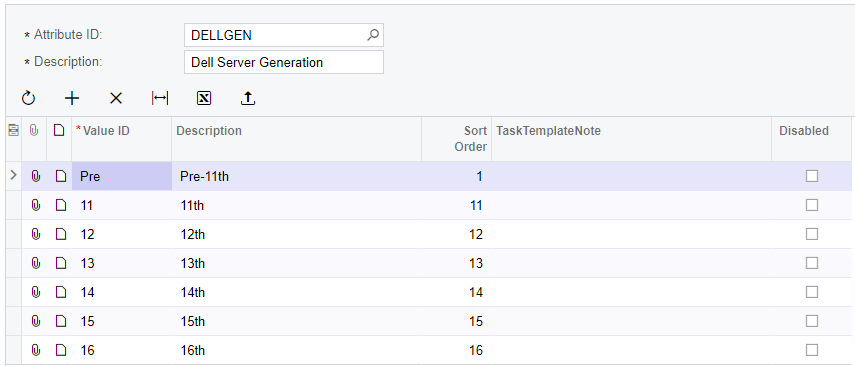
We need to pass values as comma separated, please have a look at below screenshots. I think this may help, please let me know if this not works.

-- Attributes.

-- Import Scenarios

-- Import By Scenario

-- Stock Items


Reply
Astra Mathis
 Astra Mathis
(@astra-mathis)
Joined: 3 years ago

Active Member
Posts: 10
March 17, 2023 10:57 am
Reply toJangam NagarajJangam Nagaraj

@jangam-nagaraj Any ideas on my multi select combo box import scenario and why it isn't working;

I followed all these tips on building the IS and the lack of commas between selections but it doesn't work and throws errors (the 2 above worked totally fine).

image
image
image

And if I try it with the spaces it also fails:

image


Reply
Astra Mathis
 Astra Mathis
(@astra-mathis)
Joined: 3 years ago

Active Member
Posts: 10
March 17, 2023 11:58 am
Reply toAstra MathisAstra Mathis
Jangam Nagaraj

Ignore me, my rep gave me "descriptions" instead of values and I only just noticed!


Reply
Tim Rodman reacted
DWS253
Posts: 33
 DWS253
Topic starter
June 5, 2018 9:46 am
(@dws253)
Member
Joined: 9 years ago

Thank You, Jangam!

That worked.  I was missing the <Key: AttributeID>  =[Answers.AttributeID] line.


Reply
Tim Rodman
Posts: 3204
 Tim Rodman
Admin
June 6, 2018 11:46 pm
(@timrodman)
Famed Member
Joined: 11 years ago

Brilliant! Thanks for sharing Jangam!


Reply
DWS253
Posts: 33
 DWS253
Topic starter
June 6, 2018 11:53 pm
(@dws253)
Member
Joined: 9 years ago

One thing to be aware of that caught me up for a bit...the values are comma separated, but do not put any SPACES next to the commas.  Value1,Value2,Value3,...


Reply
Astra Mathis reacted
Forum Jump:
  Previous Topic
Next Topic  
Forum Information
Recent Posts
Unread Posts
Tags
  • 12 Forums
  • 2,532 Topics
  • 11 K Posts
  • 21 Online
  • 2,418 Members
Our newest member: Chad Treadwell
Latest Post: Limited or no support from Acumatica?
Forum Icons: Forum contains no unread posts Forum contains unread posts
Topic Icons: Not Replied Replied Active Hot Sticky Unapproved Solved Private Closed

Online Members

  • Laura Carpenter
Acumatica Forums

Terms of Use & Disclaimers :: Privacy Policy

Copyright © 2026 · AUG Forums, LLC. All rights reserved. This website is not owned, affiliated with, or endorsed by Acumatica, Inc.

‹›×

    ‹›×