AugForums.com

An Acumatica User Group

  • Free
    • Start Here
    • Rolodex
    • Podcast
    • Blog
    • Forums
  • Paid
    • AugSQL
    • GI Course
    • GI Library
    • Consulting
  • Register
Acumatica Forums

By using this website, you agree to our Terms of Use (click here)

Forums
AUG Forums
Everything Else
Generate Location B...
 
Notifications
Clear all

Questions Generate Location Barcodes

 
Everything Else
Last Post by nshah002 1 year ago
5 Posts
2 Users
3 Reactions
1,312 Views
RSS
nshah002
Posts: 9
 nshah002
Topic starter
July 16, 2024 1:29 pm
(@nshah002)
Eminent Member
Joined: 3 years ago

Hi,

Is there a way to have Acumatica generate simple barcodes for all the location values in the company?  This would avoid having to use excel or another tool to create barcodes?  


Topic Tags
Barcode
4 Replies
Herman Kotze
Posts: 6
 Herman Kotze
July 17, 2024 4:47 am
(@hkotze)
Active Member
Joined: 2 years ago

Hi @nshah002

Yes, there is a way and based on what you want it to print.

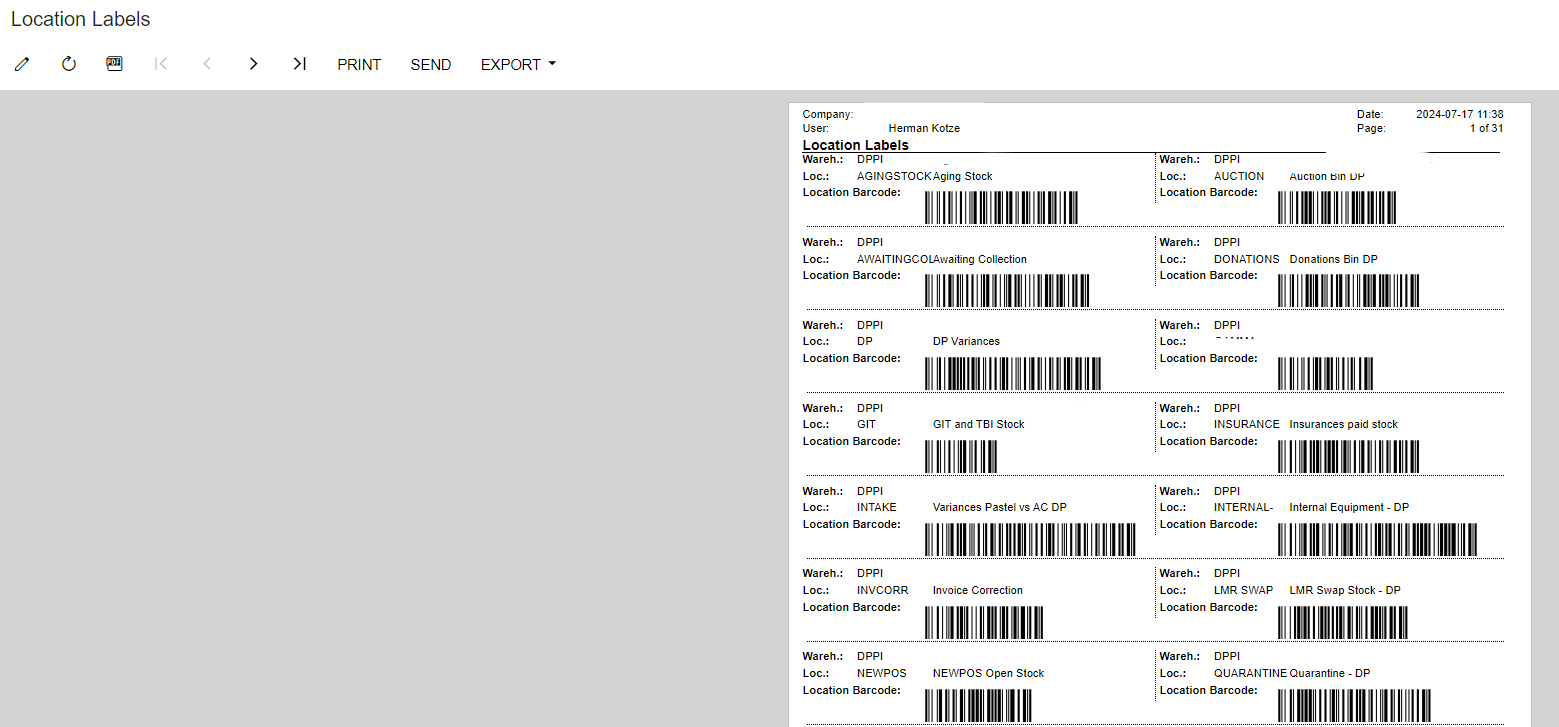
We have this currently under Inventory>Printed Forms>Location Labels and when you run the report it gives you the below, screenshot added.

If you are familiar with Report Designer in Acumatica, you can customize what you want it to print and how big just to name a few.

Ours is set based on the warehouse, it gives you the warehouse name, Location name (Bin Location) and then the barcode for the location.
 

image


Reply
nshah002
 nshah002
(@nshah002)
Joined: 3 years ago

Eminent Member
Posts: 9
July 17, 2024 9:59 am
Reply toHerman KotzeHerman Kotze

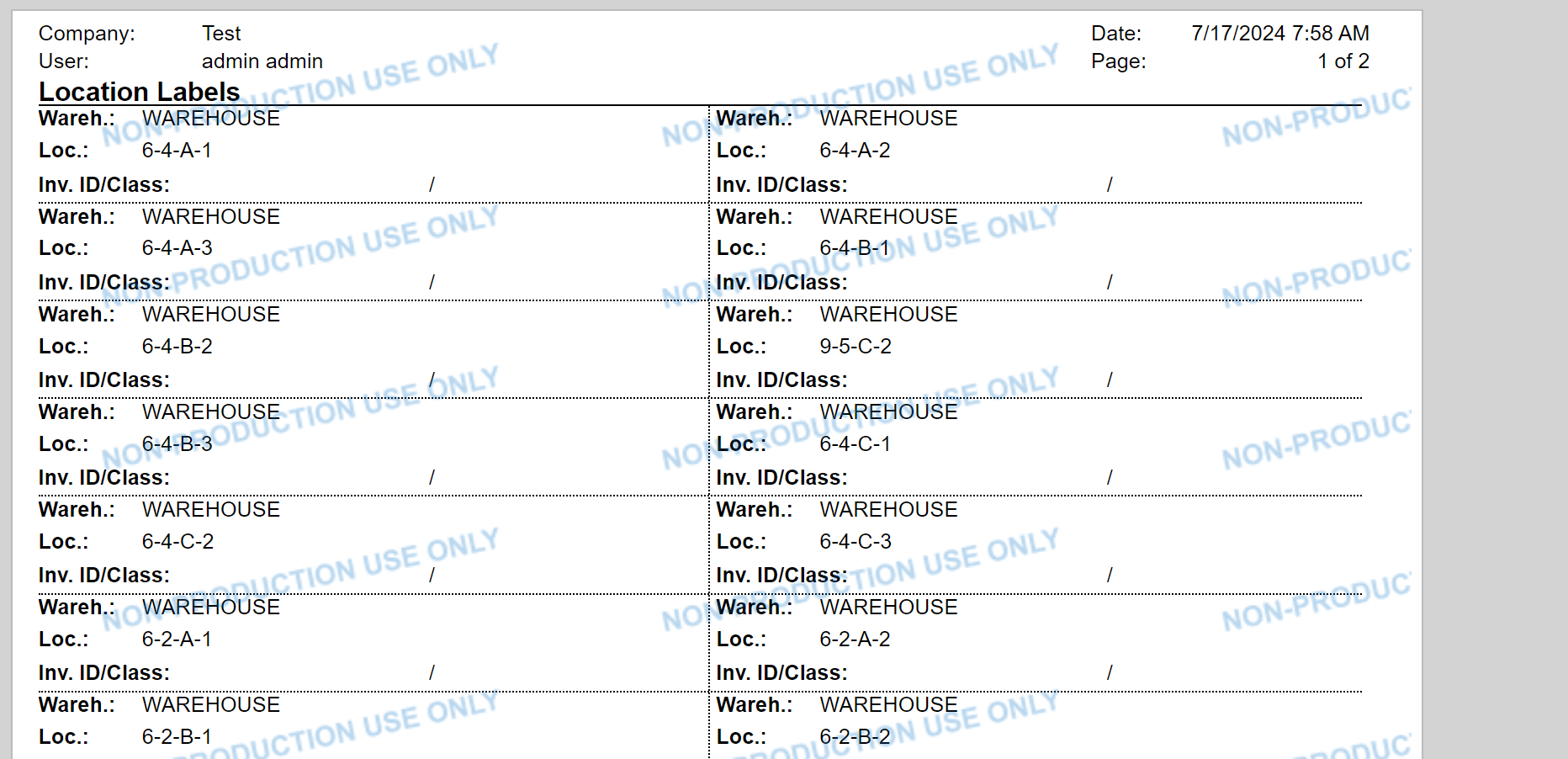
@hkotze thank you!  For some reason when I run this report it does not print a barcode.


image


Ideas?


Reply
Herman Kotze
Posts: 6
 Herman Kotze
July 17, 2024 11:37 am
(@hkotze)
Active Member
Joined: 2 years ago

@nshah002, I made the change today in Report Designer.

In Acumatica Inventory>Printed Forms> Location Labels click on Edit Report

image

This will download the file to your PC.

If you have Report Designer, double click on the file downloaded, it should be called IN619000

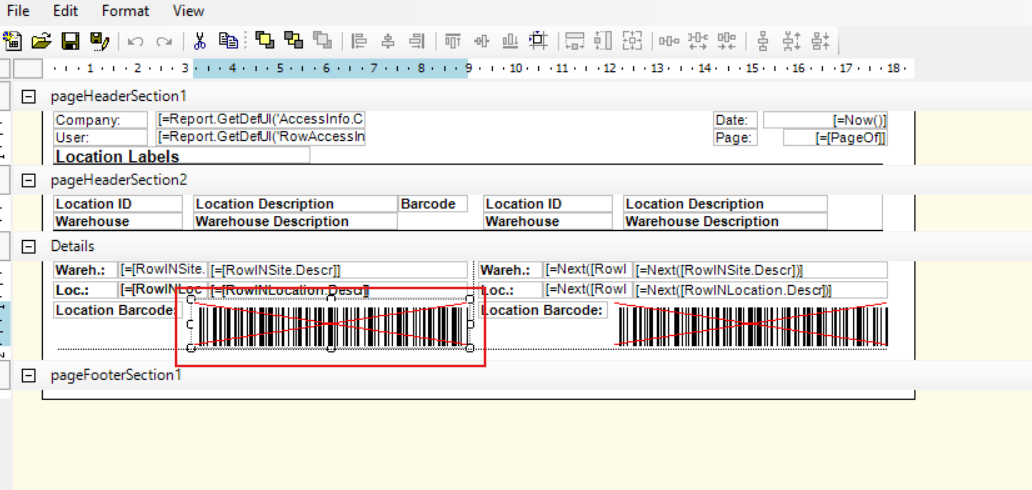
Once the report opens, click on the field under Loc. I changed ours to Location Barcode.

image

To change the value of this field, go to the right and once you clicked on the field in the report

design, in the filed you can change it to what you want it to.

image

Now for the barcode, click the field next to the field you just changed in the design, I marked it with the red square.
image

Delete it to enter a new field.

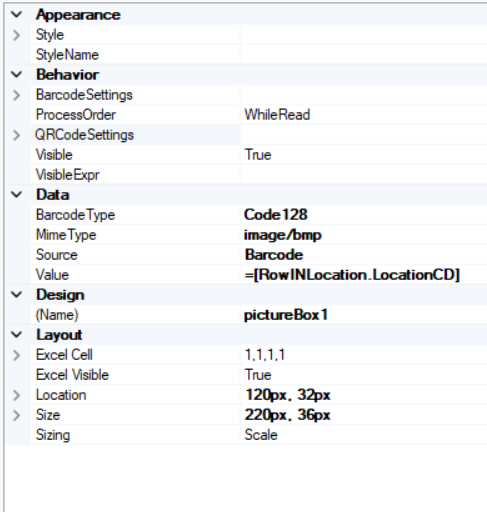
Now click in the top right, PictureBox, and add it to where you just deleted the other field.

Now you just change the Data settings for that PictureBox as per the screenshot below:
image

Once you are done, click on "File" in the top left, "Save to server."

Give it a name and tick "Save as new version"

image

Then once you saved it, go back to Acumatica Inventory>Printed Forms> Location Labels

Click on "Report Versions" and your new report should be there. Now select your warehouse

and if you have bin locations in the warehouse your report should print with all bins and barcodes.

image

Hope this assists you


Reply
nshah002 and Dominic Boullé reacted
nshah002
 nshah002
(@nshah002)
Joined: 3 years ago

Eminent Member
Posts: 9
July 19, 2024 8:33 am
Reply toHerman KotzeHerman Kotze

@hkotze thank you soo much!


Reply
Tim Rodman reacted
Forum Jump:
  Previous Topic
Next Topic  
Related Topics
  • barcode scanning with serial numbers - purchase receipt
    5 years ago
Topic Tags:  Barcode (4) ,
Forum Information
Recent Posts
Unread Posts
Tags
  • 12 Forums
  • 2,526 Topics
  • 10.9 K Posts
  • 21 Online
  • 2,411 Members
Our newest member: thollings
Latest Post: Generic inquiry with information from Audit history(CT301000)
Forum Icons: Forum contains no unread posts Forum contains unread posts
Topic Icons: Not Replied Replied Active Hot Sticky Unapproved Solved Private Closed

Online Members

 No online members at the moment

Acumatica Forums

Terms of Use & Disclaimers :: Privacy Policy

Copyright © 2025 · AUG Forums, LLC. All rights reserved. This website is not owned, affiliated with, or endorsed by Acumatica, Inc.

‹›×

    ‹›×