
By using this website, you agree to our Terms of Use (click here)

I am creating a two step process that imports new Inventory(stock) items to Acumatica. Step one is a customization that parses large files for data and enters the necessary information to a sql database. I have created a column in this database for the date the entry was created.
Step two is going to be taking anything in that database that was created that day and import it to Stock Items. Both of these processes get run early in the morning while no one is using the system.
Unfortunately, a standard Import Scenario does not allow me to limit the import in the way I want, because there is no way to have a Source Restriction use something like @Today or =DateAdd(Today()) as a Value to compare against the database column that I created for the date.
My next thought was to have my MS SQL Data Provider utilize the LastModifiedDateColumn/CreatedDateColumn and Import Scenario's Sync Type to only import new or modified records.
Here is what my Data Provider looks like (you can see that LastModifiedDateColumn and CreatedDateColumn are set to my AddedDate column from my source table. This is because an existing entry in the database might be updated from new source files.):
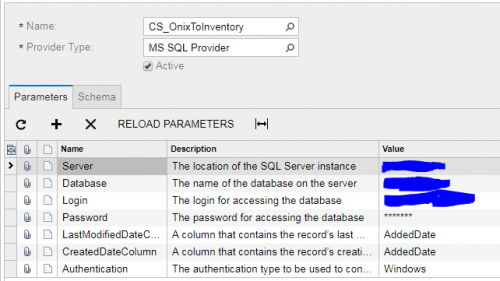
And here is what my Import Scenario Looks like (you can see I have Sync Type set to Incremental - New Only):

With these settings, I was hoping that the Import Scenario would only Prepare (and then Import) entries in the database that were new or updated since the last Import. However, while testing, I will add some entries to the source database, process the import from the Schedule>Import Scenarios screen, add a few new entries to the source database, and process the import again. Unfortunately, it continues to import ALL database entries, not just new or updated entries.
For instance, I initially add 5 entries to the source database, prepare/process the import, and the Number of Records column says 5. I add 10 more, process again and expect to have 10 in the Number of Records column, but instead have 15. (and this is being added to an already existing inventory of thousands, so the existing entries don't come into play with the numbers).
Have I misunderstood what these settings are supposed to result in? Have I incorrectly set anything up? If someone is able to direct me to a solution to this problem, I would really appreciate it.

Are you auto-numbering your Items? I'm trying to figure out why it's adding new ones instead of just updating it if the Item ID matches.
I personally haven't used the Incremental - New Only option because I don't trust it. Sorry, wish I could be more help.
Have you considered making your Provider a SQL View rather than a SQL Table? Then you could put your TODAY restriction in the WHERE clause of the SQL View.
I actually think it seems like just adding a Select statement in the Command field of the Data Providers Source Object's Schema table does what I intended to do.
I just included
WHERE AddedDate = convert(varchar, getdate(), 101)
to a Select All statement.
Gee that was easier than I made it out to be.
Wow, that's really cool. I thought you had to create the SQL View, then see it listed in the SCHEMA tab of the Data Providers (SM206015) screen and select it there.
I didn't realize that you could just select a table, then populate the Command column on the SCHEMA tab of the Data Providers (SM206015) screen.
I was able to get it working in my environment too:


Online Members
