
By using this website, you agree to our Terms of Use (click here)

Hello,
In CRM module, I have the following issue: Business accounts with the common data are duplicating. In order to solve it, i decided to merge Business Accounts by name, last name and phone number. In Acumatica, I could not find any page or action to create above described procedure.
Any Help/Advice/Assistance will be highly appreciated.
Thank you in Advance

Hi @eliso-gotoshia,
First, you need to ensure that you have the Lead/Contact Duplicate Validation option enabled on the Enable/Disable Features (CS100000) screen like this:

Then, you need to go to the Duplicate Validation Settings tab on the Customer Management Preferences (CR101000) screen and determine what will flag the Business Account as a possible duplicate. Also note the Validate Accounts for Duplicates on Entry if you want to validation to happen when the Business Account is created rather than when you run the Validate Accounts screen.

If you don't validate on entry, then you need to use the Validate Accounts (CR503420) screen and it will mark any potential duplicates with Possible Duplicate.

Then open the Business Accounts (CR303000) screen and look on the Duplicates tab. It will show you the Business Accounts that matched as a duplicate. If you want to merge with that account, just check it off and click the MERGE button.

Glad to hear it. Were you able to get it to work?

Thanks for your help Tim.
I used it to try and merge two Business Accounts. It recognises the duplicate, however when I press the merge button i get the following message: "CR Error: A customer or vendor account cannot be used as a source business account; it can be used only as the target."
What can be done here?
Ah, unfortunately, I think this can only be used on Prospects before they become Customers. I don't think it works on Customers or Vendors.
You might want to go add your vote to this idea:
https://feedback.acumatica.com/ideas/ACU-I-872

Hi Nadhi,
Can you provide some screenshots? I just tried the following and it worked for me:
1. Clicked the PROCESS ALL button on the Validate Accounts (CR503420) screen and triggered a Possible Duplicate value in the Duplicate column:
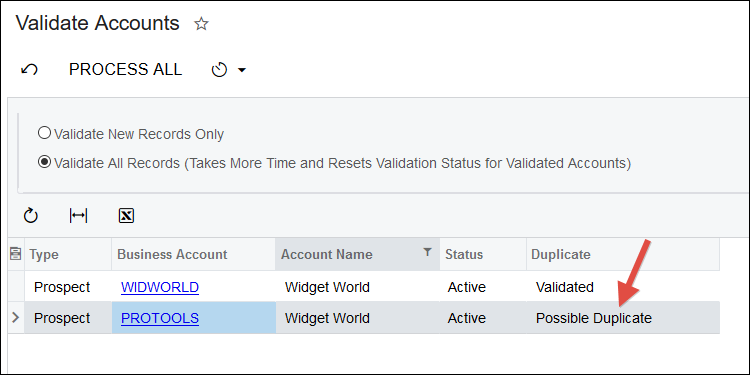
2. Clicked on PROTOOLS in the screenshot above which opened the Business Accounts (CR303000) screen.
3. Went to the DUPLICATES tab, checked off the duplicate that was found, and clicked the MERGE button:

4. This "Please resolve the conflicts" screen popped up, but I just clicked OK

5. But I got this error message:
Cannot insert the value NULL into column 'NoteID' table 'dbo.CSAnswers'; column does not allow nulls. UPDATE fails. The statement has been terminated.
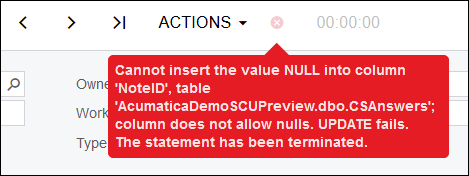
6. That seemed like an Attribute error to me so I tried the MERGE button again, but this time I set the Attribute values to empty:

7. That did the trick. The WIDWORLD Business Account no longer exists. Only the PROTOOLS Business Account exists.