
By using this website, you agree to our Terms of Use (click here)

Hi,
I have created a notification and added a link to PO302000 screen. Below is the html code it generated
<p class="richp"><a href="http://acumatica.company.com/Test/(W(2))/Main?ScreenId=po302000" objtype="file" target="_blank" data-convert="screen">Purchase Receipts</a>
And it links to a blank PO Receipts screen. However, when I send the notification I would like to include a link to the actual PO receipt by including its number in URL,
as in <a href="http://acumatica.company.com/Test/(W(2))/Main?ScreenId=po302000"+((transactions.PONbr)), but it is not working.
Any idea how to add a direct link to a document in the notification?
Thank you.


You can't open PO Receipts with an Order Nbr. Order Nbr is part of a receipt line and a receipt could include multiple orders.
Royce,
It was just a test to see whether I could add a dynamic value to URL. I will actually add the receipt number.
Ahmed,
The problem is, I am trying to create that link dynamically. This is the static part
http://localhost/Acumatica181050017/(W(111))/Main?CompanyID=SalesDemo&ScreenId=PO302000 &ReceiptType=RT&ReceiptNbr=
After the last equal sign, I want to add the actual receipt number automatically in the emails sent.
<a href="http://acumatica.company.com/Test/(W(2))/Main?ScreenId=po302000&ReceiptType=RT&ReceiptNbr=" + Actual receipt number.

Thank you.
Switch to HTML view and add something like this - obviously you need to update the domain:
<a href="https://mycompany.com/?CompanyID=((GeneralInfo.CompanyName))&ScreenId=PO301000&OrderType=RO&OrderNbr=((Document.OrderNbr))" target="_blank">Open Purchase Order</a>
This is a URL I created to open a PO.
Royce,
I see what you are doing, and created the link as below
<a href="https://url.acumatica.com/?ScreenId=PO302000&ReceiptType=RT&ReceiptNbr=((Document.APRefNbr))" target="_blank">Open Purchase Order
</a>
but it translates to below, basically still not plugging in the receipt number dynamically.
https://url.acumatica.com/?ScreenId=PO302000&ReceiptType=RT&ReceiptNbr=((Document.APRefNbr))
Thank you
What Screen ID did you associate your Automation Notification with?
Alternatively, click at the end of your template, add a blank line and then add the field via Insert, Datafield. Then switch to HTML view and clean up the HTML as needed.
It is the PO Receipt screen. I added a datafield and below is what I see when I go to HTML view,
<p class="richp"><span data-field="yes">((Document.ReceiptNbr))</span><br></p>
Acumatica treats as text.
You need to modify the HTML for your url, ie:
<a href="https://url.acumatica.com/?ScreenId=PO302000&ReceiptType=RT&ReceiptNbr=((Document.ReceiptNbr))" target="_blank">
Royce,
I really appreciate your help. I may be missing something here or my Acumatica instance has a bug. I don't see the difference between what typed and what you typed and it still comes out with no full url.
Mine
Yours
I hope below image explains the situation better.
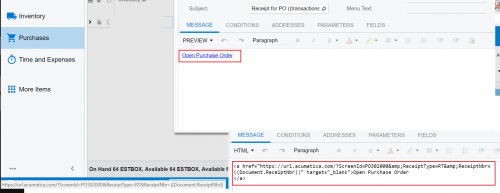

I just tried and it worked for me. One thing I noticed is that you're missing "Main" after acumatica.com and before your ?
<p class="richp">Here is a link to the Purchase Receipt:</p><p class="richp"><a href="https://acumaticademo.aktion.com/Acumatica2018R1/Main?CompanyID=Demo+Company&ScreenId=PO302000&ReceiptType=((Document.ReceiptType))&ReceiptNbr=((Document.ReceiptNbr))" target="_blank">Click here</a></p><p class="richp"><br></p>

I confirmed that the email generated had a link that I could click and go straight to the Purchase Receipt.
Tim,
I had versions which had the "Main?" as well but it still did not translate the ((Document.AprefNbr)) or any other field.
I have copied/pasted your example and it still did not translate those fields. I got a support plan with Acumatica now, will ask them and update the post with an answer hopefully.
Did you pull up a receipt in the Purchase Receipts (PO302000) screen to confirm that you are using the URL displayed in that screen?
I did. Finally, it works. Below is the working url
<a href="https://URL/Main?ScreenId=PO302000&ReceiptType=RT&ReceiptNbr=((Document.ReceiptNbr))" target="_blank"><br>Click here to see the PO details in Acumatica.</a></p>
which is not different from the others, but it worked. I guess part of the problem was that I was expecting to see the results on the "Preview" screen, however, it did not generate the PO numbers dynamically until it really processed the notification.
Thanks for everyone for their help.