
By using this website, you agree to our Terms of Use (click here)

Tim,
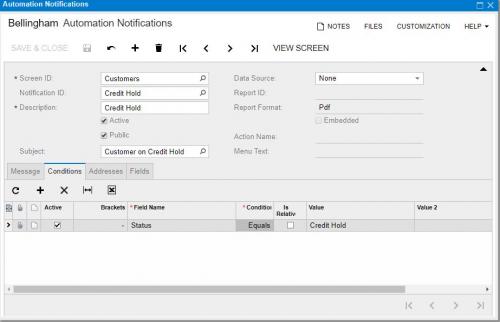
Do you know much about Automation notifications. I have set one up to send out an e-mail everytime a customer is placed on credit hold. That was pretty simple and straight forward to setup. However, I am wanting to do the reverse. I want to to send out an e-mail everytime a customer is taken off of credit hold, which is done by changing their status from Credit Hold to Active. I don't see a way to build that logic into the tool.

Hi Brian,
I think Automation Notifications are great, but it will be even better when Acumatica introduces BAM (click here) because it will allow for more advanced logic using Generic Inquiries and will allow you to trigger alerts on some kind of schedule, not just when the Save button is pressed.
Back to your example, have you tried setting up another Automation Notification, but put Active in the Value field? Then add the Status field to the Fields tab which will cause the notification to fire only when the Status field changes. Do you think that would do the trick?
It's on the roadmap. I saw it at the Acumatica xRP Summit. That's a screenshot from one of the presentations.
Are you sure that you added the Status field to the Fields tab?
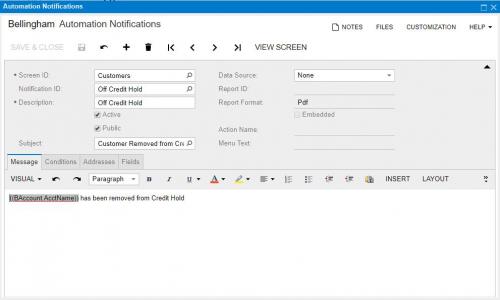
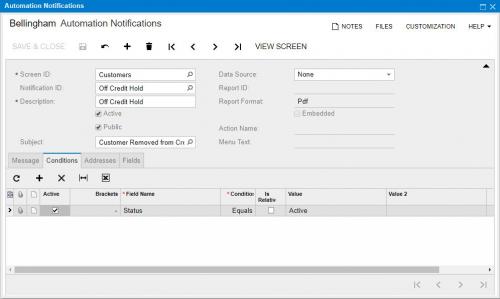
See above. I had a user change an e-mail account associated with a customer, hit save and it triggered the notification.
Definitely looks like you have it setup properly. I've used that Fields tab before for Automation Notifications on other screens and it worked for me. I would submit a support case with Acumatica because what you're experiencing seems to me like it might be a bug.