
By using this website, you agree to our Terms of Use (click here)

Dear Mr Rodman,
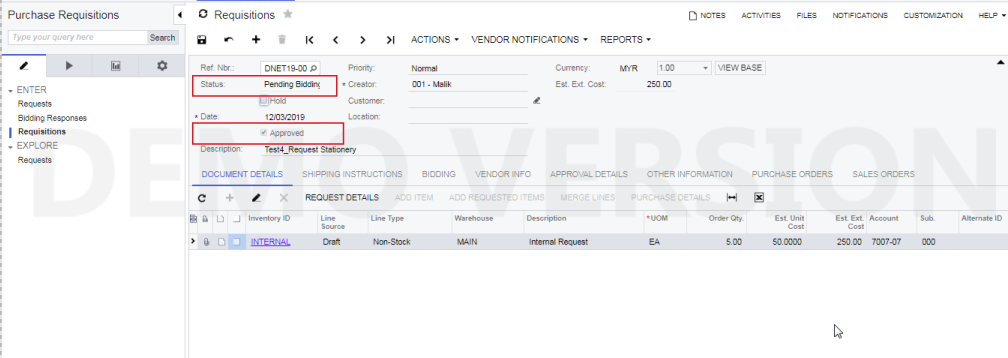
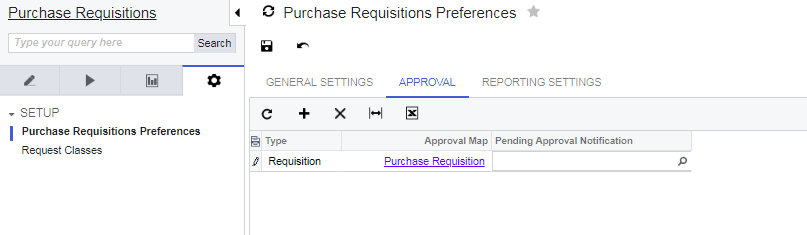
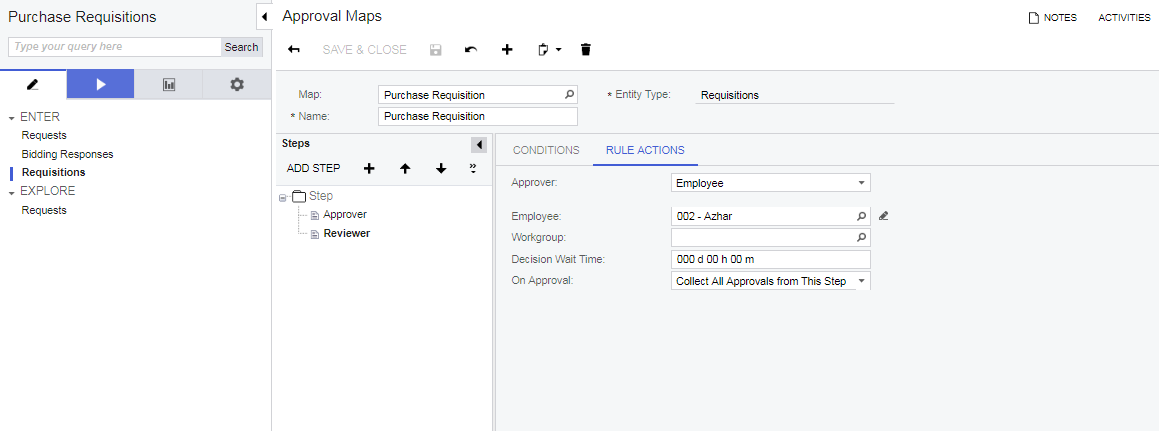
The approval process for purchase requisition (CST.RQ.30.20.00) is not working. Whenever I save the record and untick the hold button, the status become "Pending Bidding" instead of "Pending Approval". And the "Approved" check box is become auto ticked. Im not sure whether I did correct setup in Approval Map and Purchase Requisition Preference or not. I did my other Approval Map setup for other module which is working fine, but this Purchase Requisition keep failed. Please assist me if mist out any important setup. Herewith I attached the relevance setup's screenshot.




Dear Mr Rodman,
Needs your advise on the above. Please assist.
Thank you.

I just tried and it worked for me. Have you tried removing the first line highlighted below?

I just used the one step approval that's available in the SalesDemo environment:

It seems like you want a 2 step approval. But your screenshots above don't have criteria that will allow you to hit the 1st step of the approval. Your conditions only look for Requisitions where the 002 Employee approved it, but where is the condition that assigns the Requisition to Employee 002?
Also, it's worth pointing out that Paramount WorkPlace has an eProcurement solution that's more robust than the Requisitions in Acumatica if you find Acumatica Requisitions to be too limited for your needs.
Online Members
