
By using this website, you agree to our Terms of Use (click here)

Hi!
I am using an Import Scenario to add Purchase Receipts to a AP Invoice and I am having trouble with errors. The supplier that sends the invoice may send the wrong InventoryID or some articles may have been missing from the delivery. The invoices contain between 50-1000 lines from different Purchase orders and different Purchase receipts. The problem is that when Acumatica can´t find the PO number och POReceipt number, the import stops. And, most of the time, it doesn't save the correct lines. Since a big invoice could take 1-4 hours to import, it´s almost impossible to wait for the error, check which line that cuoldn´t be imported, uncheck that and try again.
I am including my scenario (only the lines), it´s for the AP Invoice window and I am using the Add POReceipt line to invoice action.
My guess is that the dialogue box doesn't really close during the import and that´s why the correct lines doesn'
419-Import-scenario-Add-POReceipt-line-to-AP-Invoice.xlsx
419-Import-scenario-Add-POReceipt-line-to-AP-Invoice.xlsx
419-Import-scenario-Add-POReceipt-line-to-AP-Invoice.xlsx
419-Import-scenario-Add-POReceipt-line-to-AP-Invoice.xlsx
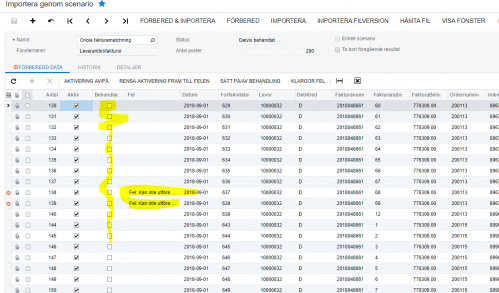
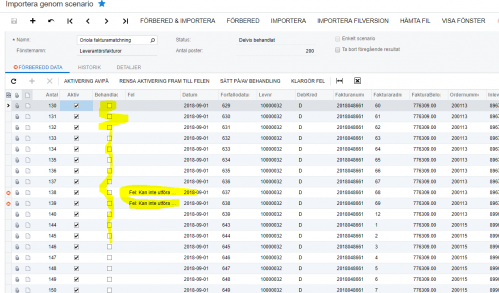
t get saved. I am including a typical screenshot from failed import. Is there something wrong with the scenario? Sometimes it does save one line at a time, but I can´t see why it works sometime and other times not. We would prefer to use the API for this, but the fork that we are using doesn't give us this possibility, so for now I have to use Import scenario. Now we do the imports in batches to get some control over the process, but that also takes time and makes any automation impossible. Everything else is working i.e. the file sync from the FTP where we collect the AP invoices, it´s the import that fails.
I have tried adding some unnecessary actions i.e. adding a note to the invoice, just to make it save after every imported line, but that doesn´t work every time either.
Thanks in advance,
Ted
www.treviga.se
www.visma.net

Hi Ted,
Have you tried unchecking the Break on Error checkbox on the Import by Scenario (SM206036) screen?
Also, is the Commit box checked for your line on the Import Scenarios (SM206025) screen?

I hear ya though with the APIs. Import Scenarios aren't great at handling errors. Graceful error handling, error logging, etc. is what importing via APIs is good at.
Hi,
Yes, I have experimented with Break on error, it seems to make it worse as sometimes it saves lines without marking them as "Processed"... 🙁
And the Commit box is checked also. I get the feeling that Acumatica/Visma.net "times out" during intensive actions. This also happens via the API, actually, so we batch 200 lines at the time when creating POReceipt from POrder.
We have reported this as an error to Vismas Dev team, but they have not produced a solution yet.
They will make the fields available through the API in a coming release, but I thought that perhaps I'm making a simple error - it was worth a shot.
Ted
PS I have been following this page/blogg the last year and would like to thank you for many good solutions, it's been a great help several times DS

Thanks for the kind words Ted. Sorry I couldn't help on this one.