AugForums.com

An Acumatica User Group

  • Free
    • Start Here
    • In-Person Gatherings
    • Power BI Workshop
    • Podcast
    • Rolodex
    • Blog
    • Forums
  • Paid
    • AugSQL
    • GI Course
    • GI Library
    • Consulting
  • Register
Acumatica Forums

By using this website, you agree to our Terms of Use (click here)

Forums
AUG Forums
Everything Else
Acumatica Trial Mod...
 
Notifications
Clear all

Questions Acumatica Trial Mode and snapshot question

 
Everything Else
Last Post by SQLRunner 8 years ago
7 Posts
2 Users
1 Reactions
5,126 Views
RSS
SQLRunner
Posts: 45
 SQLRunner
Topic starter
January 24, 2018 3:57 pm
(@sqlrunner)
Trusted Member
Joined: 8 years ago

Good Afternoon,

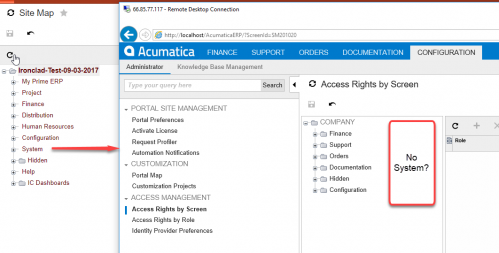
I have a couple of unique items that hopefully have an easy answer.  The first question is on Acumatica trials, I am able to install and showcase across the internet. However,  the interface with the default admin account seems stripped down, I do not see the system tab for example, so no idea how to get to the snapshot page.  Secondly, we are working with a vendor who is being restrictive of what we do with company data,  i.e. no SQL access.  Some of the company execs have had enough and simply want to replicate the data locally.  I noticed that the snapshot will be pivotal for this, it contains the schema information and the data that resides in the table.  I'm currently writing a C#/MySQL program that will parse these files and replicate the results locally in MySQL.   So long story short, there doesn't happen to be an easy way to do this?  Figured I would ask, it will take a bit of time to write the program that produces the correct results.  Thanks again for any insight.


6 Replies
Tim Rodman
Posts: 3204
 Tim Rodman
Admin
January 24, 2018 5:13 pm
(@timrodman)
Famed Member
Joined: 10 years ago

When you create a new Acumatica instance using the Deploy New Application Instance option on the Acumatica ERP Configuration Wizard, make sure you choose SalesDemo in the Insert Data column. That company has tons of demo data in it.

The Snapshot does have all the data from every table in it. Why not just restore the Snapshot through the Acumatica user interface so it will take care of populating your MySQL database for you? I'm just not sure how you would handle an automatic refresh if that's needed.

Reply
SQLRunner
 SQLRunner
(@sqlrunner)
Joined: 8 years ago

Trusted Member
Posts: 45
January 25, 2018 10:29 am
Reply toTim RodmanTim Rodman

Hi Tim,

Thanks again for the solid input.  I'll redeploy and make sure I grab the sales demo.  I had selected a couple of the options and deployed them as different companies.  Not 100% if the sales demo was one of them.  I do think the snapshot import will be ideal, I will see if I can get access to that option within the trial.  In my current acumatica trial, I did not have the system tab, so it appeared I could not get to the snapshot imports.  I agree 100% that will be much easier then creating a console application to do it.


Reply
SQLRunner
 SQLRunner
(@sqlrunner)
Joined: 8 years ago

Trusted Member
Posts: 45
January 29, 2018 12:15 pm
Reply toTim RodmanTim Rodman

Hi Tim,

I reinstalled the application and made sure to select sales demo.  Following application instantiation, I log in with the default admin login.  However, the default account does not seem to have access to everything or something is blocking access or perhaps its just not available for some other reason.  In our live system, on the site map, there is a section called System, from which you can do a bunch of admin things from adding users to building custom inquires.  This option appears to be absent while logged in with the admin on the new demo instance.  The configuration is also missing the add user option.  In most demos, I can see the system on the screen, there must be options missing?  See attached screenshot.  I also used version 5.30.2233 which is the version our live server is running.  Thanks for any additional info.


Reply
Tim Rodman
Posts: 3204
 Tim Rodman
Admin
January 31, 2018 10:59 pm
(@timrodman)
Famed Member
Joined: 10 years ago

I think I know what happened. You installed the Customer Portal, not the main Acumatica.

The installation routine is TOTALLY NOT INTUITIVE.

This is where you made your mistake:

Looking at that screenshot above, you would probably think that checking the Create Portal box will install the Portal "in addition to" installing the main Acumatica site. At least that's how I read it. But checking that box will install the Portal "in place of" the main Acumatica site. In my opinion, that should be a radio box with two options (Create Main Site and Create Portal) where you can only select one option. But, alas, that's not the way it is.

But it's one of those minor cosmetic things that isn't going to be very high on the already very ambitious product roadmap so I wouldn't expect it to change anytime soon.


Reply
SQLRunner
Posts: 45
 SQLRunner
Topic starter
February 1, 2018 10:47 am
(@sqlrunner)
Trusted Member
Joined: 8 years ago

Fantastic, I will redo the installation and account for that option. Thanks again Tim, I'll let you know how it goes.


Reply
SQLRunner
Posts: 45
 SQLRunner
Topic starter
February 1, 2018 11:57 am
(@sqlrunner)
Trusted Member
Joined: 8 years ago

Tested and confirmed.  Thanks for the insight, that was indeed the problem.


Reply
Tim Rodman reacted
Forum Jump:
  Previous Topic
Next Topic  
Forum Information
Recent Posts
Unread Posts
Tags
  • 12 Forums
  • 2,530 Topics
  • 11 K Posts
  • 10 Online
  • 2,418 Members
Our newest member: Chad Treadwell
Latest Post: Negative/Credit Inventory Value?
Forum Icons: Forum contains no unread posts Forum contains unread posts
Topic Icons: Not Replied Replied Active Hot Sticky Unapproved Solved Private Closed

Online Members

  • Johnny Tang
Acumatica Forums

Terms of Use & Disclaimers :: Privacy Policy

Copyright © 2026 · AUG Forums, LLC. All rights reserved. This website is not owned, affiliated with, or endorsed by Acumatica, Inc.

‹›×

    ‹›×