
By using this website, you agree to our Terms of Use (click here)

I tried to install the Acumatica ERP from the Acumatica Developer Network download. The Web Site Configuration screen did not give an option for an application pool, so I just made one up. Acumatica loaded up but it didn’t open correctly. The error screen is attached. I assume the failure is because I didn’t specify a valid application pool.

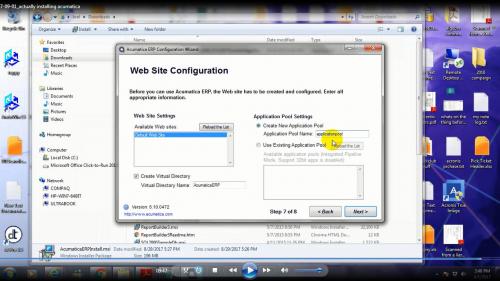
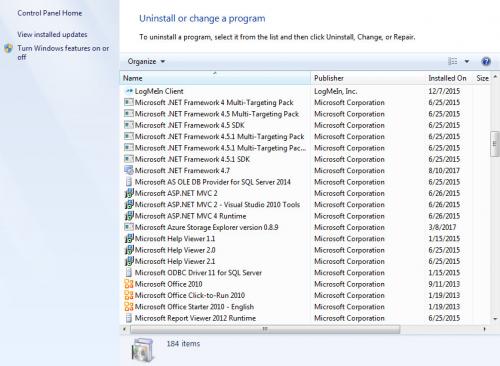

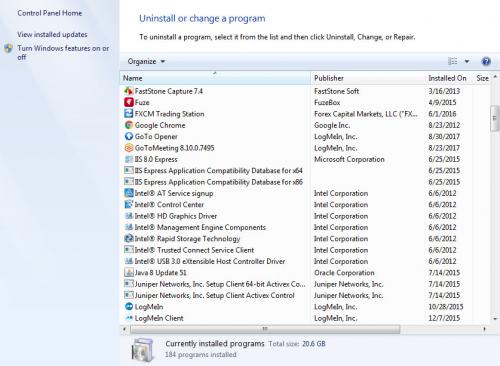

I attached various screens that show the problem and screens that show the IIS version and Microsoft .Net framework and ASP.net versions on my computer. (I am not sure if the attachments loaded up correctly here). Is IIS 8.0 Express good enough for an Acumatica installation? How do I get my computer to show a valid Application Pool on the Web Site Configuration page on the Acumatica Installation Wizard? Thank you.

Hi TrentRocco,
I doubt that the Application Pool is the problem.
If you launch IIS...

You'll see that there is an Application Pools area...

Honestly, I don't understand IIS that well, but it seems like there are two things: Sites and Application Pools. A Site belongs to an Application Pool, with DefaultAppPool being the default Application Pool for Sites.
When you install Acumatica, you are basically installing a Site because Acumatica is just a website, just a collection of webpages. This is also known as an Acumatica Instance.
However, some of the settings are controlled at the Application Pool level. Because of that, I always install a separate Application Pool for each new Acumatica Instance, maintaining a 1-1 relationship between each new Site and Application Pool. That way I know that each Acumatica Instance is completely segregated. Don't ask me what those settings are because I don't know. Just know that it's a good practice to have a separate Application Pool for each Acumatica Instance.
I always name the Application Pool the same as the Site (or Instance) name. In your screenshot above, your Site (or Instance) name is AcumaticaERP. I always just copy whatever is in the Virtual Directory Name field into the Application Pool Name field (that is, of course, after selecting the Create New Application Pool option).
But I don't think Application Pool is your problem.
I'm not sure if IIS Express is the problem. I don't use IIS Express on my laptop.
I just turn on Internet Information Services.
To do this in Windows 10, browse to Add or remove programs...

Choose Programs and Features on the right-hand side...

Choose Turn Windows features on or off...

Choose Internet Information Services and some of the features underneath it.
This is what I have running on my laptop and it's enough to run Acumatica...

For something more official, this is from page 7 of the S100 Installation and Site Management course document which you can find by clicking here and then clicking on Training Materials -> S100 TRAINING GUIDE (you have to have created a free account on the site to access the content).

All of that said, I suspect that your problem has to do with the following error in your screenshot above:
"Managed handler is used; however, ASP.NET is not installed or is not installed completely."

In your screenshot above, you have ASP.NET selected, but maybe you don't have .NET 4.5.1 or later installed.
.NET 4.5.1 or later is required for Acumatica . This is from page 6 of the Training Materials -> S100 TRAINING GUIDE document mentioned earlier.

I am running Windows 7 Home Premium SP1. The various .net Programs are attached

.
I was able to start the IIS 8.0 Express screen. As you can see from the attached, the application pools are running Microsoft.net 4.0 NOT 4.7
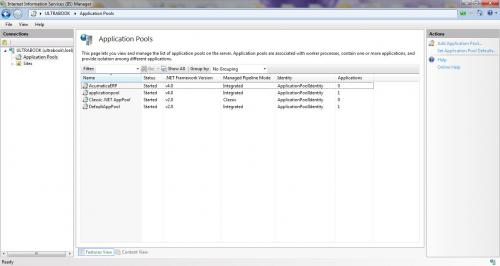
Do you think the problem is that the Application Pools are only running Microsoft.Net 4.0? It is possible that IIS Express only uses Microsoft.Net 4.0 and not any higher and it is also possible that I can only get the IIS Express on a Windows 7 laptop. Do you know anyone who got Acumatica running on Windows 7 laptop?
There is a family of Microsoft.net 4.5 programs running but only one Microsoft.Net 4.7 program installed. I will try to install 4.7 again using the Microsoft instructions.
Specifically I have Microsoft.Net Framework 4 Multi-Targeting Pack
Microsoft.Net Framework 4.5 Multi-Targeting Pack,
Microsoft.Net Framework 4.5 SDK,
Microsoft.Net Framework 4.5.1 Multi-Targeting Pack,
Microsoft.Net Framework 4.5.1 Multi-Targeting Pack ENU,
Microsoft.Net Framework 4.5.1 SDK
and Microsoft.Net Framework 4.7
But I don't have the family of 4.7 programs installed like I do for the 4.5 and 4.5.1 versions.
I will report back once I try to reinstall Microsoft.net 4.7 but I am not very hopeful because I only have the Express Version of the IIS. Any thoughts? Thanks.
I ran Acumatica on a Windows 7 machine a while back and didn't have any trouble.
Also, this is from page 5 of the S100 Installation and Site Management course document

Can you turn on regular IIS by turning the feature on in windows (click here)?
Or, can you check to see what version of .NET your IIS Express is running?
- Click on Application Pools
- Click on your application pool (I used DefaultAppPool in the screenshot below)
- Click on Basic Settings...
- See what is listed under .NET CLR version


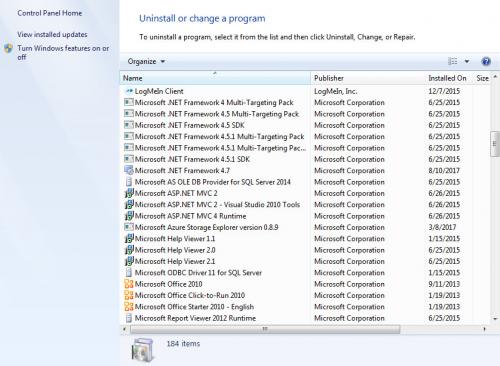
Here is a screenshot of my programs for comparison:

I wonder if .NET 4.7 isn't listed here because it's Windows 10 and it's instead listed at the top of this screenshot as a feature to turn on/off
Nothing jumps out at me. Did you comb through the S100 Installation and Site Management course document to see if anything jumps out at you?
I'm starting to wonder if IIS Express is the problem. Did you try turning on IIS as a feature in Windows 7 (click here) instead of using IIS Express?
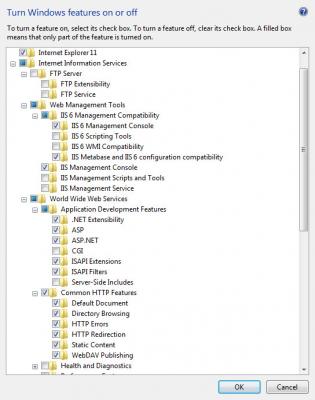
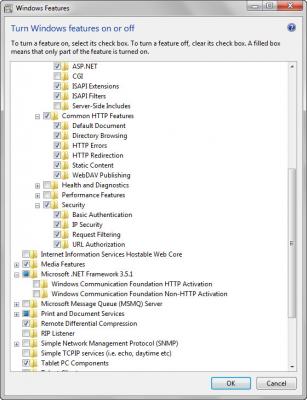
I just noticed that you're missing the two things listed in the Performance Features section on page 5 of the S100 Installation and Site Management course document.
You might try checking off those things, then restarting IIS.