AugForums.com

An Acumatica User Group

  • Free
    • Start Here
    • Rolodex
    • Podcast
    • Blog
    • Forums
  • Paid
    • AugSQL
    • GI Course
    • GI Library
    • Consulting
  • Register
Acumatica Forums

By using this website, you agree to our Terms of Use (click here)

Forums
AUG Forums
Acumatica Report De...
Splitting formula i...
 
Notifications
Clear all

Questions Splitting formula into two lines

 
Acumatica Report Designer
Last Post by mcraig 5 years ago
6 Posts
2 Users
2 Reactions
2,607 Views
RSS
Tami
Posts: 36
 Tami
Topic starter
October 19, 2020 1:01 pm
(@tlynn)
Trusted Member
Joined: 6 years ago

Hello!!

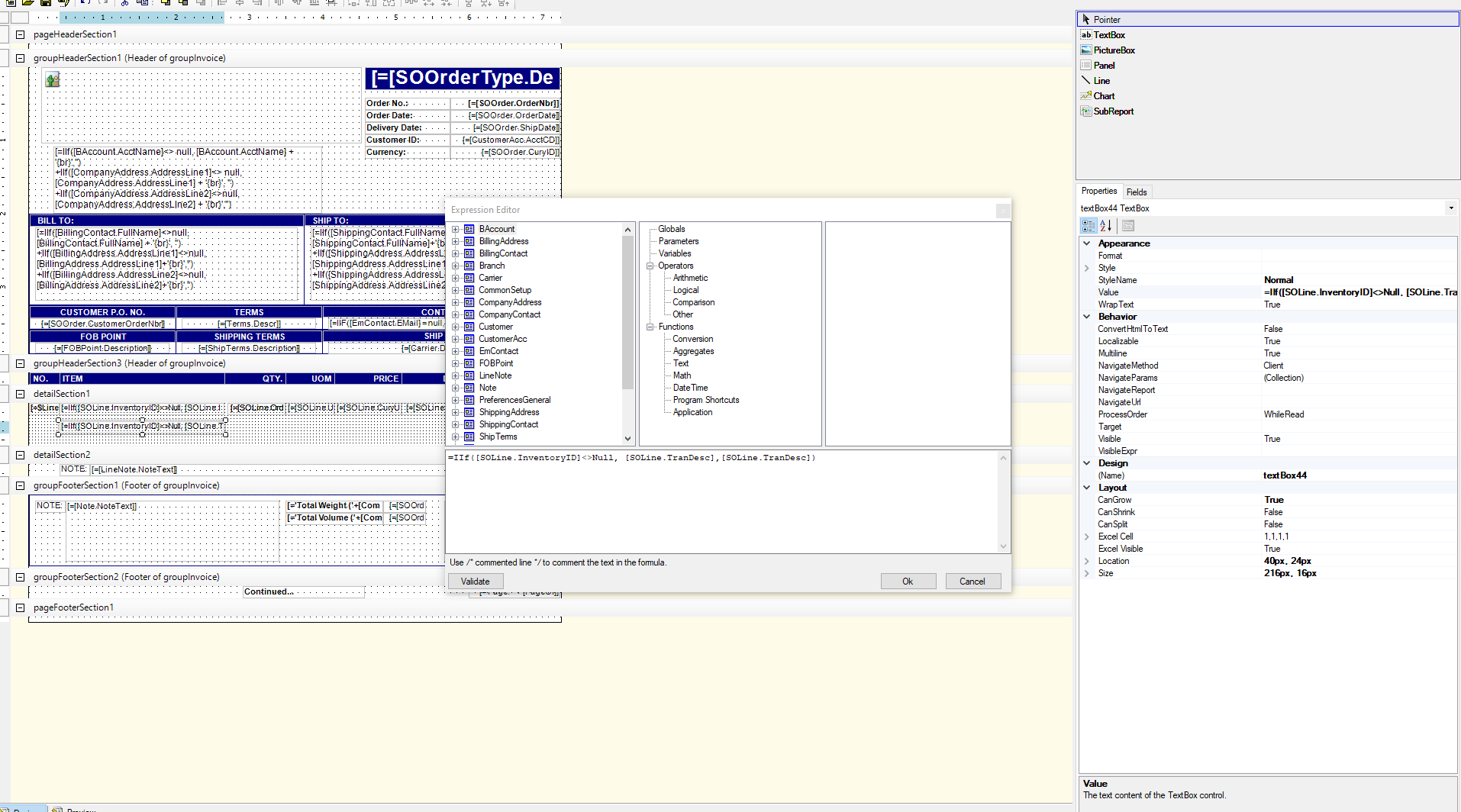
I need help splitting the below formula into two separate lines. one line for the INVENTORY ID, and a separate line for the descriptions.

I keep getting a message that I am missing the closing parenthesis.

Thank you!!


=IIf([SOLine.InventoryID]<>Null, Format( '{0}: {1}', [SOLine.InventoryID],[SOLine.TranDesc]),[SOLine.TranDesc])


5 Replies
mcraig
Posts: 65
 mcraig
October 19, 2020 2:48 pm
(@mcraig)
Estimable Member
Joined: 6 years ago
Sales Order Form  Inventory Item

I copied the information you supplied. Commented out the form field information supplied by Acumatica and inserted what you have. No error came up.

When I validated. Maybe retry.  Matt


Reply
Tim Rodman reacted
Tami
Posts: 36
 Tami
Topic starter
October 20, 2020 6:47 am
(@tlynn)
Trusted Member
Joined: 6 years ago

Thank you. The formula I posted is not the one with the error. When I tested what you wrote it did work but just repeated the Inventory ID on the second line.

I need to split my formula into two formulas. One formula that will show the Inventory ID and another one that will show the Description of the Inventory ID. I get an error when I try to split them because I don't know how to split them out.

🙂


Reply
mcraig
Posts: 65
 mcraig
October 20, 2020 2:02 pm
(@mcraig)
Estimable Member
Joined: 6 years ago
Example two lines  Item number on first   Description on second
Item number  on top line
Description on second line

I split the detail line.   Item number on top line, Description on the second line. 

On the top line you could turn off CanGrow. But you would probably leave it on the second line. 

I hope this helps

Matt


Reply
Tami
 Tami
(@tlynn)
Joined: 6 years ago

Trusted Member
Posts: 36
October 21, 2020 6:15 am
Reply tomcraigmcraig

That worked Matt - thank you for your help. 


Reply
mcraig
 mcraig
(@mcraig)
Joined: 6 years ago

Estimable Member
Posts: 65
October 21, 2020 10:06 am
Reply toTamiTami
mcraig

Your Welcome!  Matt


Reply
Tim Rodman reacted
Forum Jump:
  Previous Topic
Next Topic  
Forum Information
Recent Posts
Unread Posts
Tags
  • 12 Forums
  • 2,527 Topics
  • 10.9 K Posts
  • 26 Online
  • 2,412 Members
Our newest member: Peter Paasch
Latest Post: Can't export GI's to excel that contain the FATrans DAC after upgrade to 2025 R1 in less than 25 min
Forum Icons: Forum contains no unread posts Forum contains unread posts
Topic Icons: Not Replied Replied Active Hot Sticky Unapproved Solved Private Closed

Online Members

 No online members at the moment

Acumatica Forums

Terms of Use & Disclaimers :: Privacy Policy

Copyright © 2026 · AUG Forums, LLC. All rights reserved. This website is not owned, affiliated with, or endorsed by Acumatica, Inc.

‹›×

    ‹›×