
By using this website, you agree to our Terms of Use (click here)

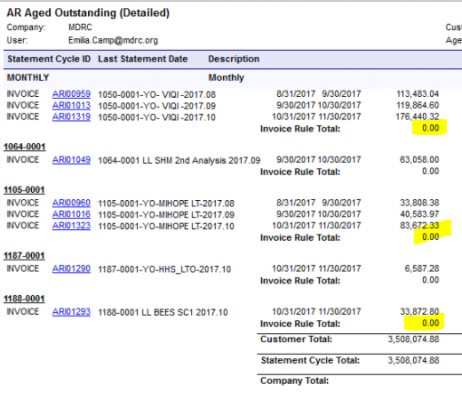
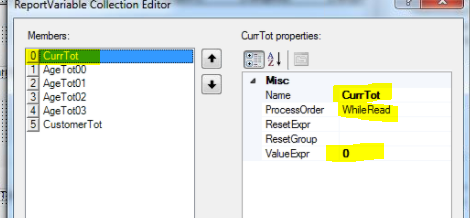
We have a functional report that has groupings, headers and footers with report variable totals. Looking to add another grouped level with headers, footers and subtotals. Added the grouped level, everything is working fine, now adding the variable for subtotal. The existing subtotal variables all have a ValueExpr of zero with a ResetGroup blank. We tried mimicking this in the new footers, but it returned a zero. How can a ValueExpr = 0 return a subtotal?

I think you want the value to be a sum of some of the other variables. Without seeing your .rpx file, it may be something like
ValueExpr: =$AgeTot00 + $AgeTot01 +$AgeTot02 + $AgeTot03
If you're allowed to post your .rpx file, I'd be happy to look it over and give you an exact answer. I'm just not sure what is producing your dollar amt on the right. If it's multiple variables, add them together in your ValExpr(as shown above) and set your ResetGroup to being the group your Invoice Rule Total lives in. If you do not assign a ResetGroup, you'll get a rolling total.
Hope this makes sense.

Agreed. Would be easier to see what's going on with the .rpx file.
The screenshot of CurrTot is set to a formula of 0 which of course will always be 0. But it's hard to tell if CurrTot is the variable that is being used on the Company Total line of the report.
So, off the cuff. You have a line who's value you wish to SUM that is being represented by a variable $DocBal, which is just:
=[ARRegister.SignBalance] * [ARRegister.DocBal]
I would set your invoice rule total to:
=SUM([ARRegister.SignBalance] * [ARRegister.DocBal]).
Every time you loop in group3 you'll see a single entry for each item, but when you hit the footer of "Invoice Rule" you change your scope back to seeing every item within your group3 set all at once. Now you just want the sum of all the SignBalance items multiplied by the DocBal items.
If for some reason this goes awry (or you really want to use a variable). You can build a variable to hold each line item's value. The variable would look like (click the image to see it clearly):
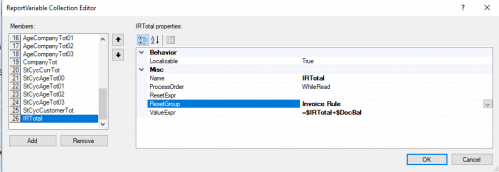
The reset group tells it that once it passes through the footer of "invoice rule" to reset back to 0. The value expr is a way to get a cumulative value (adding what we previously had to what we currently see) through each iteration of group3. Then you just display that variable as your total on the Invoice Rule Total line.
Hey Michael,
You're killing it with the forum participation. Love it!
I agree with you about variables. If you can use something like Sum() instead it's better. I try to avoid variables like the plague. They are slow and they are confusing for me.
But in this case I think it's needed because I don't think functions in the Aggregates category work in the Report Footer section which is where Company Total is on this report. I think functions in the Aggregates category have to be in a Group section.
Or maybe a Group could be added based on the Branch to avoid using a variable.
Attached are snippets from an invoice document with a working aggregate in the footer. I'm not doubting you, just wondering if I have a specific instance or if you maybe hit an odd instance when yours didn't work. I also avoid variables, unless the formula requires more than one line (destroys readability):
RPX Code shown below where each line has a ARTran.CuryTranAmt value, at the group footer I have =SUM(ARTran.CuryTranAmt):

Report with sum in it:

Running ACU Rep Writer for Version 6.10.1511
Sorry for derailing from the main topic. I'd be happy to shift this into another post if you'd prefer.
Hey Michael,
So I finally came up with a method to make sure that I don't miss posts. And the method found that I missed this post. My bad.
Your example does an aggregation in the Group Footer which totally works. I'm just not sure you can do it in the Report Footer, at least not last I checked.