
By using this website, you agree to our Terms of Use (click here)

I have a report that I have grouped by a specific custom field in our sales orders. The one custom field will have the same value on multiple lines of the sales order and then those common lines will have additional data shown in the detailSection1. I have been trying to figure out if you are able to keep the data from the grouped sections of the report together before there is a page break. The report currently does not have any defined page breaks in any of the sections. In the screenshot below, I have circled the parts of the report that I want to keep together before a page break occurs.
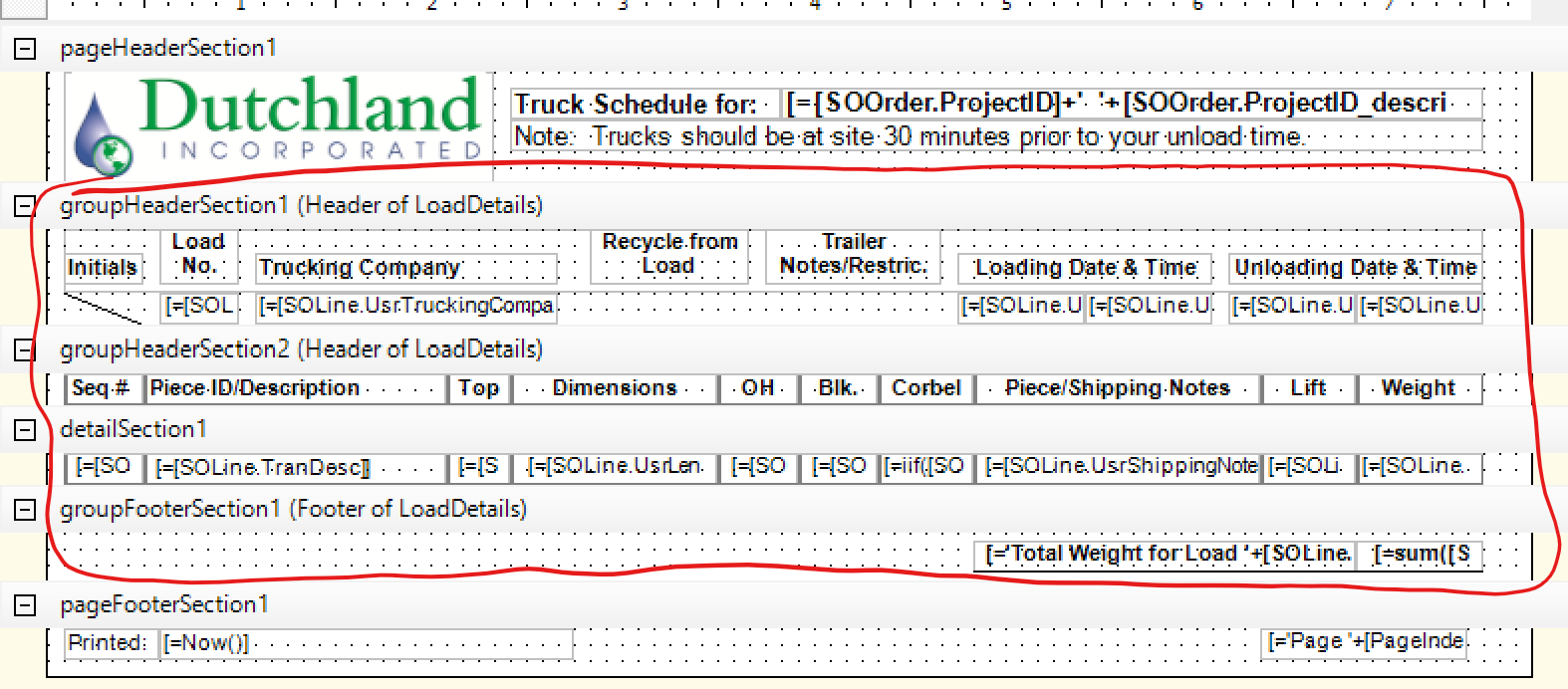
As you can see in this screenshot, the page break is naturally happening between groupHeaderSection2 & detailSection1.

Any thoughts on how I can keep this together when I run the report? Note that the number of lines that I have in the detailSection1 are not going to be consistent. Sometimes there can be 1 line of data in detailSection1 and sometimes there could be as many as 6-8 lines of data in detailSection1.
I have attached a copy of my report for your reference, however because of the number of custom fields that are used and the fact that the grouping is happening with one of the custom fields, you may not be able to put it into your instance and see results when running the report.

Hi Laura
Try putting the Page Break on the Group Footer Section1 - see screenshot

@jeffrey-patch that just gives me a page break per grouping. I am hoping to have multiple groupings of each section on one page. I think I have concluded that it is not possible with the current version of the report designer. Who knows if it is something that could be done in the future or not. Thanks for your thoughts!

How about moving groupHeaderSection2, detailSection1 & groupFooterSection1 (which needs to be changed to footer of groupHeaderSection2) to a subreport and include that in groupHeaderSection1 underneath the content that's currently there.
Hopefully then the keep together property of groupHeaderSection1 should keep all of the content together.
This is just a theory.