
By using this website, you agree to our Terms of Use (click here)

How can group item and sum qty in the invoice report when I print ? Can you give me some sample video ?
FROM
1 A 1 1$ 1$
2 A 2 1$ 2$
TO
1 A 3 1$ 3$

Hi Zanata,
If you are starting with the standard Invoice, then I would recommend just adding a new group underneath the existing Invoice group. For your new group, group by InventoryID.
Hi Tim,
Because I am new with Acumatica, could you please give some capturing picture of it?
You can go here to add a new group

I have done as you said BUT it does not work.
Can you attach your .rpx file?
When I edit report , it download rps file. And I cannot attach.
You have to use the File -> Save As... button to save as .rpx.
Take a look at this post which discusses this more:
https://www.augforums.com/acumatica-rps-versus-rpx-file-types/
Still not seeing an attachment. Make sure to click the Attach Files button after uploading the attachment.
Ok, now it came through.
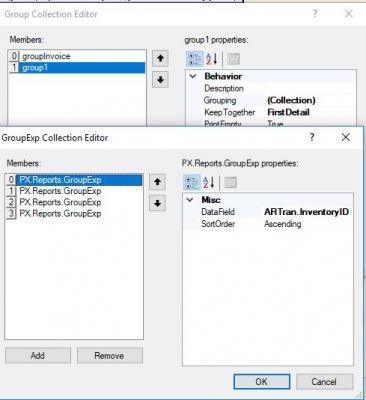
In group1, I would just group on one field, ARTran.InventoryID, like this:

Then, in the groupFooterSection3 area, try summing up one of the fields like this:

Dear TIM,
I have tried like you guide me BUT it still does not work.
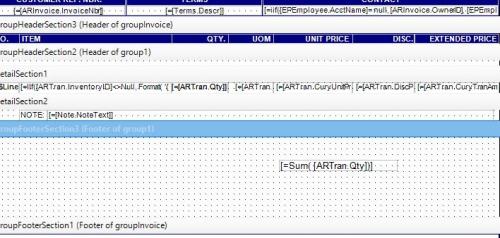
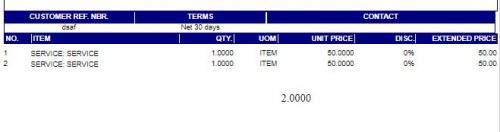
It's returning one line with a quantity of 2 instead of two separate lines with a quantity of 1. Isn't that what you wanted? Of course, you'd need to do the Sum formula for the other fields as well, like the Amount.
Hi Tim,
Can you do it for me as the sample and attach file back to me ? Thanks...!
Online Members
