
By using this website, you agree to our Terms of Use (click here)

I have a requirement to include a quantity field as part of a barcode. The barcode must consist of a "Q" followed by a whole number (no decimal positions). For example, if the quantity field stored in Acumatica has a value of "4.00". The barcode must contain the data as "Q4". Any ideas on how to do this? Thanks.

@khoosen Welcome to AUGForums!
Assuming you are familiar with embedding a bar code within your report, you need to then tell the report how to populate the bar code. in the Data Value your formula should be something like this:
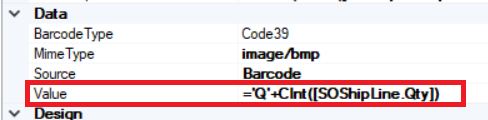
='Q'+CInt([SOShipLine.Qty])
I am using a shipment as the source, so your field may change, but this formula (CInt) is converting the value to an integer. When printed the bar code will be populated with the Q plus the whole number value and no decimals. Here's a screen shot of the pick list with an added field to show what the bar code reads 🙂
