AugForums.com

An Acumatica User Group

  • Free
    • Start Here
    • In-Person Gatherings
    • Power BI Workshop
    • Podcast
    • Rolodex
    • Blog
    • Forums
  • Paid
    • AugSQL
    • GI Course
    • GI Library
    • Consulting
  • Register
Acumatica Forums

By using this website, you agree to our Terms of Use (click here)

Forums
AUG Forums
Acumatica Report De...
Adding background i...
 
Notifications
Clear all

Questions Adding background image using database source

 
Acumatica Report Designer
Last Post by Iskandar 8 years ago
10 Posts
2 Users
1 Reactions
3,712 Views
RSS
Iskandar
Posts: 24
 Iskandar
Topic starter
May 18, 2018 5:08 am
(@iskandar)
Member
Joined: 6 years ago

Hi Everyone

Does anyone know how to add a background image using database source?

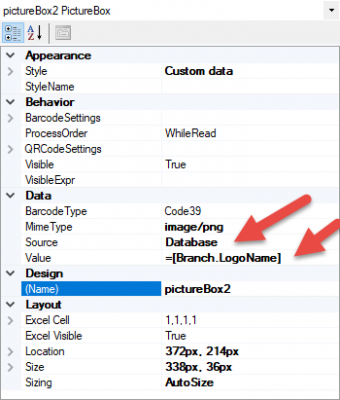
i was try using picture box to test the database source and its work fine but if i want my image become a background in my invoice is never work

my picture box
my background
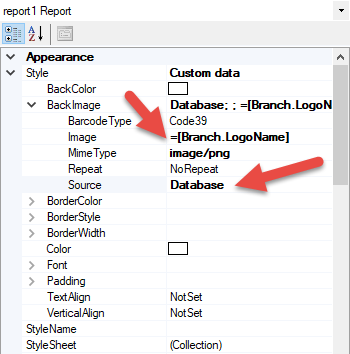
can anyone help

Thank you


9 Replies
Tim Rodman
Posts: 3204
 Tim Rodman
Admin
May 18, 2018 7:15 pm
(@timrodman)
Famed Member
Joined: 11 years ago

I just tried it too. I was only able to get it to work with a Source of Embedded.


Reply
Iskandar
Posts: 24
 Iskandar
Topic starter
May 20, 2018 9:59 pm
(@iskandar)
Member
Joined: 6 years ago

I really need a formula for my Background Image and the only way is using Database. I am trying to make the method and the result of the method is the image but the back Image can not read the formula at all.

is there any other way?

Thank you


Reply
Tim Rodman
Posts: 3204
 Tim Rodman
Admin
May 22, 2018 8:20 am
(@timrodman)
Famed Member
Joined: 11 years ago

I can't think of another way unfortunately. What logic are you wanting to use to determine which background image you are going to pull from the database?


Reply
Iskandar
Posts: 24
 Iskandar
Topic starter
May 23, 2018 1:49 am
(@iskandar)
Member
Joined: 6 years ago

It's actually simple
If my status is On Hold or Balanced, a background image will appear in the report, that's it.
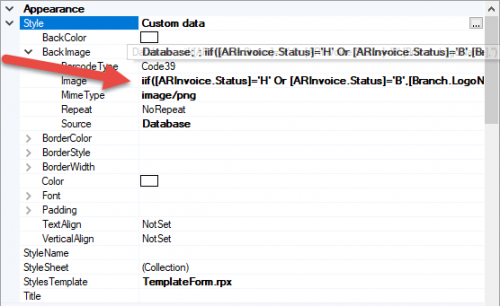
That's my formula

Thanks Tim


Reply
Iskandar
Posts: 24
 Iskandar
Topic starter
May 23, 2018 2:13 am
(@iskandar)
Member
Joined: 6 years ago

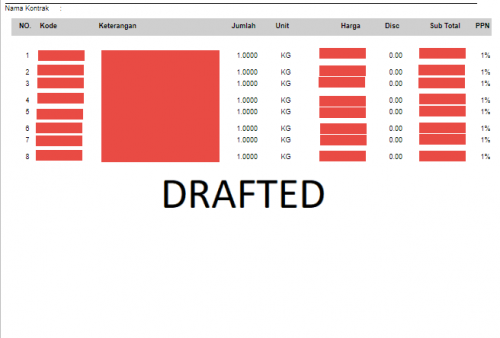
My current Reports

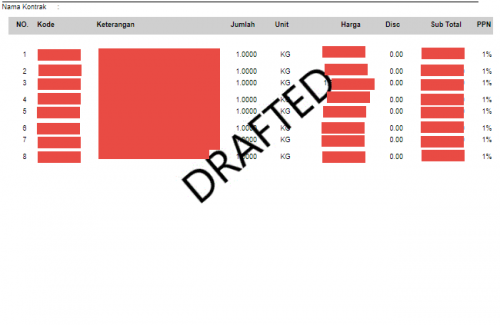
I really want my Image (DRAFTED) to be the Background Image in the Document Details.

So My Reports will Look like this
Thank you


Reply
Tim Rodman
Posts: 3204
 Tim Rodman
Admin
June 4, 2018 1:52 pm
(@timrodman)
Famed Member
Joined: 11 years ago

Ah, I see. That's a good use case. Have you tried just adding an image field over the top rather than using the background image feature?

Reply
Iskandar
 Iskandar
(@iskandar)
Joined: 6 years ago

Member
Posts: 24
June 4, 2018 11:06 pm
Reply toTim RodmanTim Rodman

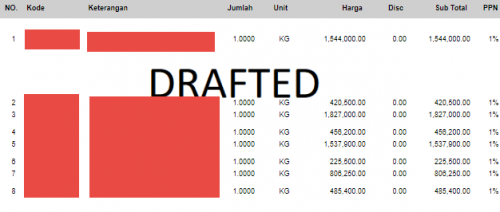
I already try that way, the result is like this :

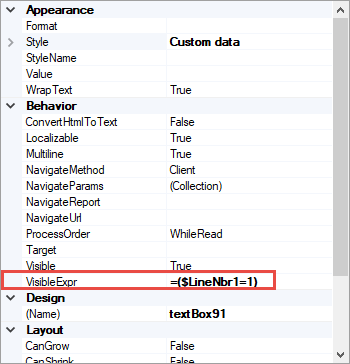
I put my textbox like this :


i was try a picturebox too but the result is same. i want try subreport things to make my background image in my reports i hope that will work

Thank You


Reply
Tim Rodman
Posts: 3204
 Tim Rodman
Admin
June 6, 2018 11:46 pm
(@timrodman)
Famed Member
Joined: 11 years ago

Hmmm, ya, I can see now that the problem is that you don't want the line in the Detail section to grow. I wish I could think of another way around this problem, but I can't at the moment unfortunately.


Reply
Iskandar
Posts: 24
 Iskandar
Topic starter
June 7, 2018 6:11 am
(@iskandar)
Member
Joined: 6 years ago

Yeah, exactly.

I try a sub Reports things and my sub reports is got the Background image in it but the result doesn't display the Background image, just the Details Sector.

It's ok tim, i'll come up with another way.

if anyone find the solution, Please let me know.

Thank you


Reply
Tim Rodman reacted
Forum Jump:
  Previous Topic
Next Topic  
Forum Information
Recent Posts
Unread Posts
Tags
  • 12 Forums
  • 2,532 Topics
  • 11 K Posts
  • 11 Online
  • 2,418 Members
Our newest member: Chad Treadwell
Latest Post: Limited or no support from Acumatica?
Forum Icons: Forum contains no unread posts Forum contains unread posts
Topic Icons: Not Replied Replied Active Hot Sticky Unapproved Solved Private Closed

Online Members

 No online members at the moment

Acumatica Forums

Terms of Use & Disclaimers :: Privacy Policy

Copyright © 2026 · AUG Forums, LLC. All rights reserved. This website is not owned, affiliated with, or endorsed by Acumatica, Inc.

‹›×

    ‹›×