AugForums.com

An Acumatica User Group

  • Free
    • Start Here
    • In-Person Gatherings
    • Power BI Workshop
    • Podcast
    • Rolodex
    • Blog
    • Forums
  • Paid
    • AugSQL
    • GI Course
    • GI Library
    • Consulting
  • Register
Acumatica Forums

By using this website, you agree to our Terms of Use (click here)

Forums
AUG Forums
Acumatica Generic I...
Special Character (...
 
Notifications
Clear all

Questions Special Character (Examples: + - * / %) In Generic Inquiry Formula

 
Acumatica Generic Inquiries & Pivot Tables
Last Post by Grant-Westmill 5 years ago
5 Posts
2 Users
1 Reactions
2,960 Views
RSS
Grant-Westmill
Posts: 6
 Grant-Westmill
Topic starter
January 4, 2021 9:06 pm
(@grant-westmill)
Active Member
Joined: 5 years ago

Hello all!

I searched for this and couldn't find any results so I was hoping someone here could help.

I was inspired by this helpful post by Tim Rodman to create a column for attached files.

In it he mentions using a formula to only select the file name rather than the entire path. I liked that idea so I tried to look for the backslash character '\' but of course that is used as an arithmetic operator so it fails validation and causes an error on the page.

For now I am using the first formula below but wanted to find out how I could search for a backslash character in the filename rather than the parenthesis which would be possible to find in a file name.

I created this GI formula:

=Right( [UploadFile.Name], len([UploadFile.Name])-InStrRev( [UploadFile.Name], ')' )-2)

I would like it to be like this (but whatever would actually search for the backslash instead of causing an error).

=Right( [UploadFile.Name], len([UploadFile.Name])-InStrRev( [UploadFile.Name], '\' )-1)

How can an InStr formula find a backslash or other special character? (Examples: + - * / %)

Thank you!


4 Replies
Tim Rodman
Posts: 3204
 Tim Rodman
Admin
January 5, 2021 1:05 am
(@timrodman)
Famed Member
Joined: 10 years ago

You are SOOOOO close. You have to "escape" a special character with a backslash. By "escape", I mean that you put the backslash before the special character. If you want a backslash, then put a backslash, then another backslash.


Like this:

=Right( [UploadFile.Name], len([UploadFile.Name])-InStrRev( [UploadFile.Name], '\\' )-1)


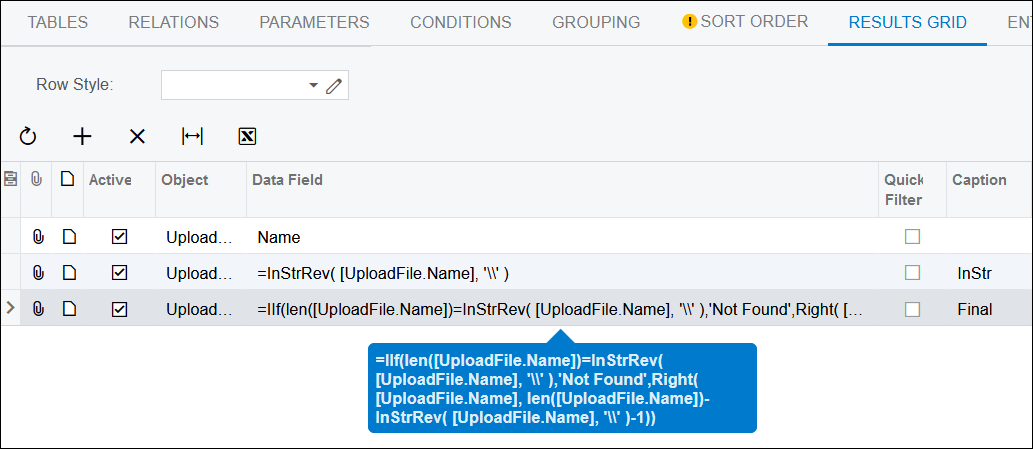
I tried this in my environment and I had some files that didn't have a backslash, so I did these formulas:

=InStrRev( [UploadFile.Name], '\\' )
=IIf(len([UploadFile.Name])=InStrRev( [UploadFile.Name], '\\' ),'Not Found',Right( [UploadFile.Name], len([UploadFile.Name])-InStrRev( [UploadFile.Name], '\\' )-1))
image


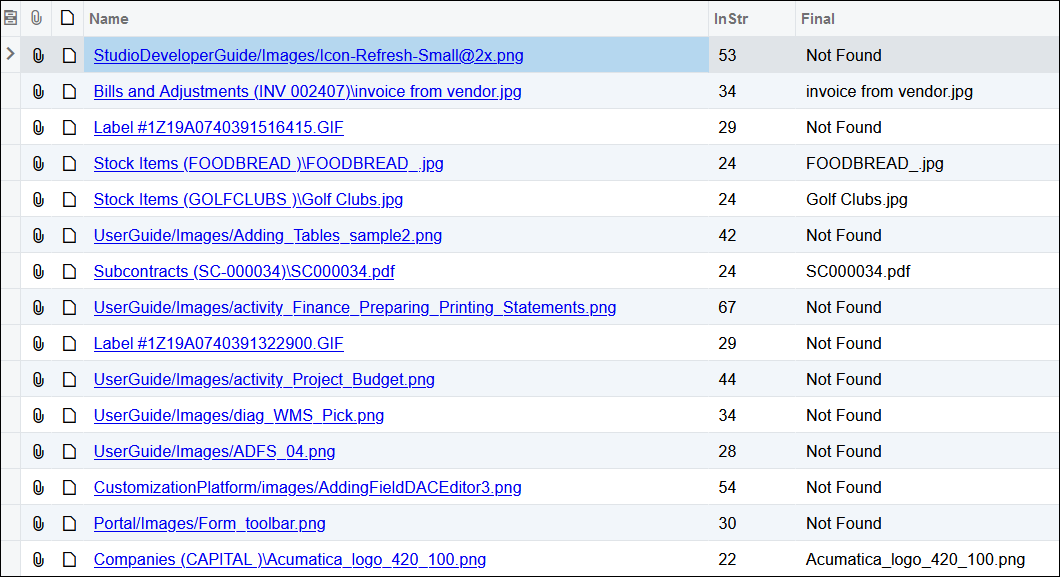
Which yielded these results:

image

Reply
Grant-Westmill
 Grant-Westmill
(@grant-westmill)
Joined: 5 years ago

Active Member
Posts: 6
January 5, 2021 3:14 pm
Reply toTim RodmanTim Rodman

@timrodman thank you very much! I thought I had tried doubling up the character but I must have missed doing that with the single quotes.

It worked as you suggested above!

So far these particular files are all attached directly to the row item so it seems to find them just fine, but I see from your example that one may need to look for the last forward slash instead of a backslash.

Just curious, what would cause a path to have a forward slash instead? I don't see any on our site like that, if I look at "Search In Files".


Reply
Tim Rodman
 Tim Rodman
Admin
(@timrodman)
Joined: 10 years ago

Famed Member
Posts: 3204
January 5, 2021 5:04 pm
Reply toGrant-WestmillGrant-Westmill
Tim Rodman

@grant-westmill Not sure what causes the forward slash. I was wondering the same thing.


Reply
Grant-Westmill
 Grant-Westmill
(@grant-westmill)
Joined: 5 years ago

Active Member
Posts: 6
January 5, 2021 5:27 pm
Reply toTim RodmanTim Rodman
Grant-Westmill
Tim Rodman

@timrodman no problem! We just started using the system in 2020 so maybe they don't do paths like that anymore. or maybe it's because we aren't using some modules that you have. Those are just some guesses, but it's not really a big deal. You showed me the solution for my main issue so that's what's important.


Reply
Tim Rodman reacted
Forum Jump:
  Previous Topic
Next Topic  
Forum Information
Recent Posts
Unread Posts
Tags
  • 12 Forums
  • 2,530 Topics
  • 11 K Posts
  • 15 Online
  • 2,418 Members
Our newest member: Chad Treadwell
Latest Post: Negative/Credit Inventory Value?
Forum Icons: Forum contains no unread posts Forum contains unread posts
Topic Icons: Not Replied Replied Active Hot Sticky Unapproved Solved Private Closed

Online Members

  • Johnny Tang
Acumatica Forums

Terms of Use & Disclaimers :: Privacy Policy

Copyright © 2026 · AUG Forums, LLC. All rights reserved. This website is not owned, affiliated with, or endorsed by Acumatica, Inc.

‹›×

    ‹›×