
By using this website, you agree to our Terms of Use (click here)

Hi,
I'm havinc issues when I use mutiple tables, data is duplicated. Here's my config:

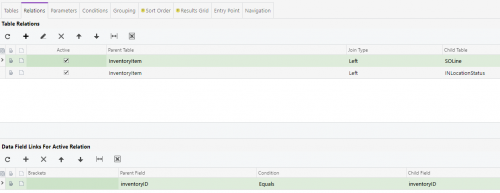
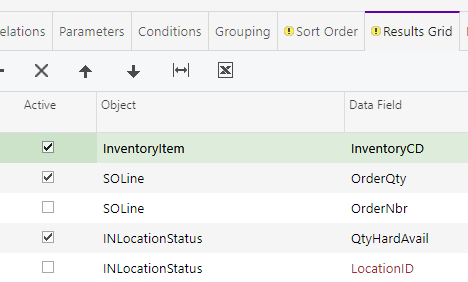
My results for 1 product:

My quantity (how many time the product was ordered) should be 5 and Qty Hard Available should be 21. The quantity ordered is mutiplied by my wahrehouse locations (10 for this product) and the quanty available is multiplied by how many orders are including this product (5 for this product).
Here's some od the results I get if I don't group my results by inventoryID:

Basically all I want is my stock and how many time we have sold the specific product. I tried to divide my available stock by how many orders (have this product) but the count([SOLine.orderNbr]) show all the lines instead of counting only unique order numbers.
Thank you for your help 🙂

I think the issue lies in your joins. You'll get an ItemID times the # of SOLines with the item, which is what you want. BUT you've then added a duplicate of these rows for every warehouse location that has the item. This is something you DON'T want and is ruining your day. For your situation, you only need the qty available and don't care about the location right? I would use the table INSiteStatus for this.
Table Join:
InventoryItem Left INSiteStatus
InventoryID equals InventoryID
Result Screen:
INSiteStatus - QtyAvail
This should only return a single value to each row, no duplicates. You should be able to run your count now on the SOLines without any issues when you group. Your QTY Available will need to use the aggregate "min" so you don't see the summation of the values, but only a single value. If you hit any other issues, please export your GI to xml and send your file along.
Hi Michael,
Thank you very much for you answer! As you mentioned INSiteStatus is much better for me to use. My only concern is that I still have multiple row per InventoryID as I have multiple sites (warehouse). Since we have always 3 sites per InventoryID, I though I could just divide everything by 3. But I'm having Unknown column 'INSiteStatus.QtyHardAvail' in 'having clause' error. When I disable the field (HardAvail) with the error, I can see some better data in Qty Ordered but it's not quite right. Instead of seeing 5 orders, I see 4.9999999 orders.
I guess everything will work smoothly if I could just edit the SQL query 🙂
Ok, I opened the inquiry and here's what I would do:
For the count of SOLines, the .99999 is a rounding error. Add Ceiling to round up. This assumes you never sell fractional products.
=Ceiling([SOLine.orderQty]/3)
The QTY Hard Available error you're seeing involves the "count" function (the system is trying to aggregate one term, but not all the terms). If you run multiple sites, you may need to write a report for this and use variables to track the data. I can't think of an elegant GI solution for this off-hand. When you collapse more than one set and have to aggregate across them, GI's tend to come up short.
Do you use the report writer tool? Tim has an excellent link to the report writer here in the forums. If you want to shift this into the report writer, you can call your variables in the headers for your groups, then apply them at the footers of the groups making most of this a reasonably trivial exercise. For now, hopefully someone else has an answer to your issue within the GI. If you do decide to make this into a report, feel free to post your .rpx file here and we can start tearing into it.

I think you just need to include the Warehouse ID when you join from SOLine to INSiteStatus to remove the duplicates. So use both InventoryID and SiteID in the join.
Then you'll still need to group in the inquiry, counting the SO Lines and taking the max of the quantity available.
Or, instead of grouping on the inquiry, I'd be curious to see if a pivot table on the inquiry would do the job.
Thanks for your replies!
@Tim Unfortunately Inventoryitem doesn't have a SideID. Inventory has only 1 line per product (with a default SiteiD). Linking the default SiteID and with SiteID from INSiteStatus will exclude the stock from other warehouses.
@Michael I will look into the report write tool but I'm having issues to login to our system since we enabled db auth...
Sorry about that, I should have said SOLine. I just updated my previous post to reflect that.
Online Members
