AugForums.com

An Acumatica User Group

  • Free
    • Start Here
    • In-Person Gatherings
    • Power BI Workshop
    • Podcast
    • Rolodex
    • Blog
    • Forums
  • Paid
    • AugSQL
    • GI Course
    • GI Library
    • Consulting
  • Register
Acumatica Forums

By using this website, you agree to our Terms of Use (click here)

Forums
AUG Forums
Acumatica Generic I...
Generic Inquiry RES...
 
Notifications
Clear all

Questions Generic Inquiry RESULTS GRID Column Order

 
Acumatica Generic Inquiries & Pivot Tables
Last Post by Michael Roszkowski 5 years ago
2 Posts
2 Users
1 Reactions
2,741 Views
RSS
Tim Rodman
Posts: 3204
 Tim Rodman
Admin
Topic starter
January 7, 2021 2:09 pm
(@timrodman)
Famed Member
Joined: 10 years ago

I'm curious to hear how others arrange their columns on the RESULTS GRID tab of the Generic Inquiry (SM208000) screen.


I personally like them in this order:
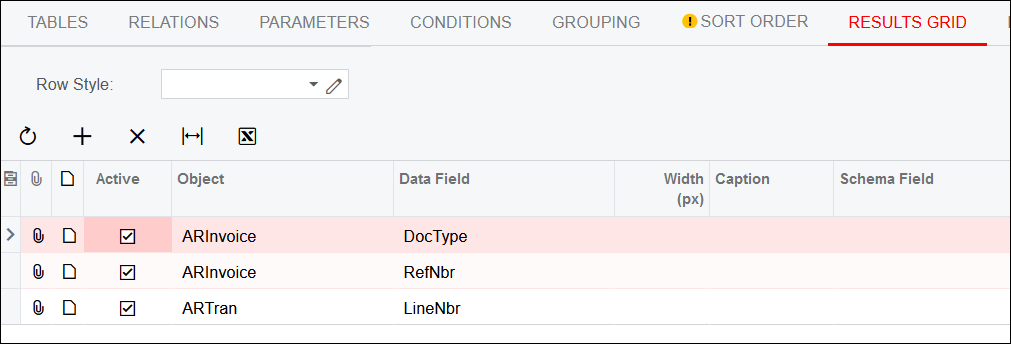
image


When I add a new row, I'm always populating the Object and Data Field columns so it makes sense that they come first.


The next column that I use most frequently is Width (px) because I like to take a couple of extra minutes to set column widths that make sense for each column. A little time up front means a lot less time spent by individual users to adjust column widths individually.


I also like having Width (px) next because it's a text field that allows me to use the down arrow on my keyboard to move to the next row. This is useful when you're adding a lot of columns to the Generic Inquiry. Use tab on your keyboard to move though the Object and Data Field columns, then use the down arrow to move to the next row, all without having to touch your mouse.


The next most frequently used column for me is Caption so it's the next column that I can tab into if I need to.


Finally, sometimes I need Schema Field, especially when I just added a column with a formula. So it's the next column.


I have other columns too, but I don't use them nearly as frequently as the columns in the screenshot above.


How do you arrange your columns?


1 Reply
Michael Roszkowski
Posts: 28
 Michael Roszkowski
January 20, 2021 9:15 am
(@mikerosz)
Trusted Member
Joined: 6 years ago

On the Results Grid tab you can drag and drop the items you want to move around.  It is a little touchy, but it works.


Reply
Tim Rodman reacted
Forum Jump:
  Previous Topic
Next Topic  
Forum Information
Recent Posts
Unread Posts
Tags
  • 12 Forums
  • 2,530 Topics
  • 11 K Posts
  • 17 Online
  • 2,418 Members
Our newest member: Chad Treadwell
Latest Post: Negative/Credit Inventory Value?
Forum Icons: Forum contains no unread posts Forum contains unread posts
Topic Icons: Not Replied Replied Active Hot Sticky Unapproved Solved Private Closed

Online Members

 No online members at the moment

Acumatica Forums

Terms of Use & Disclaimers :: Privacy Policy

Copyright © 2026 · AUG Forums, LLC. All rights reserved. This website is not owned, affiliated with, or endorsed by Acumatica, Inc.

‹›×

    ‹›×