
By using this website, you agree to our Terms of Use (click here)

I have created a GI to calculate commissions. There are a lot of IIF statements in my Amount column to account for weird cases as we recently moved to Acumatica from Quickbooks and this is the first time we have to do this. Hopefully, in the coming months I can let Acumatica handle this.
The problem is, I want GI to ignore any "Voided" payments, but it still shows them. Also, it does not show any amount if it has a "Multiple Installment split", even though I have an IIF statement to take care of that.
= IIf ( [ARAdjust.AdjgDocType] = 'RPM' ,-1,1) * IIf([ARAdjust.AdjdRefNbr]<400000, IIf([ARTran.TranDesc]='Imported from QB', IIf ( [ARTran.CuryTranAmt] < [ARAdjust.CuryAdjdAmt], [ARTran.CuryTranAmt], [ARAdjust.CuryAdjdAmt] ),0),Switch( [ARAdjust.AdjdDocType]='INV', IIf ( [ARAdjust.CuryAdjgAmt] < [ARAdjust.CuryAdjdAmt], [ARAdjust.CuryAdjgAmt], [ARAdjust.CuryAdjdAmt] ) - [SOFreightDetail.CuryFreightAmt], [ARAdjust.AdjdDocType]='DRM', [ARAdjust.CuryAdjgAmt], [ARAdjust.AdjdDocType]='CRM', [ARAdjust.CuryAdjgAmt]*(-1)))
Modified for multiple Installment Split
= IIf ( [ARAdjust.AdjgDocType] = 'RPM' ,-1,1) * IIf([ARAdjust.AdjdRefNbr]<400000, IIf([ARTran.TranDesc]='Imported from QB', IIf ( [ARTran.CuryTranAmt] < [ARAdjust.CuryAdjdAmt], [ARTran.CuryTranAmt], [ARAdjust.CuryAdjdAmt] ),0),Switch( [ARAdjust.AdjdDocType]='INV', IIf([ARTran.TranDesc]='Multiple Installment split', [ARAdjust.CuryAdjdAmt] , IIf ( [ARAdjust.CuryAdjgAmt] < [ARAdjust.CuryAdjdAmt], [ARAdjust.CuryAdjgAmt], [ARAdjust.CuryAdjdAmt] ) - [SOFreightDetail.CuryFreightAmt]), [ARAdjust.AdjdDocType]='DRM', [ARAdjust.CuryAdjgAmt], [ARAdjust.AdjdDocType]='CRM', [ARAdjust.CuryAdjgAmt]*(-1)))
I have attached the .xml of the GI, just in case you want to take a look at it.
Thank you for your help.

Try filtering on ARPayment.DocType rather than ARPayment.Status. I think the Voided value in ARPayment.Status is used for something else. A new payment record with ARPayment.DocType of Void Payment gets created for a voided payment.
Tim,
I have tried it but it does not work. I used "Void Payment" option but it still pulls the payment even though it is voided. Also, the same payment shows as "Payment" and "Void Payment", which kind of defeats the purpose. I was hoping to be able to go by the status. Maybe, this is another bug in 6.10, because I can display the data, but cannot filter with it.
Thank you.
Ah, yes, good point. That won't work. The Payment creates an additional Void Payment record when you void it.
So, back to your idea, it seems like filtering on the Status should work.
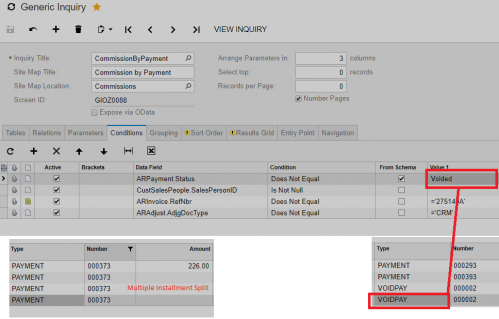
I just tried it. With the Voided filter not active, I get the voided payment:


With Voided filter in place, it correctly filters out the record:


I'm just not sure why it wasn't working for you above.
Tim,
From the screenshots I can tell that you are using at least 2017 R1, if not R2 or later. I hope it will work for me as well once I do the switch from 6.10.
Thank you.
It's possible, but I thought they fixed this issue back in 6.0. I could be wrong though.
You might try one more thing. To see the Type value as it is stored in the database, add the following calculated column:

Which will show you that the Type of Payment gets stored in the database as PMT

So, try using PMT on the Conditions tab instead (make sure you uncheck the From Schema box)

And see if that filters out the Payment record like it does for me:

I did try it without the Cstr, and it did not work. I will try with CStr and let you know.
Thank you.
Online Members
