
By using this website, you agree to our Terms of Use (click here)

Anybody know how to add GIs to the inquiries menu?
I tried following Doug's post here but the code he pasted seemed incorrect and he wasn't responding to comments:
Can someone correct his code or point out to a post that does have this info?
I checked around the site and couldn't find anything regarding adding GIs to the Inquiries menu in this forum section.

What version are you on? The menu structure completely changed as did the method of adding inquiries to the menu in Acumatica 2017.

In 2017, if you add the site map title and select the site map location on the generic inquiry screen, when you save the inquiry, it adds it to that menu structure. You may need to check your menu settings and make sure the new menu item is checked if you want it to show on your quick menu. Much easier, because I have no idea how to read c# code.
In 2017, if you add the site map title and select the site map location on the generic inquiry screen, when you save the inquiry, it adds it to that menu structure. You may need to check your menu settings and make sure the new menu item is checked if you want it to show on your quick menu. Much easier, because I have no idea how to read c# code.
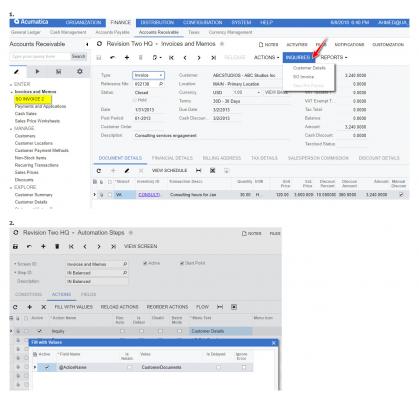
Thanks but the Inquiries menu being referred to in OP is referring to screenshot 1 below next to the Arrow. It requires usage of automation steps (screenshot 2)
The method you are saying just adds the shortcut to it, which is useful, too but will require the user to click and manually type in the order #.
Ah, oops, now I get it. I guess it would have helped if I had read your original like.
I was thinking you meant the Inquiries folder in the main menu.
I suggest asking your question in StackOverflow since it's related to C# and include a link to Doug's post:
https://stackoverflow.com/questions/tagged/acumatica
Sounds good, here it is for others' reference:
Online Members
