
By using this website, you agree to our Terms of Use (click here)

I'd like to set my home page to a dashboard, but the folder 'shared dashboards' is not listed as an option. I'm assuming that I need to change the access rights somewhere, but I just can't find the right switch to flip.
Does anyone know how to grant rights use dashboards on home pages?

Hey Peter,
It's actually a non-trivial answer (if anyone has done this in R2 with the new site map searching please update this thread).
What you need to do is add the dashboard to a place on the site map that's accessible from that user profile page:
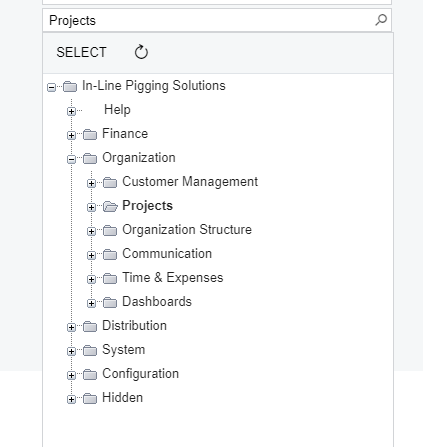
So you can see there I have my dashboard set as my home page and it's under the projects folder (I actually have the dashboard on that main project folder). Under the dashboards screen you can actually set where it is located:

And so just add it to a place you can see on the profile home page screen and then you should be good! It's a bit of a mess around because you'll also need to ensure the user who is getting that dashboard has access to wherever on the site you put the dashboard.

Much cleaner in 2019 R2 because there is no more "Modern UI" and "Classic UI" concept. There is just one UI in 2019 R2 so you don't have to put the Dashboard in 2 places.
Online Members
