
By using this website, you agree to our Terms of Use (click here)

Hi Everyone,
When I go to add an Widget to an Acumatica Dashboard, I see that there is a Widget called Power BI Tile.

Does anyone know what this is?

Hi Kermit,
Power BI is a business intelligence solution from Microsoft.
You can securely pipe Acumatica data into Power BI using something called OData. More on OData here:
http://www.augforums.com/acumatica-connects-to-microsoft-excel-and-power-bi-with-odata/
Power BI is like Acumatica Dashboards "on steroids". You can build more advanced dashboards using it.
Think of a Power BI Tile like an Acumatica Dashboard Widget. It's one piece, or element, of a Power BI dashboard.
The Power BI Tile widget in an Acumatica Dashboard allows you to take a Power BI Tile and display it inside an Acumatica Dashboard.
For more on how to do that, checkout this article: http://www.augforums.com/power-bi-tile-dashboard-widget-in-acumatica-6/
Hmmm, interesting. Thanks for the post. I'll have to check it out when I have more time.

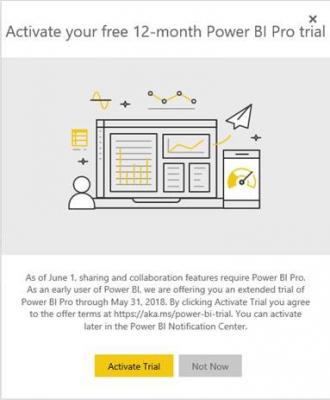
It looks like Microsoft has updated access to Power BI and now requires Power BI Pro which entails a significant investment on a per client basis. Have you had the opportunity to review these changes? We were in the process of trying to put in place some BI tiles for multiple clients but have obviously hit a significant roadblock with the new economics that this would require. I was wondering if you've had a chance to review their changes and had any alternate methods to accomplish this?
https://whitepages.unlimitedviz.com/2017/05/power-bi-premium-pricing-model-good-bad-ugly/
https://powerbi.microsoft.com/en-us/calculator/
Attached is what we now receive when we try to log into Power BI.
Thanks!
Hi shirsch,
I think you just answered the question that I had on this post (click here) about whether or not a Power BI Pro license is required which is $120/year.
If you check the link above, you'll see that I was able to embed an entire Power BI Report using just a Power BI Pro license which I think is weird because you can have as many Acumatica users as you want using the report with everyone piggy-backing on that one Power BI Pro license. I feel like this is something that Microsoft would probably want to "correct" in the future.
I haven't tried the Power BI Tiles, but I assume that they would work the same way because they give you even less functionality than the Power BI Reports do.
But it doesn't appear that you need Power BI Premium which is super expensive. At least not for now. Just Power BI Pro at $120/year.
Tim,
One of the things we worked through when initially setting up Acumatica dashboards was user branch security, a user who has access to only one or two branches is able to get delivery of the same Acumatica tile and only display data related to those branches. Since Power BI is setup through a single user ID it would appear that there is no way around that but I wanted to get your input to see if this is something you've considered or may have a solution for. Even if we wanted to set up branch specific tiles we couldn't deliver them back into Acumatica to specific users without setting each user up with a Power BI account which of course defeats the purpose of using the single account. Wondering if you have any thoughts? Thanks!
Hi shirsch,
You are correct. There are a few ways that I can think of to handle this:
- Setup a separate user for each Branch in Power BI. Then setup separate Dashboards per Branch in Acumatica and assign security to the existing Branch security groups.
- Create multiple dashboards in Power BI under one user. Then setup separate Dashboards per Branch in Acumatica and assign security to the existing Branch security groups.
- Forget Dashboards in Acumatica altogether and create a Report in Power BI (which is really like a Dashboard in Acumatica, but better). Still have separate Power BI users per Branch, then drop the Power BI Report on the Acumatica menu multiple times, once for each Branch (each one connecting to Power BI with a different Power BI Branch user), and give access to each menu item to the existing Branch security groups in Acumatica. This is the method that I personally prefer because maintaining identical copies of a Report/Dashboard is next to impossible due to the fine formatting stuff that you wind up getting into.

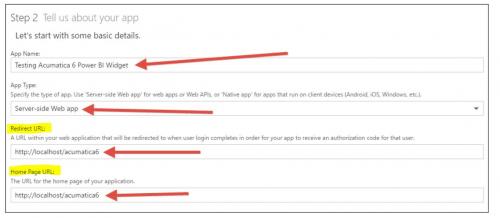
Tim - i am not sure that we are posting the correct URL to connect we are having trouble connecting Power BI to the Acumatica. not sure what we are doing wrong
You would use the URL of your Acumatica instance instead of http://localhost/acumatica6 (I was using that because Acumatica is running on my local computer).
But, something has changed since I wrote that blog post. Actually, scroll to the bottom of it and you'll see some comments to that effect.
I'll try to take a look at this over the holiday weekend to figure out how to get it working again.
Are you getting something like this?
| Additional technical information: |
| Correlation ID: 74711a33-f0da-431d-af42-f53fc320bf0e |
| Timestamp: 2017-11-25 02:59:28Z |
| AADSTS50011: The reply address 'http://localhost/Acumatica/powerBI/auth/33578e63-3531-43ae-8ee3-50d0a9960458' does not match the reply addresses configured for the application: '43b8e41c-27b3-4b99-a0a4-497fa147470c'. More details: not specified |
That's the error message that I get when I try on my 6.10.0472 Acumatica Build.
However, when I try on my 17.200.0401 Acumatica Build it works fine.
So, I upgraded my 6.10.0472 build to 6.10.1511 and now it works. So there must be a fix that was applied at some point between those builds.
Also, note that I had to use http://localhost/Acumatica7/powerBI/auth in the Redirect URL field like this:


Hi Tim
I am also getting the same error, "The reply url specified in the request does not match the reply urls configured for the application", when I try to embed the Power BI App into Acumatica. I have tried adding "powerBI/auth" to the URL as you suggested. I have also tried PowerBI/OAuthAuthenticationHandler, but neither of them seem to work. Any more suggestions?
Many thanks.
Sue,
Are you on an Acumatica SaaS Instance?
Hi Tim
No I am on a hosted server.
Can you include a screenshot of this screen?