
By using this website, you agree to our Terms of Use (click here)

Does anyone know if it's possible to add parameters to Dashboards in Acumatica?
It would be nice to be able to set some filters at the top of the Dashboard and have the Dashboard update based on the values that the user sets on-the-fly.

Hey @beaker,
You can now do this in Acumatica 2018 which just launched the first preview version, build 18.091.0090.
You can set parameters on the Dashboards (SM208600) screen like this:

When you add the parameters to the area shown in the screenshot above, they will appear on the top of the Dashboard like this (I only added one, but you could add many parameters):

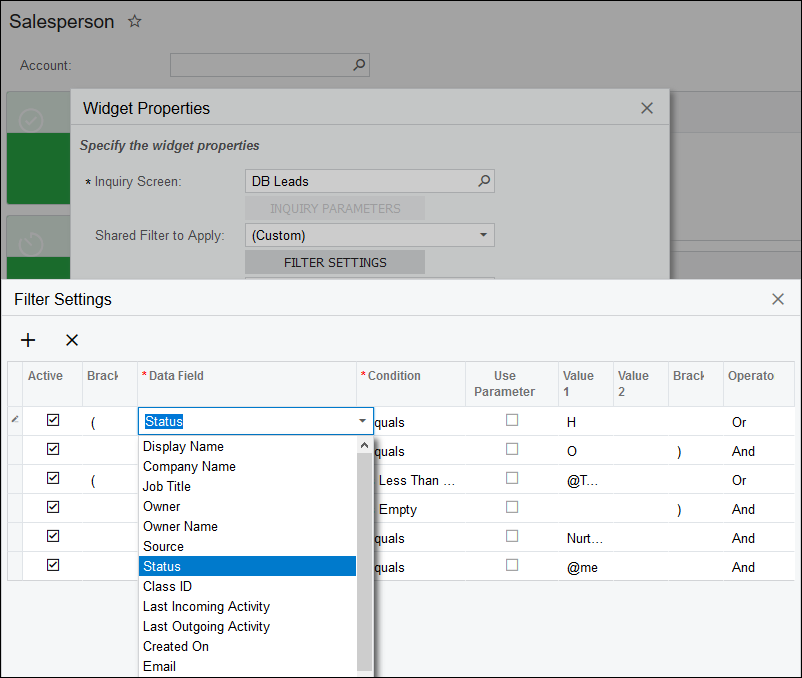
Then you decide in each Dashboard Widget whether or not to include a parameter in the filter:


Note in the screenshot above that you can now do on-they-fly filters instead of having to create Shared filters in your generic inquiries which is nice. In the past, I was cluttering up the Shared filters in my generic inquiries just for dashboards which was kind of a pain.

Fantastico! It might take us a while before we upgrade to Acumatica 2018, but it's nice to know that this feature is coming.

Tim,
When I try this with the AR Clerk Dashboard in latest 2018R1 release, using the Customer ID as the selection parameter, it blanks out all of the existing widgets and only leaves a selection finder box in the upper left corner with a finder that doesn't function.
Also tried the controller dashboard. Same result.
Any suggestions?
Hi John,
Can you take a screenshot?
I just tried adding a Customer parameter to the Controller Dashboard in addition to the Salesperson parameter. The widgets seem to ignore it unless you specifically go into a widget and use the parameter in it.

What build are you on? Maybe it's a bug introduced in a build after the 18.091.0090 build that I'm using.
Hmmm, I just upgraded to 18.100.0049 and I don't have any issues. I added two parameters to the Controller dashboard which you can see in the screenshot below. They only affect the widgets if I explicitly go into a widget and add one of the parameters to it.

One difference that I can think of between your situation and mine is that I installed an earlier 2018 build with the SalesDemo template, then upgraded to 18.100.0049 whereas you installed 18.100.0049 with the SalesDemo template. But that's a pretty slim difference so I'm not that confident that it's the problem.
One other possible difference is the database that you are using. I'm using Microsoft SQL Server. Are you using MySQL?

Hi @timrodman,
I'm trying to get the Dashboard Parameter to flow through to multiple GIs, but I can't get the Dashboard Parameter to work. My main questions are (apart from how):
1. Do you have to include the Parameter in the GI as well
2. Do you have to set up a Condition in the GI
Do both of these play a part in filtering data?
I have it working if I hard-code the Parameter on the Widget back to the GI, but that defeats the object. When I try other methods it doesn't come up with the same figures. Please help as I have 20 widgets to get working.
1. No need to have the Parameter in the GI. You can use any column from the Generic Inquiry in the Data Field column of the FILTER SETTINGS area on the Dashboard Widget. Then check Use Parameter and populate the Parameter in Value 1 to filter according to the Parameter value.
2. No need to setup a Condition in the GI. The filtering happens in the Dashboard Widget.
Online Members