
By using this website, you agree to our Terms of Use (click here)

Hi Sir,
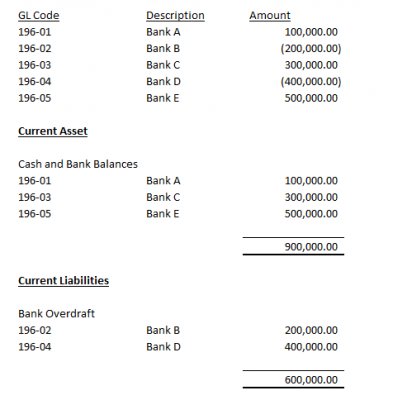
Im in midst of creating Balance Sheet for my company using Acumatica Report Manager (Report Writter). Herewith I attached the GL Code and amount for bank balances. My Finance Manager wants the bank balances to show in the balance sheet as per attachment. Can you please guide my how to set Cash and Bank Balances in balance sheet by condition if equal or more than zero, reflect in current asset and if less than zero, reflect in current liability. Thank you.

This might be a terrible solution, but it's what I'd do...
In the report writer, you can duplicate groups/sections. Make the group with your balances show up twice (or three times if you want the top showing everything). Once you have duplicate(triplicate) segments, you need to set the "Visible" parameter on the fields. For the positive section set something like balance >= 0. For the negative section set balance <0. Now you should have them split appropriately.
At this point you need to get your summations working, but we can't just use "SUM" because the group/section has all the data even though it is "hidden". At this point, I would be making one more section to go in between the duplicates you just created, but to get your sum, you need to create a variable. The variable should increment for either negative XOR positive values in the previous segments. So setting the variable to something like: = iif ( balance > 0 , balance , 0) would get you a variable holding the sum of all positive values (summation for Assets in your report). Repeat this for the section below liabilities, but with a new variable holding negative values.
Hopefully someone else has a more elegant solution, but if you feel like using brute force, this'll do it.
Second (untested) thought, you might be able to roll out "sum(iff( balance > 0 , balance , 0))" instead of rolling out variables.

Hey "Michael Report Designer Ninja", I think this question actually pertains to the Financial Report Writer which you can access using the Report Definitions (CS206000) screen 🙂
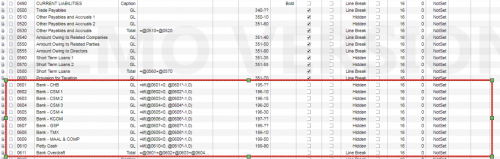
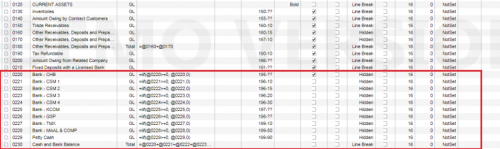
But I don't have an elegant solution with the Financial Report Writer. This isn't pretty, but the best I can think would be to go one account at a time, pull the value on one line but hide it. Then have two more lines which print conditionally in their respective sections depending on whether the value is positive or negative.
Something like this:

Online Members
