I realized that my Custom Vendors Report was not correct. This was due to the Business Account concept in Acumatica. I’m still not sure of the reason for it, but there is an entity called a Business Account (BIZACCT) that is the parent entity for both Customers and Vendors. If you go to the Segmented Keys (CS202000) screen, you can see that both Customers and Vendors share the same parent entity, BIZACCT.
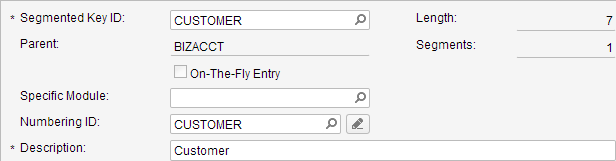

What this means is that both customers and vendors store some information in the BIZACCT entity. When I designed my Custom Vendors Report, I didn’t realized that I actually made a report which displays Customers and Vendors. I only realized this when I dropped an extra field on the report: Vendor.CreatedByID. Once I dropped this field on the report, the report looked like this:

I immediately noticed that the create user (admin) only appeared next to some of the records. The reason is that only the vendors displayed the create user. The customers did not display a create user because I dropped a vendor-specific field (Vendor.CreatedByID) on the report. The fix? I just needed to go to File -> Build schema… and change the Join type from Left to Inner under the Relations tab.

Now my report only displays vendors. Consequently, the create user is now displayed for every record.
