Recently I completed three courses in Acumatica University: S125 Document Management, S200 Integration Services, and S300 System Management.
Only one more course to go (S400 Introduction to Acumatica Technology) before I complete the Application Engineer badge. Although I don’t like to focus too much on the system maintenance stuff since I personally find it boring, it’s still good to go through the courses so I can at least be familiar with things. Once I finish the Application Engineer badge, I’ll be able to move onto the Distribution courses which I think will be a lot more interesting.
Here are some things that stood out to me in these three courses (note: Some of these features have been improved in Acumatica 5.0 which was announced earlier this week at the Acumatica Partner Summit).
Document Management (S125)
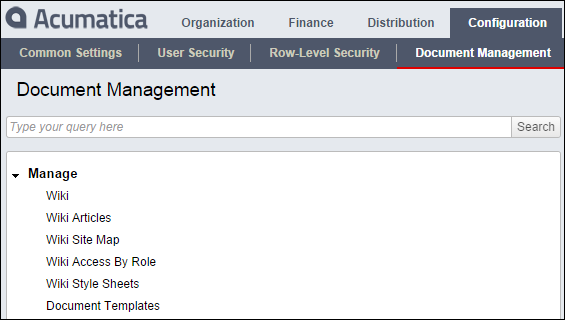
- Wiki. I can’t say enough about the Wiki system in Acumatica. Wiki is a Hawaiian word meaning “quick” and it’s used all over the internet (ever heard of Wikipedia?). I currently use the Wiki feature in Microsoft SharePoint and find it to be great. A Wiki system makes it so easy to generate web pages that are linked to each other. This is perfect for company policies and procedures, SOX documentation, ISO documentation, etc. At my company, we have an ISO document that is a PDF file with hundreds of pages. Someday I would love to turn that thing into a Wiki (it would be SO much easier to navigate). Wikis basically leverage the power of the hyperlink (click here) in the fastest way possible. In Acumatica, you can define multiple Wikis and control their structure. You can even customize the style sheets to control the formatting and presentation. Here is a screenshot of the Wiki portion of the menu in Acumatica:
- Document Management. Acumatica can act as a repository for all your documents (not just Wikis). You can upload files into Acumatica and then link them to forms, transactions (both header and detail), Wiki pages, etc. This is very powerful!
- File Versioning. In addition to storing files, Acumatica can keep track of each version of those files just like Microsoft SharePoint. You don’t have to hesitate to make changes to a file. Go ahead and make changes, the previous version is automatically preserved. If you need to, you can look at the list of versions and roll a file back to one of the previous versions. Honestly, I wonder if Acumatica can replace Microsoft SharePoint at many companies since many companies use SharePoint mainly for the Wiki feature and document repository with versioning.
- File Storage and Synchronization Options. Not only does Acumatica allow you to store files, but you can choose where those files get stored (has no affect on what things look like from a user perspective). Microsoft Dynamics GP, for example, recently added a document attachment feature, but they force you to store the documents in the database (click here) which can cause your database to become very large. Acumatica allows you to store those documents in the database or outside the database. If you want to store them outside, then you can store them in a Local File Folder, Azure Blob Storage, or you can customize a link to pretty much any storage provider. This is a great example of one of the many features that Acumatica has taken the time to get right from a technology standpoint. It’s also a great example of why I like to say that Acumatica is more of an ERP platform than it is an ERP application. Acumatica nails the core technology and you get to leverage it. AME Corporation has a great case study on using a custom storage provider (click here). Here is a quote from the case study talking about how they integrated Acumatica file storage with Box:
The Acumatica-Box integration means that staff can access Box files within Acumatica, and vice versa. Any changes made on one platform are reflected on the other. Staff can view product photos and schematic drawings parked in Box, on each product page in Acumatica. Likewise, if an image is uploaded on Box, it would be seen in Acumatica. With one click, and without leaving the Acumatica user interface, staff can access procedural documents and training videos stored in Box. “As AME Corp is a certified ISO 9001:2008 company, maintaining standards through accessible, rigorous training is very important to us,” says Dimitry.
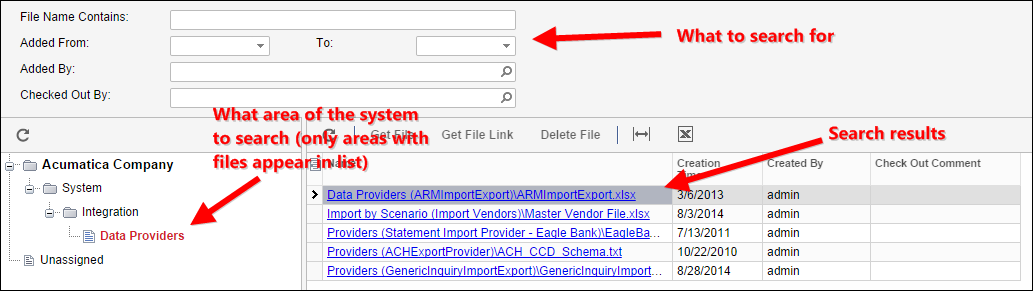
- File Search. You can use the Search in Files (SM202520) screen to search the entire repository of files, or just a portion of it. I’m not sure, but the new “Universal Search” feature in Acumatica 5.0 might have even improved this further.
Integration Services (S200)
Integration stuff is really boring for me so I just did what I needed to do in order to get through the course. It’s just not my thing. However, it can definitely be very powerful when used to interface with another system and it’s definitely worth investing in.
One very cool note from this week: Acumatica 5.0 now allows you to integrate with other cloud solutions (like Salesforce or Office 365) using Azuqua (click here).
System Management (S300)
- Multitenancy. Multitenancy means a single instance of software which services multiple organizations. This might be used by an organization like the Boys & Girls Clubs of America to create a separate company for each of their locations with separate security, yet all running on the same instance of Acumatica. Or, maybe an accounting firm wants to make a sophisticated ERP product like Acumatica available to all their clients. They can run a single instance of Acumatica, but spread the cost across all their clients by creating a separate company in the instance for each client. Each client would have a separate, completely secured company for their data without having to pay for the entire cost of Acumatica on their own. There are some limitations however. For example, the list of security roles, numbering sequences, and wiki-based documentation is shared between all the companies.
- Database Snapshots. I think it’s great that you can take snapshots of the Acumatica database from within Acumatica without needing any DBA (Database Administrator) tools. Snapshots are very useful as part of your company’s disaster recovery plan. However, they aren’t only for disasters. They can also be used to take a snapshot of the database at the end of each month. That way, you know for sure what things looked like in the system at the end of the month in case you ever get auditors questioning a previous month’s report. Snapshots are also very useful for creating a testing environment. A testing environment (or sandbox) is a must for any company using an ERP system. This allows your users to have a dummy company that they can login to when they want to try things out (maybe a new feature or a transaction processing step that can’t be reversed). Snapshots allow you to frequently restore your live environment into your test environment. That way users can do testing in an environment that is EXACTLY the same as production, just a little dated since it’s from the last time the snapshot was restored.
- Customization Tools. This is one of my favorite features in Acumatica. The ERP product that I currently work with and know very well, Sage 500, has a module called Customizer which allows you to make modifications to the system without needing to be a developer. I like Customizer in Sage 500. However, the Customization Tools in Acumatica ARE WAY MORE POWERFUL. Same idea though, make modifications without needing to be a developer. In the S300 System Management course, it mentions that you can’t create new forms with the Customization Tools. However, you can now do this in Acumatica 5.0. Gabriel confirmed this in a post on the Acumatica User Group (click here). I’m sure there are still a lot of situations where you need to get a developer to work their magic using Microsoft Visual Studio, but the Customization Tools can save a lot of development time and money in many situations.