I’m working on a Spend Analysis Report that will be available to anyone for free. Once it’s finished, you’ll be able to download it on this page and install it in your Acumatica environment.
The goal of the Spend Analysis Report is to help you analyze your company’s Cash Flow and Accounts Payable Spend.
As I work on this report, I’ll be providing updates here on this page.
Please leave a comment below to provide your feedback and to impact how this report takes shape.
You can also checkout the comments on the LinkedIn posts that I’ve made:
– LinkedIn Post 01
Update on Tuesday, December 10, 2024
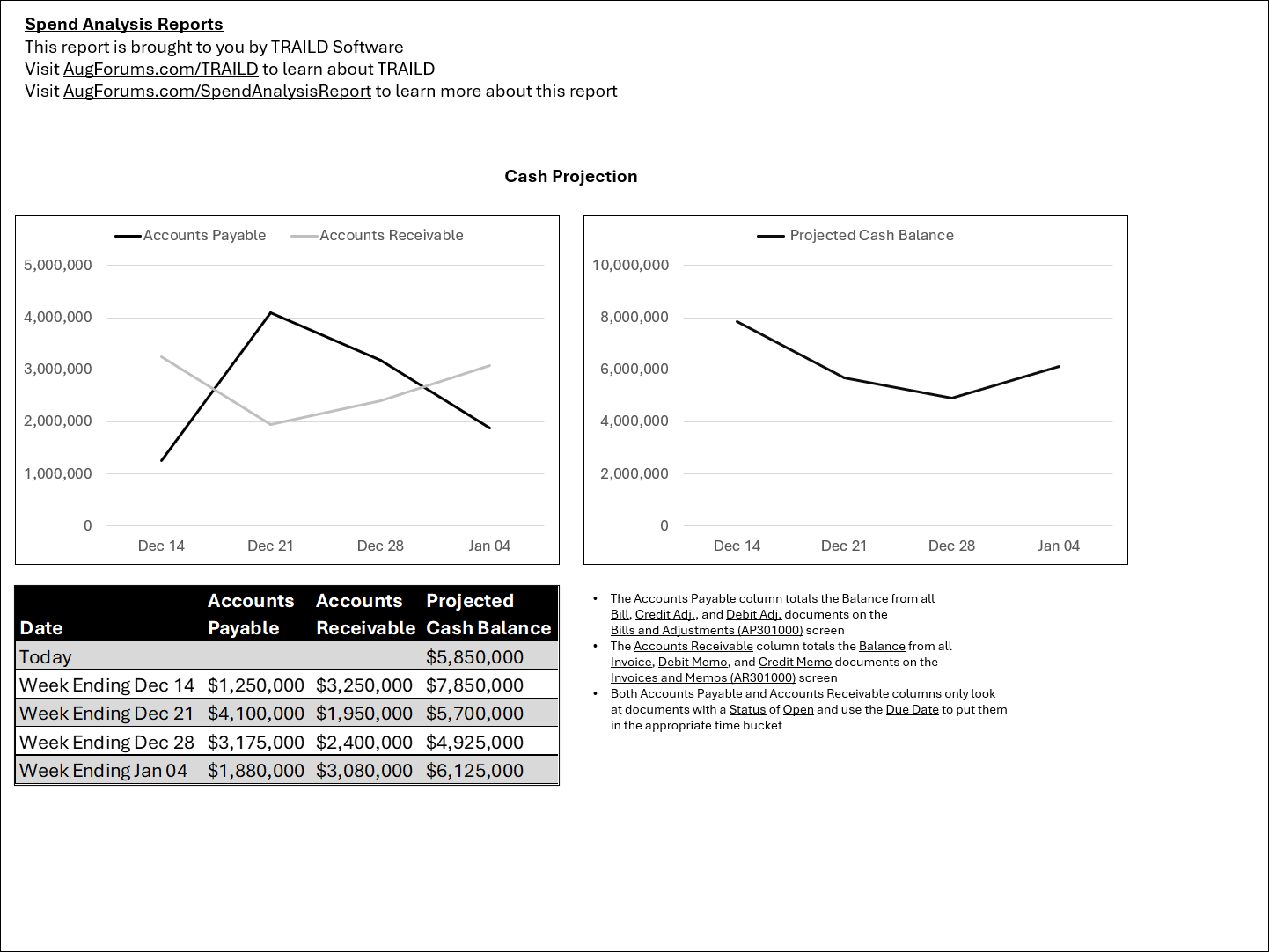
So far I’ve mocked up the first page which will show you a Cash Projection based on your Accounts Payable and Accounts Receivable data as you can see in the screenshot below.
For future pages, I’ll drill into Accounts Payable data to analyze AP spend.
Update on Thursday, January 23, 2025
Originally my goal was to have this report ready by Acumatica Summit 2025, but I want to get more feedback and do more work on the report mockup before rolling up my sleeves and building the report in Acumatica Report Designer.
I’d love to hear your feedback. You can add comments to the bottom of this page.
Would this include the ability to run the information for a Branch, Company, or Company Group?
I received this feedback today via a direct message on LinkedIn.
I like where your report using TrailD is going. 1) are you just using DocDate or DueDate? My suggestion is due date. 2) use account class instead of account number, if you aren’t already.
I received this feedback today while on a Teams call.
Can we track when an AP Bill went into approval and when it came out of approval? The idea would be to see how long it spent in the approval process. Then we could show an average time spent in approval.
When was the AP Bill paid? Days early / days late.
How much time is spent entering AP Bills? This is hard to track. Maybe look at the created dates and assume a 5 minute “splash zone” before the created date since the created date was when the record was saved in Acumatica and we can assume that it took about 5 minutes to get it entered? Then we’d need a way to string those times together and not count when 5 minutes overlap. For example, if there are only two records entered on a day with a created time of 4:05pm and 4:07pm, we should count it as 7 minutes because we’re counting 5 minutes before 4:05pm, then counting up until the last record entered on that day.
It would be nice to be able to run the report for different time buckets:
Last 2 Months
Last 8 Weeks
Last 2 Financial Periods