By using this website, you agree to our Terms of Use (click here)

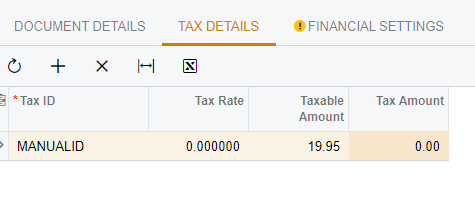
Hello. I'm working on an integration to import Amazon orders and need to map the taxes collected by Amazon to Acumatica. Our organization is currently using the Avalara integration, but we have a "Manual" tax zone setup. I'm able to successfully map the tax values with the API, and the Manual Tax ID is added to the Sales Order's "Tax Details" section, but the "Tax Amount" field remains at 0. It seems that Acumatica is trying to calculate the tax and since the tax rate is 0% it doesn't do anything once the order is saved via the API PUT. The Manual Tax Zone and Manual ID I have setup are not linked to the Avalara integration.
Has anyone been successful with importing tax amounts to Acumatica via the API? Any help or guidance on this will be greatly appreciated. =)
Thanks!
Alfredo
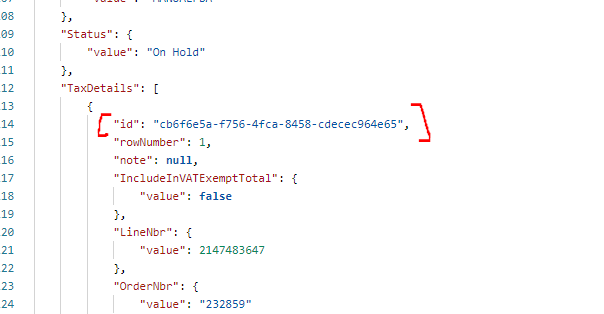
For anyone who may find this post, I figured this out. For some reason, Acumatica doesn't allow you to update the TaxDetails Tax Amount field at the time of the Sales Order creation. Once the sales order is created with your assigned Tax Zone, the "Tax Amount" field can only be updated using the Tax Details object ID. Therefore, you'll need to GET the sales order's tax details by expanding the "Tax Details" using the ODATA query $expand=TaxDetails
Then update the sales order using a PUT and send the Tax amount to the "TaxAmount" key-value using the object's existing "id". Depending on how you write your code, this will work every time perfectly. Below is a screenshot referring to the TaxDetails object id.