
By using this website, you agree to our Terms of Use (click here)

Hello, I recently received a request within our company to change how our automated approval process works and had a few questions. We have an item status we created called "Restricted" that exists to trigger an automated approval if that item ends up on a Sales Order. These Restricted items have a limited quantity and the amount that is sent to a customer is decided by that item's manager.
Currently, we have a simple process that checks the SO lines and drills into the document accordingly so that manager has to approve:
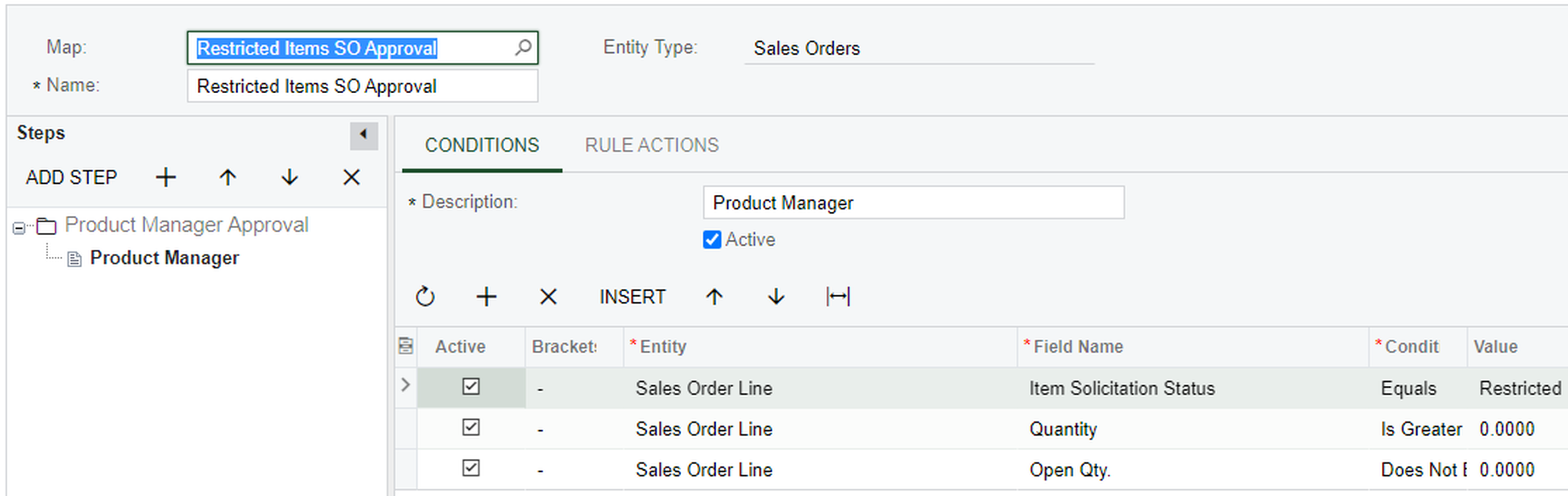

And it all works fine.
Sometimes now we are running into problems with this where other Managers cannot make a PO with Mark for PO orders because some of the SO's still need approval. We would like to make it so a secondary approver can approve the SO for them if they are unavailable.
The problem I am running into it in the conditions tab. My idea is to create parallel conditions where the Manager for that Line item is checked and the system will ping a workgroup that contains the two approvers for one of them to give the okay. I realize now though that the "Conditions" tab does not seem to have visibility that far down. I believe it is only able to see everything on the sales order only and that the "Rule Actions" is what allows the drill down into the actual Item Form Data when selecting who should approve.
Can anyone point me in the right direction for adding an 'OR' to this where the approval map will say:
If the Item Status is Restricted and the Product Manager is X -> allow approval from X or Y where X and Y are in a workgroup
Is there a better way to do this with conditions? Let me know and thanks to anyone who can help! I will answer any questions!