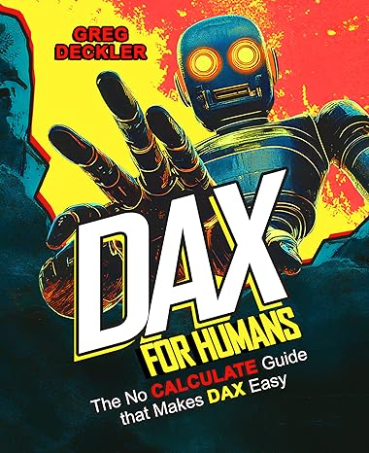
Power BI is a great tool, but the most difficult thing about Power BI is writing Measures. Measures are written in a language called DAX so you have to learn DAX. DAX is easy to start with because it feels like writing Excel formulas in the beginning; many of the formula names are the same. But it gets more complicated as time goes on so you need a DAX resource to reach out to along the journey.
Prior to July 11, 2025, I had been recommending a book called
Power Pivot and Power BI: The Excel User’s Guide to the Data Revolution by Rob Collie. Published in 2012, that book grossed over $1M in sales (evidence of it being a well-written book) and it was my personal introduction to Power BI. I liked that book because it spoke to the Excel crowd, which I was a part of.
But I struggled to use the more advanced stuff in that book because it was hard to understand. My struggle had to do with the CALCULATE function in DAX which would consistently surprise me with unexpected results.
Now, as of July 11, 2025, I have a new book to recommend:
DAX for Humans. This book teaches a technique that I’ve been following on Greg Deckler’s LinkedIn page (click here) for the past couple of years. I’ve been using this technique and I find it to be WAY easier to understand. It’s also the technique that I teach in my Power BI Workshop for Acumatica.
Below I’m reproducing the book’s forward by Brian Julius. I’m reproducing Brian’s forward here because it does a great job of explaining why the DAX for Humans approach to writing DAX is worth learning.
Sincerely,
Tim Rodman
Forward by Brian Julius
The fact that you are even holding this book in your hand or reading it on your screen is something of a miracle.
To understand why, let’s set the Wayback Machine to July 23, 2020.
I am certain that if you’d conducted a survey on that day asking every single DAX user to name the most important DAX function, the unanimous answer would have been “CALCULATE”.
Well, actually unanimous minus one, but I’m getting a little ahead of myself…
At that time, here’s what the two top DAX books said about CALCULATE:
“CALCULATE( ) is the most important and powerful function in the DAX language. It is important because it is the only function that has the ability to modify the natural filtering behavior of visuals.”
“CALCULATE is the most important, useful, and complex function in DAX, so it deserves a full chapter.”
We all accepted this as if it was handed down to us on stone tablets, and CALCULATE was the cornerstone of every book, video, and course you could use to learn DAX.
Then on July 24, 2020 at 11:13am, Greg Deckler took the slingshot out of his back pocket and hurled a rock straight at this cornerstone, in the form of an article he posted on the Microsoft Community forum entitled “CALCUHATE – Why I Don’t Use DAX’s CALCULATE Function”. In this article, Greg laid out a very detailed argument why CALCULATE is not only inessential to DAX, but in fact makes it more difficult to write, debug, and maintain.
I wish I could tell you that upon reading that article, the scales immediately fell from my eyes and I recognized it as a better and easier way to write DAX. However, I did not. I’m not sure whether it was an insufficient understanding of the nuances of DAX necessary to fully grasp Greg’s arguments, or intellectual laziness, or most likely some combination of both. Regardless, I kept writing DAX as I always had – with CALCULATE in the lead role.
However, that CALCUHATE article continued to nag at me, and two years later I found myself responsible for assembling the speakers for a large conference on DAX and Power BI. In that intervening period, I had gotten to know Greg a bit, bonding over our shared hatred of the DAX time intelligence functions.
He enthusiastically accepted my invitation to speak at the conference, delivering a masterful presentation entitled “DAX Counterculture: Alternative Perspectives on DAX” in which he clearly and systematically walked through his arguments against the use of CALCULATE and DAX time intelligence functions.
Unlike two years prior, I now found myself unable to ignore the incompatibility of the views that “CALCULATE is the most important function in DAX” and “CALCULATE is wholly unnecessary, and actually makes DAX harder”.
As the son of a biochemist who, from the time I was eight years old used to sneak me into the lab on weekends to conduct scientific experiments together, I publicly committed to performing an experiment of my own – for the entire month of September I would attempt not to use a single CALCULATE in any of the DAX I was writing, and would publish my results at the end of the month.
At that time, I was building Power BI reports on a daily basis and honestly expected that somewhere within those 30 days, I would encounter a situation that could not be resolved without the use of CALCULATE.
Much to my surprise, that day never came, and at the end of the 30-days, I found that DAX without CALCULATE was far easier to write, understand, and debug.
However, when I posted these results, many of the comments I received confidently stated that even if that were true, measures constructed without CALCULATE would perform much worse than those written in the accepted style.
So, back to the “lab” where I took reports from highly accomplished Power BI developers, reconstructed their measures in the “No CALCULATE” style, tested the performance of each pair of measures, and found no evidence of a statistical difference in performance between the two approaches.
I also ran these tests on increasingly large data sets, up to 20 million records, to counter the argument that the No CALCULATE approach would break down at large scale, and again found no evidence to support that contention.
Recognizing that CALCULATE is miles from being the most important function in DAX has profound implications for the way we should be teaching DAX. This revelation allows us to put CALCULATE in its proper context – a very advanced function (along the lines of CROSSFILTER or TREATAS) that should be one of the last ones taught, useful for “fine tuning” in very limited and specific use cases.
Now, the idea of teaching DAX beginners by building upon a foundation of CALCULATE makes no more sense to me than teaching a toddler to walk by taking them out to the track and shouting at them to run the 400m hurdles, or teaching a teenager to drive by strapping them into a racecar at the 24 Hours of Le Mans.
However, coming to that revelation presented me with an entirely new problem. By then I had become a very loud public proponent of Greg’s approach to learning and writing DAX. DAX unquestionably remains the largest hurdle to learning Power BI, and many users struggling with it asked me the best way to learn the No CALCULATE approach.
Until this moment, my answer always felt largely unsatisfactory, pointing them to a scattered collection of articles (including CALCUHATE, of course…) videos, and presentations explaining it.
However, with the publication of this book, there now is an integrated and comprehensive resource for learning DAX in an easier and better way. Far from being a dry, theoretical tome it is a plain language treasure trove – packed with highly practical uses across a wide range of domains and applications. I sincerely hope you find it as enlightening and enjoyable as I have.
To me, it also stands as a valuable reminder that the truth of a statement is not always determined by the number of people repeating it. Occasionally, that lone dissenting voice with the insight and courage to tell the rest of us “you’re wrong” ends up being right on target…
Brian Julius, Power BI expert and instructor
Click here for Brian’s LinkedIn profile