
By using this website, you agree to our Terms of Use (click here)

Need to add the Ship To address to Invoice data in a Generic Inquiry in Acumatica?
Let's say you've already added the ARTran and ARInvoice tables with a join from ARTran to ARInvoice on ARTran.TranType=ARInvoice.DocType and ARTran.RefNbr=ARInvoice.RefNbr.
In Acumatica 2018 R2 and prior, Acumatica doesn't store the ship address on the invoice record. So you have to go get it from the shipment.
You can join from ARTran to SOShipment on ARTran.SOShipmentNbr=SOShipment.ShipmentNbr.
Then you can join from SOShipment to SOShipmentAddress on SOShipment.ShipAddressID=SOShipmentAddress.AddressID.
The SOShipmentAddress table will give you the address fields you need: AddressLine1, AddressLine2, City, etc.
Note: I'd recommend using Left joins if you want to still see Invoices that have no associated Shipment.

In Acumatica 2019 R1, Acumatica is now storing the Ship To address on the Invoice record itself. I suspect this was driven by the Construction world because one Project could perform work in multiple tax jurisdictions and there is no Shipment so the Ship To address needs to be stored on the Invoice.
You can read about this new feature in the Finance: Ability to Override Shipping Address in Documents section of the Acumatica 2019 R1 Release Notes (click here).
So, in Acumatica 2019 R1, getting the Ship To address for an Invoice is a lot easier.
Just Left join from ARInvoice to ARAddress on ARInvoice.ShipAddressID=ARAddress.AddressID. Much easier right?


Hey Tim - Question for you on this same vein. I am trying to get the overridden shipping address off of a project quote and honestly can't find the info anywhere.
It doesn't seem like it gets stored in any location - doing an inspection of those elements on the quote page tells me to use the CRShippingAddress, but since I've overridden the address it isn't there anymore. That table doesn't seem to update either when you override the shipping address. It just seems very counter intuitive to me that you could override the shipping info and it doesn't appear anywhere.
Anyone have a solution for this beyond creating attributes for project quotes that you enter a shipping address into?
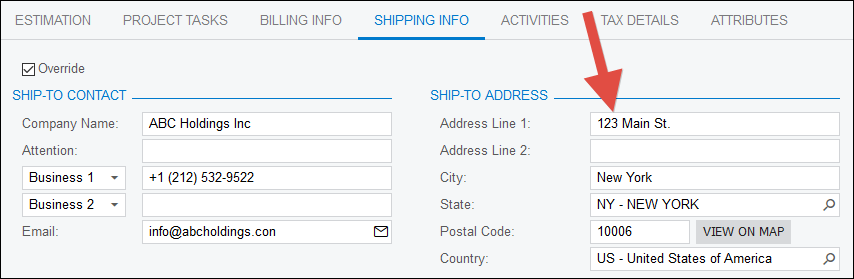
I was able to get it in Acumatica 2020 R1 (20.100.0095) by doing this:
First, I overrode the address on the Project Quotes (PM304500) screen:
Second, I created a Generic Inquiry that joined PMQuote to CRAddress on PMQuote.ShipAddressID=CRAddress.AddressID.
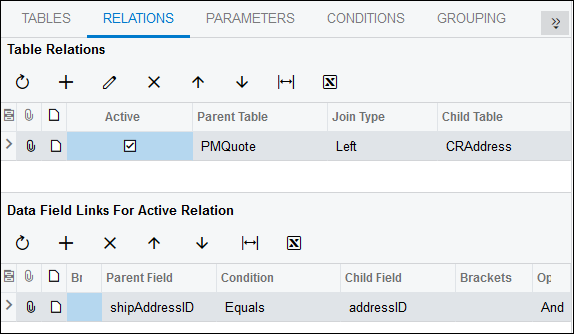
And that retrieved the address information:

Thanks for the reply Tim - I should do a better job checking back in.
=IIf([CRShippingContact.FullName]<>null, [CRShippingContact.FullName] + '{br}', [Customer.AcctName]+ '{br}')
+IIf([CRQuote.ContactID_description]<>null, [CRQuote.ContactID_description] + '{br}', '')
+IIf([CRShippingAddress.AddressLine1]<>null,[CRShippingAddress.AddressLine1]+'{br}','')
+IIf([CRShippingAddress.AddressLine2]<>null,[CRShippingAddress.AddressLine2]+'{br}','')
+IIf([CRShippingAddress.AddressLine3]<>null,[CRShippingAddress.AddressLine3]+'{br}','')
+IIf([CRShippingAddress.City]<>null, [CRShippingAddress.City]+' ', '')
+IIf([CRShippingAddress.State]<>null, [CRShippingAddress.State]+' ','')
+IIf([CRShippingAddress.PostalCode]<>null, [CRShippingAddress.PostalCode],'')
+IIf([CRShippingAddress.City]<>null OR [CRShippingAddress.State]<>null OR [CRShippingAddress.PostalCode]<>null,'{br}','')
+IIf([CRShippingAddress.CountryID]<>null,[CRShippingAddress.CountryID_Country_description]+'{br}', '')
+IIf([CustomerContact.Phone1]<>null, [CustomerContact.Phone1], '')
This is the current formula I am using to generate my shipping address - it uses the customer contact you have input OR the shipping address if you override the address. Steps to get this going:
1) join CRQuote to CRShippingAddress on ShipAddressID = AddressID (Left join)
2) Join CRQuote to CRShippingContact on ShipContactID = ContactID (Left join)
3) If you override the shipping address these joins will bring in that new contact information (I'd share a screenshot but the info is private)
Enjoy,
Nic